Logitech today announced the launch of new features for its HomeKit-compatible Circle 2 security cameras via an update to the Logi Circle app.

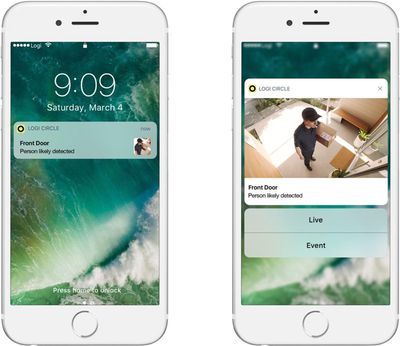
Notification Snapshots, a new in-app feature, are designed to provide a visual "snapshot" notification of an event whenever motion is detected by the Circle 2 camera.

With this option, you'll get a visual representation of exactly what triggered the motion detection feature rather than a simple text-based notification that lets you know motion was detected. Snapshots will be sent via push notification and should let you react more quickly to incoming motion detection alerts.
logicircleupdate
For customers who also subscribe to Logitech's Circle Safe premium service, Notification Snapshots offer up a zoomed-in view of the object or person that triggered the motion detection based on the Circle's Person Detection feature.

Enabling Notification Snapshots on existing Circle 2 cameras will require you to download the updated Logi Circle app from the App Store and install a new firmware update from within the app.

Along with new notification features, Logitech is also introducing new Circle Safe Home subscription plans designed for customers with multiple cameras.

Circle Safe pricing starts at $3.99 per month for the basic subscription for a single camera and goes up to $9.99 per month (or $99.99 per year) for the premium subscription, but customers with multiple cameras can now get discounted prices.

For up to five cameras, Circle Safe Basic starts at $6.99 per month or $69 per year, while Circle Safe Premium starts at $17.99 per month or $179 per year.

Circle Safe Basic and Circle Safe Premium allow you to store video in the cloud for a longer period of time and access premium features. Logitech's cameras, available from Logitech and Amazon for $180, can be used sans subscription, but only 24 hours of video footage is stored in the cloud.

Top Rated Comments

Corrode Avatar
104 months ago
These rich notifications were already possible via the Home app but I guess it's good the native app is catching up. Yikes, those subscription costs are expensive. Much happier with my Omna after returning the Circle 2.
Score: 2 Votes (Like | Disagree)
oneMadRssn Avatar
104 months ago
How is motion zones a premium feature? Netgear Arlo offers it for free (not to mention 7 days of storing motion clips for free too). I get that cloud storage costs money, but motion zones is purely an in-device processing feature and totally unrelated to cloud costs.
Score: 1 Votes (Like | Disagree)
b0nd18t Avatar
104 months ago
Stay away from this product. $10/month is ridiculous. You can’t set motion zones without paying that so enjoy “snapshots” of every car that passes without it. Wish I would have bought a Ring or something.
Score: 1 Votes (Like | Disagree)
Craiger Avatar
104 months ago
Stay away from this product. $10/month is ridiculous. You can’t set motion zones without paying that so enjoy “snapshots” of every car that passes without it. Wish I would have bought a Ring or something.
It's been great for me as a living room security camera. I paired it with an iHome switch so that the power is cut to it when I'm home. I also have a few things happen when it senses motion to hopefully scare off intruders.

Homekit only sends me notifications if a person is in the room. My dog triggers recordings but no notification.

This is with the free plan.
Score: 1 Votes (Like | Disagree)
tzm41 Avatar
104 months ago
Bought Omna at full $200 when it came out. I have had no issue with it or its HomeKit integration. Sounds like a better choice than this.
Score: 1 Votes (Like | Disagree)
ersan191 Avatar
104 months ago
These rich notifications were already possible via the Home app but I guess it's good the native app is catching up. Yikes, those subscription costs are expensive. Much happier with my Omna after returning the Circle 2.
Yeah I’ve been using the Home app and assumed everyone else was too, I read this article on 9to5mac first and was confused because this isn’t a new feature if you use HomeKit which is better than the Circle app anyway.

The one thing it does have going for it is you don’t need a hub (Apple TV or iPad and soon to be HomePod) for it to work while you’re not home.
Score: 1 Votes (Like | Disagree)

Popular Stories

iPhone Top Left Hole Punch Face ID Feature Purple

iPhone 18 Pro Launching Later This Year With These 12 New Features

Thursday January 15, 2026 10:56 am PST by
While the iPhone 18 Pro and iPhone 18 Pro Max are not expected to launch for another eight months, there are already plenty of rumors about the devices. Below, we have recapped 12 features rumored for the iPhone 18 Pro models, as of January 2026: The same overall design is expected, with 6.3-inch and 6.9-inch display sizes, and a "plateau" housing three rear cameras Under-screen Face ID...
iPhone Top Left Hole Punch Face ID Feature Purple

New Leak Reveals iPhone 18 Pro Display Sizes, Under-Screen Face ID, and More

Wednesday January 14, 2026 7:09 am PST by
While the iPhone 18 Pro models are still around eight months away, a leaker has shared some alleged details about the devices. In a post on Chinese social media platform Weibo this week, the account Digital Chat Station said the iPhone 18 Pro and iPhone 18 Pro Max will have the same 6.3-inch and 6.9-inch display sizes as the iPhone 17 Pro and iPhone 17 Pro Max. Consistent with previous...
2024 iPhone Boxes Feature

Apple Adjusts Trade-In Values for iPhones, Macs, and More

Thursday January 15, 2026 11:19 am PST by
Apple today updated its trade-in values for select iPhone, iPad, Mac, and Apple Watch models. Trade-ins can be completed on Apple's website, or at an Apple Store. The charts below provide an overview of Apple's current and previous trade-in values in the United States, according to the company's website. Most of the values declined slightly, but some of the Mac values increased. iPhone ...


Verizon New

Verizon Offering $20 Credit After Major Outage, Here's How to Get It

Thursday January 15, 2026 7:37 am PST by
Verizon today announced it will be offering customers a $20 account credit after a major outage on Wednesday, and action is required to receive it. The carrier said affected customers can accept the credit by logging into the My Verizon app, but it might take some time before this option shows up in the app. Affected customers will receive a text message when the credit is available. On...
Apple MacBook Pro M4 hero

These 5 Apple Products Will Reportedly Be Upgraded With OLED Displays

Friday January 16, 2026 7:07 pm PST by
Apple plans to upgrade the iPad mini, MacBook Pro, iPad Air, iMac, and MacBook Air with OLED displays between 2026 and 2028, according to DigiTimes. Bloomberg's Mark Gurman previously reported that the iPad mini and MacBook Pro will receive an OLED display as early as this year, but he does not expect the MacBook Air to adopt the technology until 2028 at the earliest. A new iPad Air is...