

Camera+ received an update on Friday that brings a handful of welcome UI and workflow improvements, while fixing a number of issues reported by users of the popular long-running photo app for iPhone and iPad.
Although the latest v10.10.12 update of Camera+ focuses on enhancing reliability, there are a couple of notable additions to its feature set that are worth highlighting, the ability to copy and paste edits between images on the Lightbox being one of them.
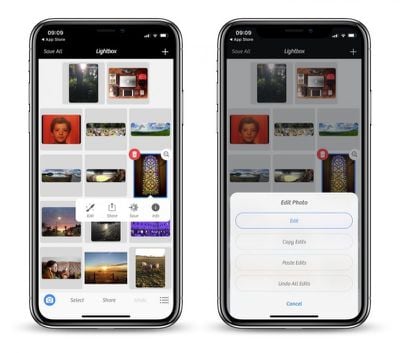
To transfer complex applied edits to another photo, select the image on the Lightbox, long-tap the edit button, and then select Copy Edits. With your adjustments in the memory, simply select your target photo, long-tap Edit, and then select Paste Edits to apply them.
Compatible edits will be automatically applied to images with no issues, but it's worth noting that things like Portrait mode will only make the jump if the destination photo was originally captured with depth information, which Camera+ has supported since October.
Meanwhile, long-time users of Camera+ may have noticed that the badge indicating the color space of a photo on the Info summary screen was missing for HEIF and TIFF formats. That's no longer the case, with wider color space tags like DCI/P3 now displaying on the relevant images.
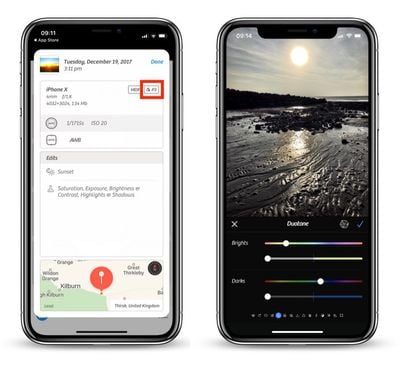
Additionally, users who like to shoot in RAW will be happy to learn that Camera+ now correctly honors the preference for saving the DNG representation independently of the JPEG/HEIF asset when exporting to Camera Roll, although bear in mind that the in-app Lightbox always uses the combined representation.
Elsewhere, the editing screen has been improved for iPhone X displays, while a couple of blips when sharing to the Files app or WhatsApp have been ironed out. The update also includes optimized memory usage on iPhone 6 devices, especially when shooting TIFF and macro, while a handful of crashes have also been fixed.
Camera+ costs $2.99 for iPhone and $4.99 for iPad, and can be downloaded from the App Store. [Direct Link]
















Top Rated Comments