Flexibits, the company that makes popular calendar app Fantastical, today launched a new contacts management app, Cardhop. Designed to be more than just a simple contacts app, Cardhop is interactive and is designed to be your communications hub, allowing you to email, message, and interface with your contacts from one central location.

When developing Cardhop, Flexibits aimed to do the same thing for contacts that it did for the calendar - turn an app that can be dull, unintuitive, and slow into a robust, streamlined app that offers a lot more utility.


Cardhop imports all of your contacts from your Mac (which are typically also synced with iOS devices using iCloud) and it provides an interface that makes it easy to search for an existing contact or add a new one using the same natural language parsing that's available in Fantastical.
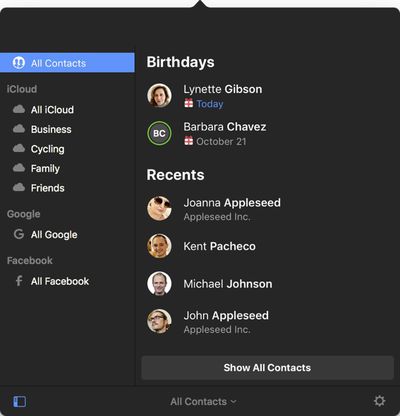
cardhopinterface
A search for "Eric" for example, will bring up the card for a contact named Eric, with information like phone number, email address, birth date, home address, Twitter handle, Facebook profile, Skype username, and more. There are dozens of fields that can be added for each contact.
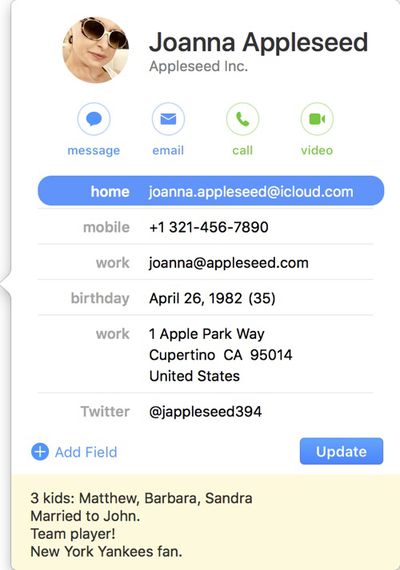
cardhopcontactcard
Entering a phrase like "Eric 867-5309 work" will automatically add the phone number you entered to Eric's contact card under the work heading, and similar phrases can be used to quickly update or remove information for all contacts. Added information will sync to the default Apple Contacts app.

If you start typing a name that's not already in your contacts list, Cardhop will automatically add a new entry with the information. Groups of contacts are also supported, so you can create a group like "work" to automatically send an email or a message to everyone you work with.
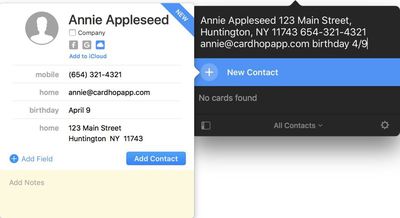
cardhopnewcontact
Cardhop's most useful feature is perhaps its quick actions. Every contact card in Cardhop features four customizable quick action buttons for interacting with contacts and performing tasks like placing a call, sending a tweet, or sending an email. The following quick actions are available: Call, Copy, Directions, Email, FaceTime, FaceTime Audio, Large Type, Message, Skype, Telegram, Twitter, URL, and VoIP.

Clicking on one of the quick action buttons performs the task assigned to the button, but typing a quick action like "Skype Eric" or "Message Eric" also works. When using the call feature, there's also an option to place the call on your iPhone from your Mac using Bluetooth. Cardhop has the potential to save time in a workflow because it automates tasks that would normally take several clicks.

cardhopquickactions
Cardhop also takes advantage of the underused "note" feature available in the default Contacts app, making a notes section front and center for each contact in the app. Notes can be used to add details about contacts that you want to remember, leading to richer interactions.

"Until now, contacts apps were basically boring databases," said Michael Simmons, Co-founder of Flexibits. "Cardhop is an entirely different approach and we think it's going to simplify and truly change the way people think about and interact with their contacts."

Cardhop is normally priced at $19.99, but to celebrate its launch, Flexibits is offering it for $14.99 for a limited time. Cardhop can be downloaded from the Mac App Store.


Top Rated Comments

AndyK Avatar
107 months ago
This seems to try to solve a problem I’m not sure I have.
Score: 9 Votes (Like | Disagree)
jphall Avatar
107 months ago
If it had a history / activity for each contact so i can neatly have all my emails organized it would be awesome.
I've been using BusyContacts since it came out, very full featured app with an Activity pane for Calendar/Mail/Messages/Twitter history if you so desire.

https://www.busymac.com/busycontacts/index.html

I've been using BusyMac apps for well over a decade, really great apps!
Score: 4 Votes (Like | Disagree)
Fran6cojL Avatar
107 months ago
I need this! but! with a historical view of all communications with my contacts.

If it had a history / activity for each contact so i can neatly have all my emails organized it would be awesome.

We need a windows my people functionality like on mac
Score: 3 Votes (Like | Disagree)
RimasM Avatar
107 months ago
I like how $14.99 becomes 16.99€ despite of 1USD ~ 0.85€
Score: 3 Votes (Like | Disagree)
AJ Mac25 Avatar
107 months ago
I'm a big, big fan of Fanstastical its a huge part of my workflow. I'd like to try this out but I'm not sure if i need it.
There is a free trial download on the company's webpage.
Score: 2 Votes (Like | Disagree)
Fran6cojL Avatar
107 months ago
I've been using BusyContacts since it came out, very full featured app with an Activity pane for Calendar/Mail/Messages/Twitter history if you so desire.

https://www.busymac.com/busycontacts/index.html

I've been using BusyMac apps for well over a decade, really great apps!
YOU ARE THE MAN!! i have been looking for something like this for a while now!!!
Score: 2 Votes (Like | Disagree)

Popular Stories

iphone 17 models

No iPhone 18 Launch This Year, Reports Suggest

Thursday January 1, 2026 8:43 am PST by
Apple is not expected to release a standard iPhone 18 model this year, according to a growing number of reports that suggest the company is planning a significant change to its long-standing annual iPhone launch cycle. Despite the immense success of the iPhone 17 in 2025, the iPhone 18 is not expected to arrive until the spring of 2027, leaving the iPhone 17 in the lineup as the latest...
duolingo ad live activity

Duolingo Used iPhone's Dynamic Island to Display Ads, Violating Apple Design Guidelines

Friday January 2, 2026 1:36 pm PST by
Language learning app Duolingo has apparently been using the iPhone's Live Activity feature to display ads on the Lock Screen and the Dynamic Island, which violates Apple's design guidelines. According to multiple reports on Reddit, the Duolingo app has been displaying an ad for a "Super offer," which is Duolingo's paid subscription option. Apple's guidelines for Live Activity state that...
Clicks Communicator Feature

'Clicks Communicator' Unveiled — Will You Carry This With Your iPhone?

Friday January 2, 2026 6:35 am PST by
The company behind the BlackBerry-like Clicks Keyboard accessory for the iPhone today unveiled a new Android 16 smartphone called the Clicks Communicator. The purpose-built device is designed to be used as a second phone alongside your iPhone, with the intended focus being communication over content consumption. It runs a custom Android launcher that offers a curated selection of messaging...
Low Cost MacBook Feature A18 Pro

Low-Price 12.9-Inch MacBook With A18 Pro Chip Reportedly Launching Early This Year

Friday January 2, 2026 9:08 am PST by
Apple plans to introduce a 12.9-inch MacBook in spring 2026, according to TrendForce. In a press release this week, the Taiwanese research firm said this MacBook will be aimed at the entry-level to mid-range market, with "competitive pricing." TrendForce did not share any further details about this MacBook, but the information that it shared lines up with several rumors about a more...
Low Cost A18 Pro MacBook Feature Pink

Apple's 2026 Low-Cost A18 Pro MacBook: What We Know So Far

Friday January 2, 2026 4:33 pm PST by
Apple is planning to release a low-cost MacBook in 2026, which will apparently compete with more affordable Chromebooks and Windows PCs. Apple's most affordable Mac right now is the $999 MacBook Air, and the upcoming low-cost MacBook is expected to be cheaper. Here's what we know about the low-cost MacBook so far. Size Rumors suggest the low-cost MacBook will have a display that's around 13 ...
Apple Fitness Plus hero

Apple Announces New Fitness+ Workout Programs, Strava Challenge, and More

Friday January 2, 2026 6:43 am PST by
Apple today announced a number of updates to Apple Fitness+ and activity with the Apple Watch. The key announcements include: New Year limited-edition award: Users can win the award by closing all three Activity Rings for seven days in a row in January. "Quit Quitting" Strava challenge: Available in Strava throughout January, users who log 12 workouts anytime in the month will win an ...
Mac Pro Feature Blue

What's Happening With the Mac Pro?

Wednesday December 31, 2025 9:59 am PST by
Apple hasn't updated the Mac Pro since 2023, and according to recent rumors, there's no update coming in the near future. In fact, Apple might be finished with the Mac Pro. Bloomberg recently said that the Mac Pro is "on the back burner" and has been "largely written off" by Apple. Apple apparently views the more compact Mac Studio as the ideal high-end pro-level desktop, and it has almost...