

Parallels Desktop 13 for Mac received an update on Thursday to include full compatibility with the new Apple File System (APFS) and HEVC video standard included in macOS High Sierra.

With APFS support, Parallels Desktop 13.1 can take advantage of Apple's cross-platform replacement for HFS+, bringing more security and better performance on devices with flash memory.
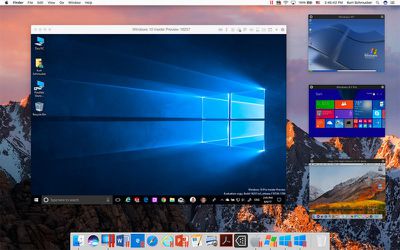
upgrade beauty picture in picture
New HEVC video support means the virtualization software will be able to benefit from more efficient compression of video files and smoother playback. You can learn more about Apple's new HEVC video codec here.

Elsewhere, there are a host of stability and performance fixes, as listed in Parallels' knowledge database update summary. They include the following:

  • Enables the user to create a new Boot Camp® virtual machine on a Mac® with macOS® High Sierra.
    Enables the user to install a High Sierra virtual machine from the Recovery partition on their High Sierra Mac.
  • Resolves an issue with some Windows shortcuts not working (for example, "Control+Shift+"+"/"-" in Microsoft Excel).
  • Resolves an issue with installing Parallels Tools on Windows XP (Note: Parallels Tools are used for Windows and macOS integration. Do not confuse them with Parallels® Toolbox.)
  • Resolves an issue with Windows not starting when opening a file associated with a Windows application on macOS.
  • Resolves an issue with crashes of BIMcollab ZOOM and TopSolid CAD.
  • Resolves an issue with Zoom In and Zoom Out in APEX 3.
  • Resolves an issue with “Sending as Attachment” not working for Windows files and Mac email client after suspending and resuming a Windows virtual machine.
  • Resolves an issue with OneDrive for Business not shared with macOS, even if that option is enabled.
  • Resolves an issue with Microsoft Windows Start menu not appearing when clicking the Windows icon if Dock auto-hide is enabled.
  • Resolves an issue with copying Windows files to Mac.
  • Resolves an issue with TeamViewer camera not working.
  • Resolves an issue with maximizing Windows applications in Coherence mode.
  • Resolves an issue with installing a macOS older than Mac OS X® Mavericks 10.9 in the virtual machine from the installation image.
  • Resolves an issue with macOS not going to sleep when there is a virtual machine in Coherence mode.

To download the latest update, users can click the Parallels Desktop menu and select Check for Updates.

Parallels Desktop 13 for Mac costs $79.99 for a new license. Existing users of Parallels Desktop for Home and Student can upgrade to V13 for $49.99, with a time-limited offer enabling users of the Desktop Pro Edition to upgrade for the same price (usually $99.99). For more pricing details, see the Parallels website.

Related Forum: macOS High Sierra

Top Rated Comments

109 months ago
Parallels is literally the worst... Instead of just providing consistent updates to their product they decide that you need to buy a new version each year, and they deliberately introduce bugs that push people to do so. Despicable...
Score: 5 Votes (Like | Disagree)
v1597psh Avatar
109 months ago
They still haven't fixed video artefacts ('http://kb.parallels.com/uk/123840') when switching desktop spaces in Full Screen mode which is really annoying after I upgraded to High Sierra. Maybe it's an issue with High Sierra itself.
Score: 1 Votes (Like | Disagree)

Popular Stories

m5 macbook pro deal

Why You Shouldn't Buy the Next MacBook Pro

Tuesday February 10, 2026 4:27 pm PST by
Apple is planning to launch new MacBook Pro models as soon as early March, but if you can, this is one generation you should skip because there's something much better in the works. We're waiting on 14-inch and 16-inch MacBook Pro models with M5 Pro and M5 Max chips, with few changes other than the processor upgrade. There won't be any tweaks to the design or the display, but later this...
iOS 26

Apple Releases iOS 26.3 and iPadOS 26.3

Wednesday February 11, 2026 10:07 am PST by
Apple today released iOS 26.3 and iPadOS 26.3, the latest updates to the iOS 26 and iPadOS 26 operating systems that came out in September. The new software comes almost two months after Apple released iOS 26.2 and iPadOS 26.2. The new software can be downloaded on eligible iPhones and iPads over-the-air by going to Settings > General > Software Update. According to Apple's release notes, ...

M3 iPad Air

Apple's Next Two Products Are Coming Soon

Thursday February 12, 2026 11:17 am PST by
Apple plans to release an iPhone 17e and an iPad Air with an M4 chip "in the coming weeks," according to the latest word from Bloomberg's Mark Gurman. "Apple retail employees say that inventory of the iPhone 16e has basically dried out and the iPad Air is seeing shortages as well," said Gurman. "I've been expecting new versions of both (iPhone 17e and M4 iPad Air) in the coming weeks."...
macbook air prime day 2025

M5 MacBook Air: Release Date, Features, and Performance Predictions

Wednesday February 11, 2026 3:36 am PST by
The MacBook Air is Apple's most popular laptop – a thin, fanless machine that wields quiet power thanks to the efficiency of Apple silicon. While the M4 model isn't exactly old, attention is already turning to its successor. Apple doesn't telegraph new product launches ahead of time, but we can draw a surprisingly clear picture of what to expect by looking at Apple's silicon roadmap,...
iPhone 16e Bottom Crop

Apple Reportedly Unveiling a New iPhone Next Week

Tuesday February 10, 2026 1:51 pm PST by
Apple plans to announce the iPhone 17e on Thursday, February 19, according to Macwelt, the German equivalent of Macworld. The report said the iPhone 17e will be announced in a press release on the Apple Newsroom website, so do not expect an event for this device specifically. The iPhone 17e will be a spec-bumped successor to the iPhone 16e. Rumors claim the device will have four key...







































