

A collection of ARKit demos have steadily released over the summer following the announcement of the developer platform at WWDC this past June, and now we're merely weeks away from ARKit's debut alongside iOS 11 sometime in September. Today, item tracking company Pixie Technology announced the newest iteration of its "Pixie Point" tracker, which will use a few miniature-sized finding devices and ARKit to guide users to their lost items in augmented reality.
The introduction of ARKit into Pixie follows the company's previous version of the Pixie Point, which originally used a combination of proximity-guiding menus and in-house augmented reality technology to discover lost items. Now, ARKit is being used to improve upon the previous technology with "one continuous AR experience," and Pixie Technology is calling the new tracker and iOS combination, "one of the first practical everyday apps using Apple’s ARKit in iOS 11."
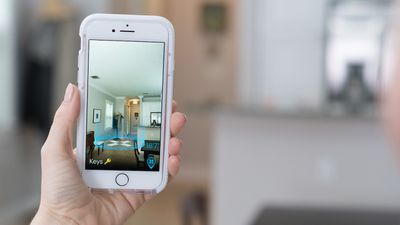
Instead of traditional sound-based Bluetooth trackers, Pixie uses visual data as well as audio cues to provide a more accurate position of a lost item. To use Pixie, users need to attach one of the Pixie Points to an included iPhone case (or use an included adhesive sticker to attach the Pixie Point to a different case), while the second Pixie Point is linked to items of importance. While indoors, users first perform a panorama room scan with the iOS Pixie app to discover a 3D avatar of their missing wallet, keys, or bag.
The avatar will float over an augmented reality area of "Pixie Dust," related to the exact location of the lost item in the room, while the exact distance to the item (down to the amount of inches) will be overlayed on the app's user interface. As users get closer, the avatar grows in size, and once they're within five feet of the item the audio cues kick in from the Pixie Point on the lost item, further helping in rediscovery.
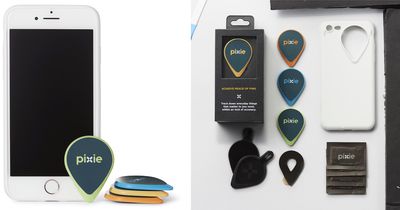
With the help of ARKit, a Pixie Point can be seen through walls and furniture, which Pixie Technology noted will help finding lost items under cushions, in drawers, and in nearby rooms. The company also explained that the Pixie Point's reduced reliance on sound will help item discovery even in noisy environments.
The new Pixie is a complete paradigm shift and leverages Apple’s ARKit, enhanced 3D motion tracking, powerful animation tools and patented signaling technology. As a result, it is:
Faster – Reducing overall search time
Friendlier – Providing the ability to continually use the ultimately intuitive AR interface through the entire finding process even while on the move
Functional – Improved accuracy and the ability to conduct even the hardest searches and even in a noisy environment, increasing Pixie’s leadership as the most accurate finder on the market
Fun – While a serious tool, it is an almost game-like experience that’s super simple and quick to use
The trackers work outdoors as well with a range of 150 feet outside, and within 30-50 feet indoors. Each Pixie Point has a 12 month battery life (there is no discounted replacement program for dead trackers, akin to what Tile offers), are water and dust resistant to IP67 standards, and measure 47mm x 35mm x 3.2mm in size.
Users interested can purchase Pixie today on the company's website and on Amazon, starting at $29.99 for a 2-pack, $54.99 for a 4-pack, and $104.99 for an 8-pack. The company confirmed that any Pixie pack purchased today will be compatible with the advanced ARKit features coming in September, and the Pixie app is expected to see an update alongside iOS 11 at that time.




















Top Rated Comments
The trackers are huge and ugly.
The app looks poorly designed, at least not designed to blend in perfectly with the iOS ecosystem. It looks alien The design needs work.
That animated character on the screen did not add any value (for me), it seemed like fluff. And then the cross-hairs "radar" symbol did not actually give an indication of which direction to go in. I saw "Go to your keys" in a poorly-chosen font. Gee, that's helpful!
Pixie, back to the drawing board, I'm afraid.