

CES 2017: iDevices Unveils Wireless Wall 'Instant Switch' - MacRumors
Skip to Content

CES 2017: iDevices Unveils Wireless Wall 'Instant Switch'

by

iDevices today announced the latest product in its smart home lineup, debuting the iDevices Instant Switch, a remote wireless wall switch. Designed to pair via Bluetooth with existing products, the Instant Switch works with HomeKit and Alexa-enabled accessories.
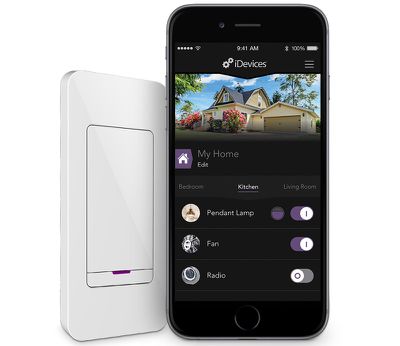
instantswitch
iDevices has designed the Instant Switch to work anywhere with either a built-in Command adhesive backing that allows it to be attached to any wall or an iDevices wall plate that allows it to fit over any standard two-screw wall plate.

Because it's peel and stick, it can be put on any wall, and it includes two CR2032 coin cell batteries that allow it to run for two years without needing to be charged.
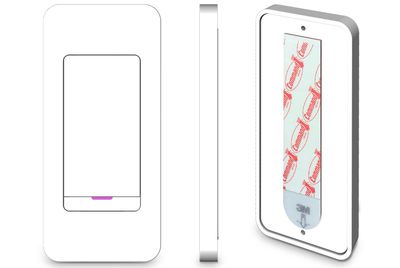
instantswitchadhesive
When paired with an iDevices' Wall or Dimmer Switch, the new Instant Switch enables a three-way control configuration. Instant Switch can be set up to control any device, like lights, from any room in the house.

"The whole point of a smart home is that it's customized to your life and intended to make it easier," said Chris Allen, CEO of iDevices. "Instant Switch gives users the ability to choose how they want to lay out control points in their home, regardless of where original outlets or switches are located. Our belief is you shouldn't have to permanently modify your home to get the control you desire."

iDevices is showing off the Instant Switch at CES this week. It will launch to the public in mid-2017 and it will be priced at $49.95.


Top Rated Comments

BJMRamage Avatar
124 months ago
Yes. This is how all smart bulbs work. They are always using some power to talk to the hub.

thanks I don't have any smart devices/stuff in the house (go ahead and say I'm not smart...flame suit on) so I was just curious. I don't think I'd do anything smart to my house now, and just wait until the day we move to a different house.

but I always like to try to understand the tech now so I am ready.
Score: 1 Votes (Like | Disagree)
WarHeadz Avatar
124 months ago
This is too confusing.
Score: 1 Votes (Like | Disagree)
Craiger Avatar
124 months ago
so, the switch is turned "on" and the bluetooth bulb/device is powered "off" but this switch activates the bulb/device and can turn it on/off with the switch/app?

does that mean there is some trickle power being used to the bulb/device to keep it "ready to use" whenever?
Yes. This is how all smart bulbs work. They are always using some power to talk to the hub.
Score: 1 Votes (Like | Disagree)
TheRealTVGuy Avatar
124 months ago
So this is a switch to control a switch?
Score: 1 Votes (Like | Disagree)
124 months ago
$50 for a switch. Seems to fit with the normal insane pricing of home construction parts. I once saw a plastic dryer outlet for $20, yet it probably only cost $1.00 to make. Crazy what people choose to pay.
Score: 1 Votes (Like | Disagree)

Popular Stories

iphone 16 teal

'Siri AI' Lawsuit Update: Apple to Pay Owners of These iPhone Models

Thursday July 9, 2026 7:08 am PDT by
In May, Apple agreed to pay $250 million to settle a U.S. class action lawsuit over Siri AI's delayed launch, and eligible iPhone users could receive up to a $95 payout. This week, the California court overseeing the case held a hearing regarding preliminary approval of the settlement, but the judge has not yet issued a ruling. It will likely be at least a few more months before eligible...
Apple TV Thumb 3

Everything Coming in the 2026 Apple TV 4K

Wednesday July 8, 2026 4:51 pm PDT by
The Apple TV 4K hasn't been updated since 2022, and it's due for a refresh. An update is planned for 2026, but Apple is likely going to wait to launch it after Siri AI launches in iOS 27. Design Apple TV design updates don't happen often, and that's not changing. The next Apple TV is going to have the same squircle shape as the current model, and it'll continue to be made from a black...
apple wallet drivers license feature iPhone 15 pro

Apple Says iPhone Driver's Licenses Will Expand to These 6 U.S. States

Thursday July 9, 2026 7:29 am PDT by
In select U.S. states, residents can add their driver's license or state ID to the Apple Wallet app on the iPhone and Apple Watch, and then use it to display proof of identity or age at select airports and businesses, and in select apps. To set up the feature, open the Wallet app on the iPhone and tap on the plus sign in the top-right corner. Next, tap on Driver's License and ID Cards,...










































