Apple Updates iMovie, GarageBand, Xcode and iWork Apps With Support for MacBook Pro Touch Bar - MacRumors
Skip to Content

Apple Updates iMovie, GarageBand, Xcode and iWork Apps With Support for MacBook Pro Touch Bar

by

Though the new MacBook Pro models equipped with a Touch Bar won't be in the hands of consumers for at least two more weeks, Apple today updated many of its Mac apps with support for the feature.

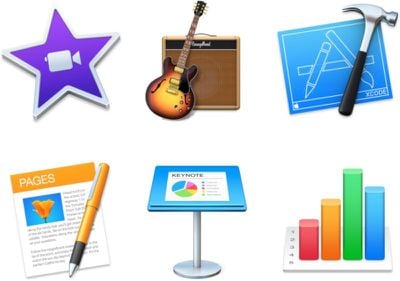
GarageBand, iMovie, Keynote, Numbers, Pages, and Xcode are now able to work with the Touch Bar built into new 13 and 15-inch MacBook Pro machines.
appupdates
In Xcode, the Touch Bar offers up context-specific buttons when in the Xcode editor, commit sheet, navigator, and Interface Builder. The Interface Builder makes it easy for developers to add Touch Bar features to their Mac apps, and the Touch Bar simulator lets them see how their app works with the Touch Bar.

In Numbers, Pages, and Keynote, the Touch Bar can be used to edit text, shapes, tables, and charts, providing quick-access tools depending on what you're working on.

In iMovie, the Touch Bar allows users to quickly add video clips to a movie, or use them to create picture in picture, green screen, and split screen effects. There are also options for using the Touch Bar to play a movie, split a clip, or adjust clip volume.

In GarageBand, the Touch Bar can be used to adjust all Smart Controls on a selected track, adjust volume, or to fine-tune the sound of instruments and effects.

Apple has also released a new version of iTunes, iTunes 12.5.2. The update is not yet available for download and it may be limited to new MacBook Pro models, introducing support for the Touch Bar.

Over the course of the next few weeks, many popular Mac apps from third-party developers will also be updated to support the new Touch Bar in the MacBook Pro. Some apps that will have Touch Bar buttons include Pixelmator, Affinity Photo, Photoshop, Sketch, DaVinci Resolve, Microsoft Office, and more.

Update: iTunes 12.5.2 is now available through Software Update for all compatible devices.
Top Rated Comments

OS X Dude Avatar
125 months ago
So every creative app from Apple got updated with Touchbar support except for Logic Pro X?
If Apple let it burn, they'll give me the last excuse to totally ditch everything of theirs.
Score: 5 Votes (Like | Disagree)
godfather1972 Avatar
125 months ago
Anybody else stuck like this? It shows five updates available up top, but nothing else and no way to install the updates.

I tried a reboot and no change.

Happened to me too so I just went to the Purchased tab and clicked Update near the iWork apps.

Score: 5 Votes (Like | Disagree)
Weaselboy Avatar
125 months ago
Anybody else stuck like this? It shows five updates available up top, but nothing else and no way to install the updates.

I tried a reboot and no change.


Attachment Image
Score: 5 Votes (Like | Disagree)
Icaras Avatar
125 months ago
So every creative app from Apple got updated with Touchbar support except for Logic Pro X?

What's is happening?
Score: 5 Votes (Like | Disagree)
Weaselboy Avatar
125 months ago
Happened to me too so I just went to the Purchased tab and clicked Update near the iWork apps.
I got that, but switched to the Purchased section, and updated each app there. All good now, playing with Motion and FCPX later... :D
Thanks to you both. That seems to be working fine. :)
Score: 2 Votes (Like | Disagree)
125 months ago
Anybody else stuck like this? It shows five updates available up top, but nothing else and no way to install the updates.

I tried a reboot and no change.
I got that, but switched to the Purchased section, and updated each app there. All good now, playing with Motion and FCPX later... :D

EDIT: I didn't see the previous post, but did get this in earlier: https://forums.macrumors.com/threads/mac-os-updates-not-showing-up.2009879/#post-23802251 - Cheers, and props...
Score: 2 Votes (Like | Disagree)

Popular Stories

macOS 27 on MacBook Pro

Apple Says macOS 27 Won't Be Compatible With These Macs

Wednesday June 3, 2026 8:29 am PDT by
During WWDC 2025, Apple revealed that macOS 26 Tahoe would be the final major macOS version for Intel-based Macs. macOS 27 will be compatible with Apple silicon Macs only, meaning that you will need a Mac with an M-series chip or a MacBook Neo with an A18 Pro chip in order to install the software update. Apple will unveil macOS 27 during its WWDC 2026 keynote this Monday, June 8, and the...
MacBook Neo on Yellow Feature

MacBook Neo is So Popular That Apple Reportedly Doubled Production

Wednesday June 3, 2026 9:24 am PDT by
On an earnings call in late April, Apple's CEO Tim Cook said that customer response to the MacBook Neo was "off the charts," and the popularity of the laptop has reportedly led the company to significantly boost production. Apple supply chain analyst Ming-Chi Kuo this week said he believes that MacBook Neo shipments to Apple were doubled from an initial target of 5 million units to 10...
iphone 18 pro blue%402x

iPhone 18 Pro: Dark Cherry, Light Blue, and Dark Gray Chassis Leaked [Update]

Thursday June 4, 2026 5:18 am PDT by
Update: Since publication, new information has come to light suggesting the images have been AI-manipulated and are not in fact iPhone 18 Pro chassis parts. The original article follows. The color options Apple is reportedly planning for the upcoming iPhone 18 Pro and ‌iPhone 18 Pro‌ Max have appeared online today in the form of images of chassis parts of unknown authenticity....