

Skip to Content

Apple Announces watchOS 3 With Dock, Control Center, New Watch Faces and Apps, And More

Apple today announced watchOS 3, the next major version of its Apple Watch software platform. The update includes several performance and navigation improvements, new watch faces and apps, several fitness-related features, and more.
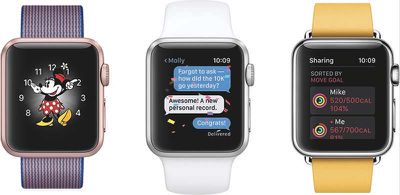
WatchOS3_trio

"Apple Watch is the ultimate companion for a healthy life and with watchOS 3, there's now even more to love," said Jeff Williams, Apple’s chief operating officer. "Favorite apps launch instantly and are simple to access, and the breakthrough new fitness and health features like the Breathe app make it feel like a whole new watch."

• Apple Watch users can press the side button to access the new Dock, where they can tap to launch native and third-party apps instantly and have the latest information in the app already updated and ready for viewing.

• Swiping up from the bottom brings up an all-new Control Center with toggles for Airplane Mode, Do Not Disturb, notifications, and more. Meanwhile, you can now simply swipe left and right to easily switch between watch faces.

• New ways to create and respond to iMessages, including a Scribble feature that dynamically recognizes which letters are drawn on the Apple Watch's screen and translates the drawings into traditional text messages. You can also send animations, invisible ink, stickers, larger emoji, sketches, taps, and your heartbeat.

• New watch faces: Minnie Mouse, Activity, and Numerals.

• Activity Sharing: You can now share your Activity rings with others for competitive motivation, and receive notifications when people finish workouts or earn achievements.

• A new Breathe app guides you through a series of deep breaths with relaxing animations and gentle taps. A summary provides you with your heart rate and the length of your breathing session, which can be adjusted by spinning the Digital Crown. Time to Breathe reminders can be set on a daily basis.

• New features for wheelchair users: The Activity app now supports a trio of wheelchair pushing techniques for varying speeds and terrain. There are also two new wheelchair-specific workouts and a new "Time to Roll" notification.

• SOS: Press and hold the side button and Apple Watch will initiate a call with 911 or local emergency services. SOS can also send a message to quickly alert your emergency contacts. The feature, which works over Wi-Fi or cellular, includes a medical card with your personal information and any medical conditions, and can provide local emergency numbers based on the country you are in.

• Apple Watch now supports Apple Pay within apps

• Apple Watch can now automatically unlock your nearby Mac

• Apple Watch can be used with the new Home app for controlling HomeKit accessories

watchOS 3 is available as a developer beta today. A public beta will be released in July. The free software update will officially launch in the fall.


Related Roundup: Apple Watch 11
Buyer's Guide: Apple Watch (Neutral)

Popular Stories

Apple MacBook Pro M4 hero

Apple Planning 'MacBook Ultra' With Touchscreen and Higher Price

Sunday March 8, 2026 8:05 am PDT by
Apple is planning to launch an all-new "MacBook Ultra" model this year, featuring an OLED display, touchscreen, and a higher price point, Bloomberg's Mark Gurman reports. Gurman revealed the information in his latest "Power On" newsletter. While Apple has been widely expected to launch new M6-series MacBook Pro models with OLED displays, touchscreen functionality, and a new, thinner design...
imac video apple feature

Apple Unveils Seven New Products

Friday March 6, 2026 11:48 am PST by
Apple this week unveiled seven products, including an iPhone 17e, an iPad Air with the M4 chip, updated MacBook Air and MacBook Pro models, a new Studio Display, a higher-end Studio Display XDR, and an all-new MacBook Neo that starts at just $599. iPhone 17e features the same overall design as the iPhone 16e, but it gains Apple's A19 chip, MagSafe for magnetic wireless charging and magnetic...
ios 26 4 yellow

Everything New in iOS 26.4 Beta 4

Monday March 9, 2026 3:50 pm PDT by
Apple is continuing to test the iOS 26.4 beta, and the latest update is now available for developers and public beta testers. As testing goes on, there are fewer new features in each beta, but today’s release adds new emoji characters and a few other changes. New Emoji Apple added new emoji characters, including trombone, treasure chest, distorted face, hairy creature, fight cloud, orca,...

Top Rated Comments

127 months ago
I could cry. This update is almost perfect.
Score: 28 Votes (Like | Disagree)
127 months ago
It's funny how some people find this useless and boring, but for us apple users this is much bigger than the jump from iOS 6 to iOS 7 ;)
Score: 10 Votes (Like | Disagree)
127 months ago
They always start with the stuff no one cares about.
The breathing function? Not so much. Faster app performance etc? Well, I care.
Score: 9 Votes (Like | Disagree)
sfwalter Avatar
127 months ago
Who would have thought of all that Apple announced today this is what I'm most excited about.
Score: 7 Votes (Like | Disagree)
NervousFish2 Avatar
127 months ago
Super excited about WatchOS... not only do I love the deeper integration of the various OS devices with being able to unlock your mac with your watch, and copy and paste across devices, but I *very much* applaud the focus on speed for the watch, without needing new hardware. It looks AWESOME. The one thing I felt the watch's fitness aspect always needed was some social networking, to allow smack talk and such. This is a great, great step, that really should have been there from the get go. I love my watch more now, and building that sense of community is ONLY going to draw in more users. This is a major plus for the future of the watch as a device. Last year the focus seemed to be a bit too much on the watch as a fashion device. This shows that they care about the interface, too.
Score: 7 Votes (Like | Disagree)
127 months ago
They always start with the stuff no one cares about.
Score: 6 Votes (Like | Disagree)














