Apple Watch Gains 'SOS' Emergency Call Feature With WatchOS 3 - MacRumors
Skip to Content

Apple Watch Gains 'SOS' Emergency Call Feature With WatchOS 3

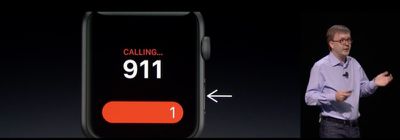
Today at it's WWDC keynote, Apple announced a brand new feature for watchOS 3 called SOS. The emergency call feature works similar to LifeAlert, allowing a user to easily call emergency services when they need it quickly and easily.
f1465838340
A user just has to press and hold the side button underneath the Digital Crown, and the emergency call will countdown from three. The Watch will then automatically call 911, or the equivalent for the country the user is in. The call will go through the paired iPhone, but it'll also be able to call directly from the Apple Watch if the Watch is on a Wi-Fi network.

SOS will also send your location to your emergency contacts, alerting them that you're in need of help. The Watch itself can also display a user's MedicalID, easily displaying a user's name, age, date-of-birth, medical conditions and other medical information.

Related Roundup: Apple Watch 11

Popular Stories

series 10 apple watch titanium digital crown

Report: Apple Watch Redesign Coming Next Year With New Band System

Tuesday June 30, 2026 8:45 am PDT by
A "major overhaul" of the Apple Watch's design is due to arrive next year with a new system for connecting bands, according to a known Weibo leaker. In a set of recent posts, the leaker known as "Instant Digital" linked the new claim to older rumors about an "Apple Watch X" model, which was said to introduce a fresh design and break compatibility with the existing watch band system. Citing...

3 4 24 Sport Band Refresh Feature

Sketchy Rumor Claims Apple Watch Series 12 Could Introduce Sensor in Band

Friday July 3, 2026 8:54 am PDT by
The Apple Watch Series 12 could ship with a new health sensor built directly into one of its bands, according to a sketchy rumor from a known leaker. The leaker known as "Kosutami" says the sensor will be injection-molded into a silicone band, and only a silicone band, apparently because Apple has not yet solved how to embed similar hardware in bands made from other materials. No detail was...

watchos 27

Siri AI Comes to Apple Watch in watchOS 27 Beta 3

Monday July 6, 2026 1:24 pm PDT by
With watchOS 27 beta 3, Apple added support for Siri AI and the Siri app, so Apple Watch users can now use the features right from their wrist. Apple said Siri AI would be coming to the watch back when watchOS 27 was first introduced, but the feature wasn't live until now. The Dynamic App Grid that pops up when the Digital Crown is pressed displays the Siri app in the center, and the...

Top Rated Comments

Johnny907 Avatar
132 months ago
And there had better be a way to disable this, or else I'm going to be wrist-dialing 911 everytime I do pushups. Having to go through my photos and delete a page full of watch face screen shots after every workout is annoying enough, but this could be extremely embarrassing plus potentially criminal in some areas.
Score: 5 Votes (Like | Disagree)
132 months ago
Could have saved my friend's dad's life... Amazing.
Score: 3 Votes (Like | Disagree)
AVEGA Avatar
132 months ago
This is a fantastic idea , I wonder how many idiots will cry and call this a junk app . I assume this is not exclusive to watch but iOS 10 update .

Watch this Jon Oliver Segment on 911 and this app will make so much more sense .
Score: 2 Votes (Like | Disagree)
132 months ago
I'm sorry for your loss.
Many thanks.
Score: 1 Votes (Like | Disagree)
tennisproha Avatar
132 months ago
Could have saved my friend's dad's life... Amazing.
I'm sorry for your loss.
[doublepost=1465928486][/doublepost]
This is really great. But how will I turn my watch off?
The macrumors post is incorrect. You hold down the side power button. It brings up 3 options: Power off, something else, and call SOS.
Score: 1 Votes (Like | Disagree)
Benjamin Frost Avatar
132 months ago
You don't think about needing assistance . . . until you do.

For me, it's living alone in a 1920's cottage with steep basement stairs . . . And having a campus studio in a building that's often deserted after hours or on holidays . . . and having a bad hip (now recoving from hip replacement surgery).

I welcome this app. The ability to communicate in an emergency is one of the reasons I got the Watch.
Hope your hip gets better and you're hopping around soon.
Score: 1 Votes (Like | Disagree)