

'Workflow' for iOS Gains Apple Music Playlist Support, 20+ New Actions - MacRumors
Skip to Content

'Workflow' for iOS Gains Apple Music Playlist Support, 20+ New Actions

by

Popular automation app Workflow has been updated with a number of new features and now provides added support for over 20 new actions.

For anyone not familiar with the app, Workflow is an automation tool that lets users create a variety of workflows to accomplish tasks like creating GIFs from a series of photos, pulling images from a web page, translating an article, calculating a tip, and more.
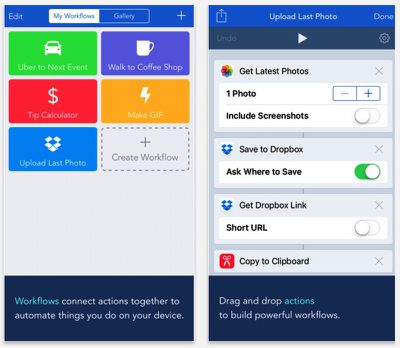
Workflow 1.5
Users can create their own workflows or download them from the Workflow gallery and other third-party sites.

With the release of Workflow 1.5, the Workflow Composer has been optimized, a search function has been included, and a number of new app actions have been added, introducing enhanced support for integration with the iTunes and App Stores, Safari browser, Ulysses, and more.

For example, the dedicated "Search App Store" action lets users search the App Store and scrape details of selected iOS apps (such as price, release date, and artwork), which can then be passed into subsequent actions inside a workflow.

Additionally, Workflow includes new Apple Music actions that enable users to create playlists and add songs to an existing playlist in their Apple Music library. Support for project management tool Trello has also been included in the latest version.

Workflow 1.5 costs $2.99 and is available for iPhone and iPad on the App Store. [Direct Link]

Top Rated Comments

134 months ago
This is such a clever app and I'm glad it exists. But for all the time I've had it, played with it, and looked at other people's Workflows, I've never managed to do anything with it that's actually useful to me.
Score: 9 Votes (Like | Disagree)
Traverse Avatar
134 months ago
It took me a while to really find use from this app. One workflow I use a lot is one that @Jessica Lares helped me with.

It's a workflow that brings up a list of MacRumors sub forums and let's me pick the ones I want to open in safari. It may seem odd, but it's much more handy than manually tapping and holding on 6+ links and selecting "Open in new tab."


Attachment Image
Score: 1 Votes (Like | Disagree)
dumastudetto Avatar
134 months ago
Workflow is really awesome. It truly demonstrates that iOS is the most powerful mobile platform in the world, and you can accomplish so much with it.
Score: 1 Votes (Like | Disagree)

Popular Stories

iphone duo

Apple Announces Foldable 'iPhone Duo'

Wednesday September 9, 2026 10:56 am PDT by
Apple today announced the "iPhone Duo," a new kind of iPhone featuring two screens and a foldable inner display. The two halves of the iPhone Duo connect into a single continuous frame with the same aspect ratio across both displays, and Apple said the transition between open and closed is designed to feel fluid. When fully open, Apple says it is the thinnest iPhone ever made, with an...
Surprise and Shine Live Coverage Article

Apple Event Live Blog: iPhone Duo, iPhone 18 Pro, and More Expected

Wednesday September 9, 2026 9:10 am PDT by
Apple's "Surprise and Shine" event kicks off today at 10:00 a.m. Pacific Time, where we're expecting to see the foldable iPhone Duo, the iPhone 18 Pro and Pro Max, Apple Watch Series 12 and Ultra 4 models, new AirPods 5 earphones, and perhaps some other announcements. Apple is providing a live video stream on its website, on YouTube, and in the company's TV app across various platforms. We...
apple surprise and shine event

Apple Event Today: iPhone 18 Pro and iPhone Duo Cheat Sheet

Tuesday September 8, 2026 10:24 am PDT by
Apple's biggest event of the year is almost here, and all eyes are on Cupertino. With the first foldable iPhone expected to headline Apple's "Surprise and Shine" event on Wednesday, September 9, at 10:00 a.m. Pacific Time, the rumor mill has been running full throttle, fuelled by the biggest single design change in the life of the iPhone. To get you up to speed, here's a quick reference...











































