

Earlier this month, Tweetbot for iOS was updated with a new "Topics" feature designed to link multiple related tweets together in a cohesive way, and now the Tweetbot app for Mac has been updated with the same feature.
Topics are built around the Twitter feature that links conversations. Tweets composed as a topic in Tweetbot are linked together via Twitter's conversation threading mechanism and use the same hashtag, so "Tweetstorms" or tweets surrounding a single topic connected.
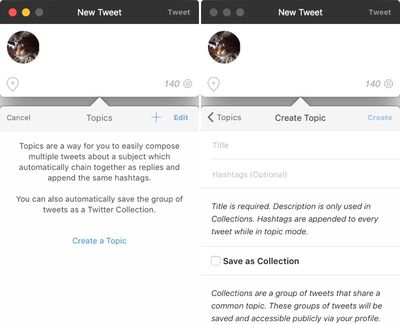
Linking multiple tweets together is often desirable in situations where a single tweet doesn't suffice, such as a lengthy rant or live event coverage.
This release introduces Topics. A Topic is a way to let you quickly Tweet a group of related Tweets without having to manually reply to yourself and/or manually add the same hashtags over and over again. They are really great for rapid fire live Tweeting events.
You can access Topics by tapping the gear menu in the New Tweet screen. They are also stored in and require iCloud, so you can start a topic on your iPhone and easily continue it on your iPad and Mac.
Today's Tweetbot update also includes support for Collections, a way to save tweets linked together as a topic, and there are a number of feature improvements and bug fixes.
- Collections Support
- Improved Quote Preview in Compose Window
- Removed play/pause button from video playback. Clicking on the video will toggle play/pause.
- Fixed an issue where incoming DM's would play a sound even when notification center was set to 'Do not Disturb'.
- If you mute someone you don't follow, it now automatically mutes searches, mentions and lists.
- Fixed an issue with using the left-arrow key when in the timeline search field.
- Fixed an issue with tab jumping too many columns.
- Fixed an issue where you could drag additional images or video into a tweet that already had the max number of attachments.
- Fixed an issue where videos would fail to upload.
- Fixed an issue where .mov files could not be added as video.
- Fixed an issue where the progress spinner wouldn't disappear after loading.
- Fixed an issue where text could be cut off at the bottom after adding an image in the compose window.
Tweetbot for Mac can be downloaded from the Mac App Store for $9.99. [Direct Link]















































