Apple TV Apps Can Now Be Previewed on the Web
Apple has begun rolling out iTunes web previews for Apple TV apps, allowing Apple TV users and developers alike to easily share links to Apple TV apps on the web. The change was first spotted by Slide to Play's Jeff Scott (via MacStories).
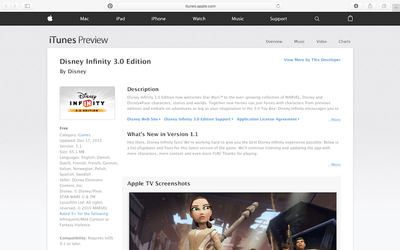
Previously, Apple only had iTunes web previews enabled for iOS and Mac OS X apps, making it very difficult for users of the fourth-generation Apple TV to share their favorite apps on the web as well as for developers to promote their apps on their websites and social media accounts.
Although the feature is still rolling out, it appears it's limited to tvOS-only apps thus far. Kevin MacLeod of AfterPad told MacStories "that while the iTunes API is now returning screenshot metadata for tvOS-only apps, that metadata is absent for iOS apps with tvOS support."
Two of the first apps to feature web previews are currently Disney Infinity 3.0 and Beergeek.com TV. While these previews offer users and developers a way to see what an Apple TV app looks like or what features it has, they do not include any way for users to take any action.
Popular Stories
Just two days before Apple's "Welcome home" experience in New York, Bloomberg's Mark Gurman has leaked several details about the new products set to be unveiled, including an all-new smart home hub, a HomePod mini 2, and a new Apple TV 4K.
Here is an all-in-one summary of the details shared by Gurman:Apple's home hub with a touch-enabled display will be named HomeView, seemingly confirming a ...
Apple today announced the fourth-generation Apple TV 4K, with key features including an A19 chip, Siri AI support, an updated Siri Remote that has Find My support with Precision Finding, built in far-field microphones, support for surround sound with four HomePods in front and rear pairs, and more.
The A19 chip in the new Apple TV 4K delivers up to 50% faster CPU performance and up to twice...
Apple likely plans to release MacBook Pro models with OLED displays, 14-inch MacBook Pro and iMac models with M6 chips, and/or an iPad mini 8 with an OLED display on Friday, November 6, according to Bloomberg's Mark Gurman.
The devices are expected to be announced on Tuesday, October 27 or Wednesday, October 28.
If this timeframe proves to be accurate, then Apple will be releasing new...