

'Launch Center Pro' Gains Notification Center Widget, Support for New Apps - MacRumors
Skip to Content

'Launch Center Pro' Gains Notification Center Widget, Support for New Apps

by

First released in 2012, Launch Center Pro was one of the first quick action apps in the App Store, designed to let users create shortcuts to features normally buried within apps, such as opening up Instagram directly to the camera, or opening a specific search within Yelp.

Over the years, Launch Center Pro has been updated several times with new features and while it has encountered some trouble with Apple, it continues to be a popular choice for users who are looking for a shortcut-based quick launch app. As of today, Launch Center Pro is getting a major update, which adds a new Notification Center widget.

With the new Notification Center widget, it's possible to add twelve of your favorite Launch Center Pro actions for quick and easy access. You can do things like call a specific person, add an event to a favorite calendar app, get directions home, scan a QR code, send a group text, and more directly from the Notification Center.
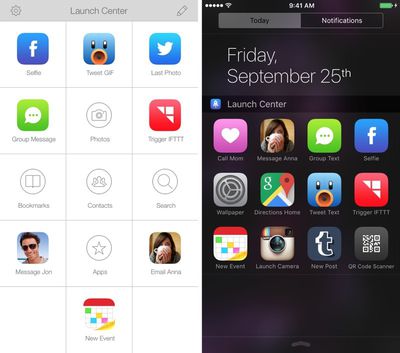
launchcenterpronotificationcenter
More complex actions, like controlling a Nest Thermostat from IFTTT, scanning a barcode and searching Amazon, or taking a photo and messaging it to an entire group are also supported by Launch Center Pro. Apps like Safari, Twitter, Facebook, and Google are all supported by Launch Center Pro, and today's update also adds support for more than 100,000 additional apps and iOS 9.

In the future, Launch Center Pro plans to support iPhone 6s features, introducing 3D Touch-based Quick Actions that will be able to be launched by using a force press on the Launch Center Pro app icon on the Home screen.

Launch Center Pro can be downloaded from the App Store for $3.99, a 20 percent discount from its usual price. [Direct Link]


Top Rated Comments

139 months ago
I guess I don't understand an app launcher in Notification Center. Seems like a horrible place to put that functionality. I think most of the Today widgets are horrible.
But for those who do like it, I'm glad we have the option!
Score: 3 Votes (Like | Disagree)
pacorob Avatar
139 months ago
I must try this app out. Anyone used this before?
I think you could better try using Launcher ('https://forums.macrumors.com/threads/ios-8-widget-customisations-using-launcher.1782093/') or others (iLauncher, S Launcher, Go Launcher - all free) for to see if it's something for you.

Been doing the same thing with Launcher for almost a year now...love the added quick shortcuts in the pull down.
I indeed also love my Launcher widget.
If you attempt to access an app via the notification center while the phone is locked do you still have to unlock the phone to actually access the app?

I have Launcher installed, but find I rarely use it seeing as I have to turn my screen on, swipe down to bring up notification center, click the icon, then unlock the device. I can just as easily unlock the device and press the icon on my home screen. Seeing as most people would default popular apps to Launcher and they'd most likely also have those same apps on the first page of their phone.

Unless I'm missing something. When I first downloaded it I thought it was going to be great and save time. Unfortunately, that doesn't seem to be the case.
I use Launcher every day.
Don't you have TouchID? I press on the home button to unlock my device then slide the Notification center down to get quick access to e.g. certain settings (battery usage per app, notifications, location settings) and especially quickly send a predefined text (iMessage, Whatsapp, sms) to send to my wife. I also love the quick access to navigate to home. The recent Launcher widget also added the option to see the actual time to home on the icon directly. I use a lot of apps and love the way that i can do things in less clicks and the need to type things every time again and again especially messages that i will send daily (e.g. i'm late from work, see you in 15 minutes...).
Score: 1 Votes (Like | Disagree)
lokey Avatar
139 months ago
I guess I don't understand an app launcher in Notification Center. Seems like a horrible place to put that functionality. I think most of the Today widgets are horrible.
Score: 1 Votes (Like | Disagree)
139 months ago
I must try this app out. Anyone used this before?
I bought it last time it went on sale - both iPhone and iPad versions. I never use them. Maybe I'm not a power user. But the things I'd automate are relatively simple tasks that don't really need a shortcut. And the documentation online leaves a lot to be desired. Cool idea but in practice not that useful to me. Your mileage may vary.
Score: 1 Votes (Like | Disagree)
spacemnspiff Avatar
139 months ago
I am a Launcher user too from when it first launched. I use it everyday from calling, texting, using Waze for frequent routes, custom 1Password searches etc.

Launcher Pro looks promising.
Score: 1 Votes (Like | Disagree)
tbayrgs Avatar
139 months ago
Been doing the same thing with Launcher for almost a year now...love the added quick shortcuts in the pull down.
Score: 1 Votes (Like | Disagree)

Popular Stories

MacBook Pro Low Angle Wide Lens

Apple to Launch 'MacBook Ultra' With These Six New Features

Friday April 24, 2026 10:32 am PDT by
While the 14-inch and 16-inch MacBook Pro were just updated with M5 Pro and M5 Max chips last month, bigger changes are reportedly around the corner. According to Bloomberg's Mark Gurman, the higher-end MacBook Pro models will be receiving a major redesign by early 2027, and he said that Apple might use "MacBook Ultra" branding for them. If so, the MacBook Ultra would likely be a...
Apple TV Thumb 3

Here's What's Coming in the 2026 Apple TV

Thursday April 23, 2026 12:08 pm PDT by
There are a lot of folks waiting for a new version of the Apple TV because the set-top box hasn't been updated since 2022. There is an update coming this year, but people will need to wait a bit longer because Apple is holding the next Apple TV until the new version of Siri comes out this fall. Design Apple TV design updates don't happen often, and that's not changing in 2026. The next...
Mostly Screen iPhone Purple Feature 2027

20th Anniversary iPhone to Feature Custom 'Micro-Curved' OLED Panel

Friday April 24, 2026 3:34 am PDT by
For its 20th-anniversary iPhone, Apple is tapping Samsung to produce a custom micro-curved OLED display that is brighter and thinner than existing panels, according to new supply chain information out of China. Apple is reportedly considering a radical redesign for the 20th-anniversary iPhone that could feature a completely bezel-less display that curves around all four edges of the device. ...










































