

As promised, Flexibits today updated Fantastical 2 for the iPhone to version 2.3, adding support for the Apple Watch. Fantastical 2's new Apple Watch app includes a list of all upcoming meetings and appointments, a list of Reminders, a Glance with quick access to a daily schedule, and the ability to add events directly on your wrist.
Flexibits' co-founder Michael Simmons told MacRumors that the company waited until the Apple Watch was released to begin developing Fantastical 2 for the wrist, in order to design an app with the best possible user experience. "I'm not going to make an Apple Watch app when I've never used one," he said. "I need to see it. You can't solve a problem if you don't know what the problem is."
After experimenting with the existing Calendar app on Apple Watch and brainstorming on how best to translate Fantastical's feature set to the wrist, the Flexibits team came up with a simple but useful solution that distills Fantastical's core functions into a form suitable for wrist-based interactions that last just seconds.
The key feature in Fantastical 2 for Apple Watch is the Glance, which shows all of a day's events arranged in a timeline. With the Glance, you get a quick overview of what's going on in a day, along with information on the next upcoming meeting or appointment.
Tapping on the timeline within the Glance opens the full Fantastical 2 app, where you can get a list of all the events happening for the next two weeks. This improves upon the default Calendar app somewhat, as Apple's own app only shows a week of events. More detailed information on each event can be accessed with a tap, and scrolling through events in a list can be done with a finger or with the Digital Crown.
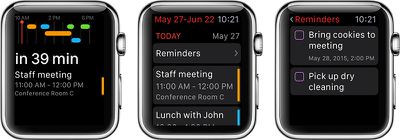
If you use Fantastical's Reminders feature, tapping "Reminders" at the top of the Apple Watch app will open a list of Reminders you've created, where they can be checked off. A force press within the Reminders list will let you add a new to-do task, while a force press in the main view of the app will let you add a new event. Events and Reminders are entered using the Apple Watch's dictation capabilities.
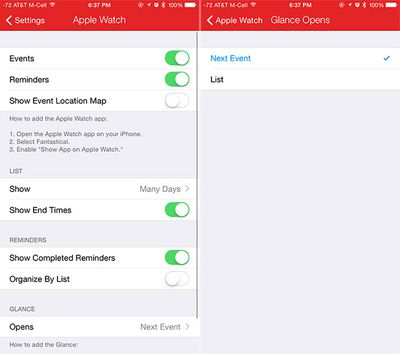
The Fantastical 2 Apple Watch app can be customized through the iPhone. Users can choose whether to display events and reminders, how many days to display within the app, and what the Glance opens -- next event or a list of all events.
Since Fantastical 2 for Apple Watch is bundled into an iPhone update, it's free for all existing Fantastical 2 users. If you own the iPhone app, you own the Apple Watch app.
Fantastical 2 can be downloaded from the App Store for $4.99. [Direct Link]
















Top Rated Comments
I remember alot of people saying they were so slow that they were virtually unusable. :confused: