New Theme Store Coming Soon to SwiftKey Keyboard for iOS - MacRumors
Skip to Content

New Theme Store Coming Soon to SwiftKey Keyboard for iOS

by

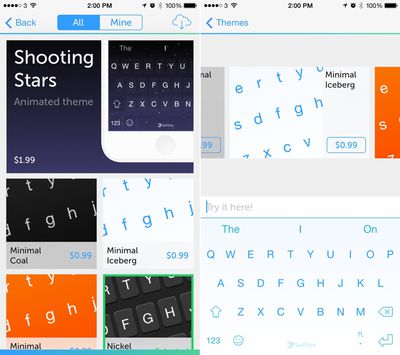
It appears that the popular SwiftKey keyboard for iOS will soon be gaining a Theme Store, MacRumors has learned. SwiftKey already has three themes available in app for free, but the new Theme Store seems to add 11 additional themes that can be purchased at prices between $0.99 and $1.99.

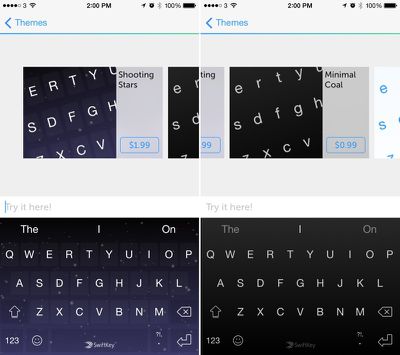
Lower priced $0.99 themes change the color of the keyboard, and some of the available options include "Coal," "Iceberg," and "Juice," three minimal themes that turn the keyboard black, white, or orange.
swiftkey1
There's also a dynamic "Shooting Stars" theme that uses Parallax to cause the stars in the background to shift when the iPhone is moved, giving it a distinctive 3D feel. "Shooting Stars" is priced at $1.99, and in addition to the parallax effect, users will also see an occasional shooting star soar across the keyboard.
swiftkey2
These new themes will undoubtedly be a welcome addition to SwiftKey users who have wanted to change the look of their keyboards to better suit their personal styles or visual preferences, and it's likely SwiftKey will continually add new themes to the Theme Store following its release.

The new SwiftKey Theme Store appears to be rolling out to SwiftKey's beta testing group, but it will likely be coming to all users as an app update in the near future. Beta testers can access the new themes through the SwiftKey container app in the "Themes" section.

Swiftkey can be downloaded from the App Store for free. [Direct Link]

Top Rated Comments

149 months ago
Am I the only one who uses the default keyboard still?
Score: 11 Votes (Like | Disagree)
149 months ago
Now if only it didn't crash several time a day.
Score: 7 Votes (Like | Disagree)
MRSooner Avatar
149 months ago
I still use the default keyboard because I can't get the 3rd party keyboards to work consistently enough.
Score: 6 Votes (Like | Disagree)
DipDog3 Avatar
149 months ago
Now if only it didn't crash several time a day.

I agree, used SwiftKey several times, but the the endless crashing was just too annoying.
Score: 5 Votes (Like | Disagree)
149 months ago
I just can't. seeing the capital letters at all times irritates me on the default keyboard. always get confused if the lock is enabled or not lol plus I can't use german / english at the same time
Capital letters are on hardware keyboards to this day and have been there for ages and people have been using them just fine all these years.
Score: 3 Votes (Like | Disagree)
star-affinity Avatar
149 months ago
I have SwiftKey as my only keyboard since day one and I have never experienced any crash whatsoever. SwiftKey is a blessing because I can type Dutch and English without switching keyboards. Is it only a problem for non iPhone 6 users, because I see so many complaints and I have truly never experienced any problems.

Have you never had it not show up in Messeges so one has to quit the app and launch it again to get the keyboard to show up? Or the keyboard not showing when trying to search from the home screen (swipe down)?

Agree on the dual lingo support – it's great –*and I really like SwiftKey except that it isn't working as consistently/gracefully as the keyboards built-in to iOS.
Score: 2 Votes (Like | Disagree)

Popular Stories

8 CarPlay Features in iOS 27 Feature

Which iOS 27 CarPlay Features Actually Work in Your Car?

Thursday September 17, 2026 4:17 am PDT by
In iOS 27, available now, CarPlay gets its biggest update in years, but some features depend on what type of car you have rather than your iPhone model. Some of the biggest additions won't do anything in the vast majority of vehicles on the road today. Here's how the new features pan out. Works in Any CarPlay Vehicle Custom widgets: In iOS 27, CarPlay is no longer limited to Apple's handful ...
Apple Watch New Charging Puck

Here's Why a New Apple Watch Charging Puck Was Just Released

Wednesday September 16, 2026 8:53 am PDT by
The new Apple Watch Series 12 and Apple Watch Ultra 4 have hardware changes that allow for faster charging, but you will need to use the new version of the Apple Watch Magnetic Fast Charger included in the box in order to achieve this boost. If you need extra ones for your own charging stands or travel or so forth, Apple released the new version of the charger on its online store last week, with...
iphone 18 pro max prepare

iPhone 18 Pro Max Requires 'Prepare to Ship' Battery Drain Before Shipping

Friday September 18, 2026 4:27 pm PDT by
The iPhone 18 Pro Max has a battery capacity over 20 watt-hours, which means there are additional shipping requirements. If an iPhone 18 Pro Max needs to be shipped somewhere, its maximum battery capacity has to be limited through firmware. According to Apple, the iPhone 18 Pro Max uses an "innovative battery-firmware solution" that limits battery capacity to below 20Wh between when the...