

Keyboards have become an increasingly important way for iPad users to boost the productivity of their tablets, and there are dozens of keyboards and keyboard cases on the market designed for the iPad. Apple itself has begun highlighting keyboard cases in recent weeks, showcasing a range of products in its brick and mortar stores, and with Apple beginning to put an emphasis on iPad accessories, interest in keyboards will undoubtedly pick up in the coming months.
ClamCase, a well-known iPad accessory maker, has been producing keyboard cases for several years and its most recent case, the ClamCase Pro iPad Keyboard Case for iPad Air 2, is a culmination of everything the company has learned people look for in a keyboard case.
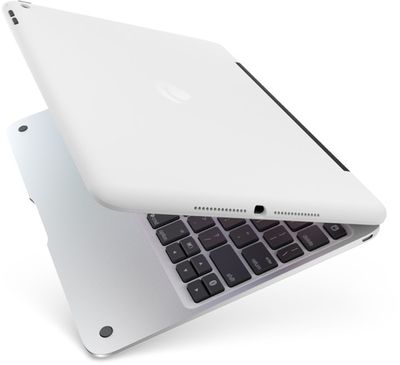
Priced at $169, the ClamCase Pro is a premium entrant in a market where $50 to $100 options are common, but it offers features that power users and frequent writers will find worth the money, including a unique 360 degree hinge for multiple screen positions, full iPad protection, and most importantly, a keyboard that has generous spacing and an above average key feel.
What's in the Box
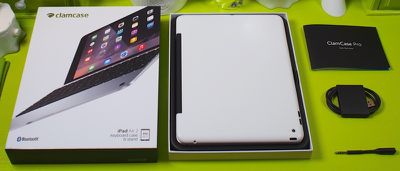
The ClamCase Pro ships in a high-quality iPad-style box that includes the keyboard case itself, a micro-USB cord for charging, a quick start guide, and a headphone adapter.
As described in the quick start guide, setup is easy, and we were able to pair the ClamCase Pro with an iPad after switching the case's power on and pairing it in the iPad's Bluetooth settings menu. After pairing, it worked immediately, with no apparent lag.
Design
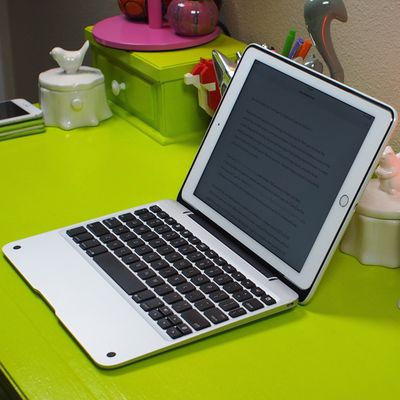
The ClamCase Pro for iPad Air 2 is, as you might imagine, a clamshell-style case that fully encompasses the iPad. The iPad Air 2 snaps snugly into the top of the case (so snugly, in fact, that it can be difficult to remove) and the bottom of the case houses black MacBook-style keys. Both the outside of the case and the top portion are constructed from a white plastic, but inside, the keyboard portion of the case is made from brushed aluminum and heavily resembles a MacBook.
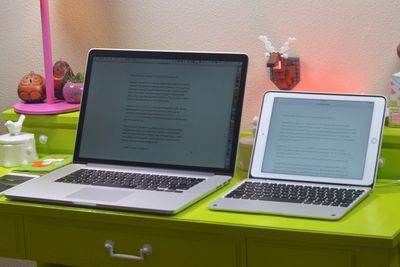
The two halves of the case are connected by a 360 degree hinge, and overall, with the iPad snapped in, it looks and feels very much like a MacBook Air -- so much so that in MacRumors' testing, we repeatedly attempted to use a non-existent trackpad instead of touching the screen.
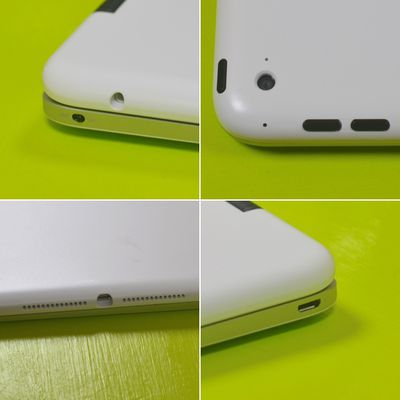
The top of the ClamCase Pro has a cutout for the iPad's Lightning port and the camera, as well as buttons that allow the iPad's power and volume controls to be used. The keyboard portion of the case has a port for headphones and a micro-USB port that's used to charge the case itself.
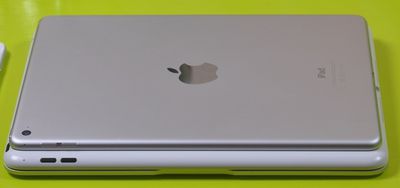
While the plastic of the case feels somewhat flimsy and low-quality, the aluminum keyboard portion is solid and feels well made. When closed, the ClamCase Pro is able to completely encase the iPad, protecting it from drops and scratches. Unfortunately, this solid feel and the high level of protection come at a cost --- bulk. The ClamCase Pro is 0.74 inches thick (at its thinnest point) and the iPad Air 2 is 0.24 inches thick, which means this case triples the thickness of the iPad Air 2 and more than doubles the weight (ClamCase Pro weighs 1.2 pounds, iPad Air 2 weighs 0.96)

At just over two pounds, the ClamCase Pro with an iPad Air 2 approaches the weight of the 11-inch MacBook Air. It's by no means heavy, but it is a consideration because it adds a decent amount of weight and negates some of the incredible thinness and portability of the iPad Air 2. Still, two pounds is portable, and the sturdiness of the case provides a very satisfying typing experience while its weight prevents the case from toppling over despite its top-heaviness.
The Keys
The ClamCase Pro's keyboard keys, arranged in a standard QWERTY layout, are smaller than those on a MacBook, but they are well-spaced and transitioning from a MacBook to the ClamCase Pro keyboard was simple and resulted in few typing errors. With other iPad keyboards, key spacing and feel can result in a significant typing adjustment period filled with errors and mistyped letters. Typing on the ClamCase Pro's keys is very satisfying, as they have a good amount of spring and a "click" that's somewhat similar to the keys of a MacBook.
The number of words we were able to type per minute on the ClamCase Pro was similar to the number of words we were able to type on a MacBook, but your own mileage may vary based on finger size and positioning.
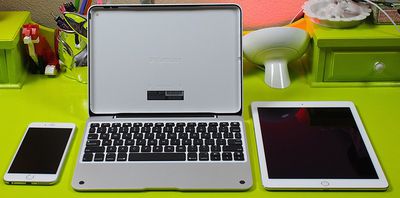
Along with the typical letters and numbers, the ClamCase Pro keyboard has dedicated keys for shift, caps lock, control, option, and command, along with arrow keys and a key that displays the case's battery life. A small LED at the top of the keyboard will pulse up to four times to notify users of the case's remaining battery life.
The keyboard also contains a number of special keys above the number row, which are used to control specific functions on the iPad. With these keys, you can access the iPad's home screen, open the Finder, cut, copy, and paste text, bring up the on-screen keyboard, activate Siri, lock the screen, play/pause media, and control the iPad's volume.
360 Degree Hinge
A unique rubber-coated 360 degree hinge is one of the most important features of the ClamCase Pro, allowing it to be used not only as a keyboard, but also as a movie stand when folded back and in "tablet mode" when folded flat, alleviating the need to remove the iPad from the case when using the touchscreen without the keyboard.
In its stand mode, it can be manipulated into almost any viewing angle, which is useful for watching movies, playing games with an MFi controller, and more. Using it in tablet mode (with the keyboard folded back) is less useful because of the bulk of the case and the feel of the keys underneath, but it's still a great option to have available.
Rotation to any angle for multiple viewing positions is a handy feature, but the hinge of the ClamCase Pro is overly stiff and a bit sticky. This can make the ClamCase Pro hard to open when closed because of the tightness of the hinge, and moving from the standard keyboard position to stand mode or tablet mode takes an amount of force that feels like it's going to break the entire case.
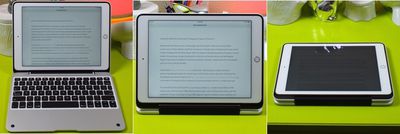
Putting the ClamCase Pro into one of these other modes is disconcerting at first because it feels like it's going to break, but at the same time, the tight hinge keeps the case upright while typing and in a sturdy position when being used as a stand. In previous iterations of the ClamCase, there were some minor issues caused by the stiff hinge, but the ClamCase team has confirmed to MacRumors that the strength of the protective shell and manufacturing techniques have been improved in this iteration in order to address past concerns.
The multiple viewing functions of the ClamCase Pro are a useful addition to the case, but it should be noted that there's no way to use the case as a stand or with a keyboard while the iPad is in portrait mode. The only portrait mode option is also tablet mode, where the keyboard is rotated all the way back.
Charging and Port Access
Both the iPad and the case can be charged while it in use, but the ClamCase Pro won't need to be charged often -- each two hour charge offers 100 hours of use time or 6 months of standby time. The ClamCase Pro has been designed to work solely with the Apple-supplied Lightning charger when charging the iPad, and we discovered that third-party chargers are generally unable to be used with the ClamCase Pro due to the tight fit and the shape of the cutout. Third-party headphones do, however, work fine with the ClamCase due to an included headphone adapter.
To conserve battery, the ClamCase Pro's Bluetooth will shut off after a set period of inactivity, but tapping a key will reactivate the Bluetooth and it will re-pair with the iPad in just a few seconds. The Bluetooth is designed to shut off when the ClamCase Pro's lid is rotated into tablet or stand mode, which prevents keys from being pressed when the keyboard is not in use, and when the ClamCase Pro is shut with an iPad inside, the Bluetooth powers down and built-in magnets put the iPad to sleep.
Who's it For?
The ClamCase Pro is not a keyboard for casual users who only need to type the occasional email, due to its price and its bulk. At the $169 price point, it's meant for serious writers who want to convert their iPads into miniature MacBooks for an unparalleled typing experience, and for those who want the flexibility of a keyboard combined with a multi-function stand and full iPad protection.
Pros:
- Good key spacing
- Solid key feel
- Morphs iPad into mini MacBook
- Multi-angle hinge
- Complete iPad protection
Cons:
- Very expensive
- Bulky
- Heavy
- Hinge is inflexible
- iPad is hard to remove
How to Buy
The ClamCase Pro iPad Keyboard Case for iPad Air 2 can be purchased from the ClamCase website for $169. ClamCase also sells additional keyboard cases designed for the original iPad Air, older iPads (2/3/4), and the iPad mini.
ClamCase only lists a 120-day warranty on its company website, but has informed MacRumors that there's an unspoken 1-year warranty in place that covers any and all manufacturing issues.
















































Top Rated Comments
I don't think the plastic is flimsy unless they've slimmed it downand it doesn't sound like they have. I do, however, wish they would make it alumnum top and bottom with a cutout where the Apple logo is, or a black plastic circle. That way at least wifi users could have a nicer looking enclosure as the wifi iPads use the Apple logo for the antenna window. And if they can't do that then they need a black option for the lid.
The keys do feel almost as good as an Apple MacBook keyboard and it looks very similar. It's trueespecially when browsing the webyou go to scroll with the non-existent trackpad. It makes me wish Apple would make their own keyboard dock with trackpad that at least supported basic gestures like scrolling, switching apps, etc.
I'm surprised the thing is still so thick. I figured they were taking so long for the iPad Air 2 version so that they could make it thinner. That's disappointing. Have they improved the stiffness of the hinge? It was a little too tight on our mini but not too bad.
They also need to add a backlight for that price. But speaking of price, you can get some decent discounts if you go to sign up with your email on their site but don't buy anything. I got either a 20 or 25% off coupon that way. But it was also around Black Friday so I found an even better one. My wife's mini keyboard ended up costing about $100, but she loves it. She uses Office on it to keep track of small business expenses and edit contracts and do email. It's nice how the keyboard flips around like a stand so you can watch movies on it. I wish the Smart Cover on my iPad Air 2 was more stable for that purpose.