Google Launches 'Google Cast' for Audio Streaming as AirPlay Alternative With a Twist - MacRumors
Skip to Content

Google Launches 'Google Cast' for Audio Streaming as AirPlay Alternative With a Twist

by

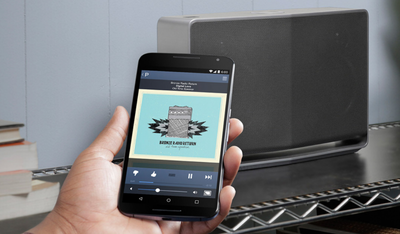
Google today announced Google Cast for audio, a new music streaming technology in the vein of Chromecast that lets users stream sound from their smartphone, tablet, or Chrome-based web browser to Google Cast-ready speakers.
Screenshot (71)
The service uses pre-existing apps like Pandora, iHeartRadio, and Google Play Music, amongst a sizable list of others, to play a user's songs on a selection of speakers from companies like Sony and LG. With the long list of supported apps and sites, Google Cast supports a wide variety of input devices from iPhone, iPad, Android Phones and tablets, to any Mac or PC with a Chrome browser.


While Google Cast at first glance appears similar to Apple's AirPlay in that it is a standard available to speaker manufacturers to ensure support for wireless audio streaming, Google Cast speakers stream content from the cloud rather than directly from the control device. As a result, Google promises users will receive the best sound quality and can multitask on their devices without disturbing the streams.

The company promises the first Google Cast-ready speakers from Sony, LG, and HEOS by Denon will be made available this spring. Alongside the promise of a wider array of brands supporting the service with their own speakers throughout 2015, Google states that these devices will accompany "a growing Google Cast ecosystem," which plans to include Android-based TVs, gaming consoles, and even set-top boxes.

Top Rated Comments

aaroman Avatar
150 months ago
Such spin...

That's amazing. No, not the tech, the spin. So somehow streaming music from some other site on the continent is supposed to be better than streaming it from a local computer connected at gigabit speeds? Rii-ii-ight...
I'll continue to use AirPlay with the Remote App on my iPhone or iPad controlling my iTunes library locally, and NOT have to worry about asking GoOgle permission to stream music from their servers. Oh, and I'll stream it to all my AirPlay devices plus my computers speakers synchronously, filling my house with music.
And when I want, I'll also be able to stream straight from my device to my speakers without having to route it over the Internet. Sorry, GoOgle, you can't put ads in my music stream or track my listening habits.
Yet another lame me-too product from the folks who brought you Android.
Score: 16 Votes (Like | Disagree)
gotluck Avatar
150 months ago
That's amazing. No, not the tech, the spin. So somehow streaming music from some other site on the continent is supposed to be better than streaming it from a local computer connected at gigabit speeds? Rii-ii-ight...
I'll continue to use AirPlay with the Remote App on my iPhone or iPad controlling my iTunes library locally, and NOT have to worry about asking GoOgle permission to stream music from their servers. Oh, and I'll stream it to all my AirPlay devices plus my computers speakers synchronously, filling my house with music.
And when I want, I'll also be able to stream straight from my device to my speakers without having to route it over the Internet. Sorry, GoOgle, you can't put ads in my music stream or track my listening habits.
Yet another lame me-too product from the folks who brought you Android.
this isnt for "all apple" people..

some people like multiple platforms
Score: 4 Votes (Like | Disagree)
150 months ago
... the "twist" being the extra bandwidth used so that Google gets a copy of everything you stream so that the data can be mined and sold to advertisers.
Score: 4 Votes (Like | Disagree)
Apple_Robert Avatar
150 months ago
AirPlay is working well for me. I see no need to go Google-eyed over this.
Score: 3 Votes (Like | Disagree)
150 months ago
what made you ditch Sonos?....I'm curious.
Sound quality.
Lack of DTS.
Limited to 5.1 DD Surround sound.
No high-deff codec.
An App being a requirement.
Limited to 2.0 support from my 4K media streamer through my 4K TV even though I get 5.1DD from Netflix/Blu-Ray.

It was just a pain, especially if you have guests. Makes a lot more sense to go 'all in' on AirPlay which lets people also throw up photos/videos on TVs.

Really no points in buying a ton a bridges to add to the system for audio.

AirPlay offers an all around better solution that includes photos/video.
Score: 3 Votes (Like | Disagree)
150 months ago
This sounds more like Sonos than AirPlay. I have yet to try Sonos but I've heard great things about it for the most part -- especially where the quality of their hardware is concerned. Sure, their hardware is not cheap; but I have a feeling it's one of those things that you get what you pay for.

I went 'all in' with Sonos last year. Multiple TV bars w/ surround and multiple peripheral speakers. Spent a TON of money. All Sonos gear is gone and I am back to Sony w/ Airplay, Marantz, and AppleTV.
Score: 2 Votes (Like | Disagree)

Popular Stories

iphone 16 teal

'Siri AI' Lawsuit Update: Apple to Pay Owners of These iPhone Models

Thursday July 9, 2026 7:08 am PDT by
In May, Apple agreed to pay $250 million to settle a U.S. class action lawsuit over Siri AI's delayed launch, and eligible iPhone users could receive up to a $95 payout. This week, the California court overseeing the case held a hearing regarding preliminary approval of the settlement, but the judge has not yet issued a ruling. It will likely be at least a few more months before eligible...
Apple TV Thumb 3

Everything Coming in the 2026 Apple TV 4K

Wednesday July 8, 2026 4:51 pm PDT by
The Apple TV 4K hasn't been updated since 2022, and it's due for a refresh. An update is planned for 2026, but Apple is likely going to wait to launch it after Siri AI launches in iOS 27. Design Apple TV design updates don't happen often, and that's not changing. The next Apple TV is going to have the same squircle shape as the current model, and it'll continue to be made from a black...
apple wallet drivers license feature iPhone 15 pro

Apple Says iPhone Driver's Licenses Will Expand to These 6 U.S. States

Thursday July 9, 2026 7:29 am PDT by
In select U.S. states, residents can add their driver's license or state ID to the Apple Wallet app on the iPhone and Apple Watch, and then use it to display proof of identity or age at select airports and businesses, and in select apps. To set up the feature, open the Wallet app on the iPhone and tap on the plus sign in the top-right corner. Next, tap on Driver's License and ID Cards,...