Google App for iOS Updated With Material Design, Maps Integration - MacRumors
Skip to Content

Google App for iOS Updated With Material Design, Maps Integration

by

Google is in the process of updating all of its apps with its new Material Design interface guidelines, and as of today, the Google app for iOS has been updated with the new look. Material Design, which Google says is based on ink and paper, uses grid-based layouts, responsive animations, and depth effects to create clean, touchable interface elements.

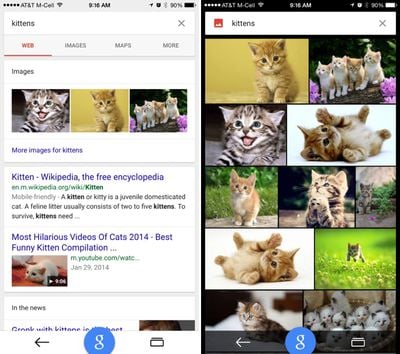
Along with adding new Material Design animations, the Google app has been updated to take advantage of the larger screens on the iPhone 6 and 6 Plus and it now displays bigger photos in image search.

Google's update includes more than just design changes, as the app has been completely rebuilt. There's a new "Google" button that lets users search with just one tap anywhere in the app, and Google Maps integration has been added, letting users check out interactive maps and Google Street View within the app. A new "recents" button is also designed to let users keep track of the searches they've conducted.
googleupdate

Introducing the new Google app
Completely rebuilt to bring you the best of Google:
- Recents--see & return to your recently visited pages
- Google button--start a new search with just one tap
- Google Maps--explore interactive maps, nearby places & Street View right inside the app (for iPhone)

New look and feel:
- Beautiful new Material Design animations
- Bigger photos in image search
-Looks great on the new iPhone 6 & 6 Plus

Google can be downloaded from the App Store for free. [Direct Link]

Top Rated Comments

rwilliams Avatar
151 months ago
Google has really struck gold with Material Design. Their apps look great and have become more enjoyable to use. That's not easy to do.

I can't wait for Gmail and Google Calendar to be redesigned and released.
Score: 9 Votes (Like | Disagree)
151 months ago
Google has really struck gold with Material Design. Their apps look great and have become more enjoyable to use. That's not easy to do.

I can't wait for Gmail and Google Calendar to be redesigned and released.
The Calendar app can't come soon enough! Using Google Calendar on iOS has been nothing but a massive frustration for me:

* Default iOS Calendar: Does not handle invites and does not allow me set notifications per account. Thanks, Google, for nuking Exchange support. This used to work so well.
* Fantastical: Relies on iOS syncing the calendar, adds two times to every event I create
* Sunrise: Uses a proprietary invite system, caused me quite a few problems
* Calendars by Readdle: Does not appear to handle invites
* Gmail: Allows response to invites but terrible app overall
* Inbox: Great app, currently does not handle calendar invites at all

And to add to all of that:

* iCloud calendars don't handle invites well at all, can't accept updates to events using native apps. Whole pile of cross-platform invite issues here.
* Built in 'Birthdays' calendar neglects anniversaries. Google's Birthday calendar has both but does not have any event notifications set for them.

Head, meet wall.
Score: 4 Votes (Like | Disagree)
Simplicated Avatar
151 months ago
Yet still none of their apps supports the standard swipe back gesture that has been around since iOS 7. I passionately hate their apps because of that.
Score: 4 Votes (Like | Disagree)
Nunyabinez Avatar
151 months ago
Serious question. Why would I want this rather than just using Google in Safari?
Score: 3 Votes (Like | Disagree)
doug in albq Avatar
151 months ago
So basically material design is let's add drop shadow everywhere.
No, it's let's add subtile drop shadows everywhere. Those things that help with contrast and depth. Visual design 101 that some folks chose to forget about (for a while). :)
Score: 2 Votes (Like | Disagree)
151 months ago
A much better and clean looking design. Especially when looking at the eyesore that is iOS 7 and 8.
Score: 2 Votes (Like | Disagree)

Popular Stories

American Express Gold Apple Pay Feature

American Express Announces New Apple Pay Feature

Tuesday June 30, 2026 10:27 am PDT by
American Express today announced that you can now redeem Membership Rewards points when checking out with Apple Pay on the web and in apps on the iPhone and iPad. When checking out with Apple Pay on iOS 18 or iPadOS 18 or later, tap on your eligible American Express card (Platinum, Gold, Green, and others) and select the Membership Rewards points option. You can use points to cover all or...
Apple Acquires Award Winning App Play Feature

Apple Acquires Award-Winning App 'Play'

Monday June 29, 2026 7:39 am PDT by
In February, Apple notified the European Commission that it would be acquiring certain assets from and have the right to hire certain employees from Rabbit 3 Times, the company behind the award-winning app design tool Play. The notification was published on the European Commission's website this week, following a four-month waiting period. Play was a Mac and iPhone app that allowed designers ...
series 10 apple watch titanium digital crown

Report: Apple Watch Redesign Coming Next Year With New Band System

Tuesday June 30, 2026 8:45 am PDT by
A "major overhaul" of the Apple Watch's design is due to arrive next year with a new system for connecting bands, according to a known Weibo leaker. In a set of recent posts, the leaker known as "Instant Digital" linked the new claim to older rumors about an "Apple Watch X" model, which was said to introduce a fresh design and break compatibility with the existing watch band system. Citing...