Apple Releases OS X Yosemite Developer Preview 7 - MacRumors
Skip to Content

Apple Releases OS X Yosemite Developer Preview 7

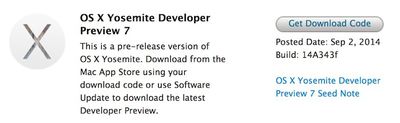
Apple today released a new version of OS X Yosemite to developers, two weeks after releasing the sixth Developer Preview and three months after unveiling the new desktop operating system at its annual Worldwide Developers Conference.

The update, build 14A343f, can be downloaded from the Mac App Store and through the Mac Developer Center. There's also a new version of Xcode 6, an OS X Server 4.0 Developer Preview, and an updated version of Apple Configurator 1.7.
yosemite_dp_7_dev
OS X Yosemite brings a flatter, more modern look to OS X, with an emphasis on translucency and redesigned dock, windows, and more. It also includes a multitude of new features, such as improved integration with iOS 8 through Continuity, a new "Today" view in Notification Center that offers integration with third-party apps, a retooled Spotlight search with new data sources, and several new features for apps like Mail, Safari, and Messages.

Over the course of the beta testing period, each Developer Preview has added new features and refined the look and performance of OS X Yosemite. DP 4, for example, added a revamped version of iTunes with a streamlined design and support for Family Sharing, while an earlier beta introduced a new Dark Mode. Developer Preview 6 added several new icons, a new look for the dashboard, and new Yosemite-themed wallpapers.

Today's Developer Preview is limited to registered developers, but in late July, Apple made a version of OS X Yosemite available to the public as part of a wide-ranging beta test. The pre-release version of Yosemite available to those participating in the public beta program has not received as many updates as the developer version and is on its second iteration. Apple is expected to release Yosemite to the public in the fall.

Notable changes in Developer Preview 7:

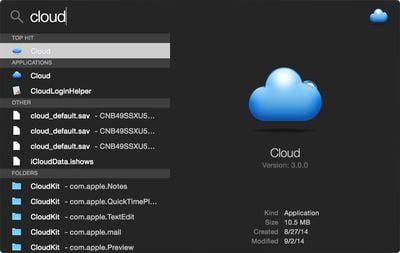
Dark Mode: Dark Mode has been tweaked slightly, and there's a new look for Spotlight when Dark Mode is enabled.
spotlightdarkmode
Icons: There are new icons for Migration Assistant, Dashboard, Disk Utility, ColorSync Utility, and Keychain Access.

newyosemiteicons
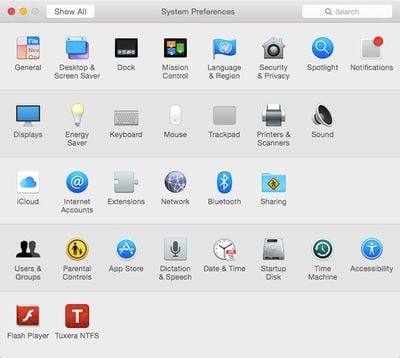
System Preferences: There are several new and modified icons in System Preferences, including a new look for Language & Region and Startup Disk.
systempreferencesicons
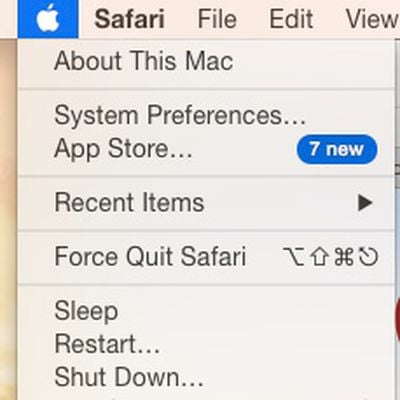
Software Update: The "Software Update" option has been removed from the main Apple menu, with App Store now displaying available software updates.

softwareupdateremoved

Related Forum: OS X Yosemite

Popular Stories

iCloud iPhone 17 Pro

iPhone Users Who Pay for iCloud Storage Get Two New Perks on iOS 27

Tuesday June 9, 2026 11:29 am PDT by
If you pay for extra iCloud storage on your iPhone, beyond the 5GB included for free, you might receive two more perks on iOS 27 at no additional cost. First, Apple said there will be daily usage limits for some of the new and enhanced Apple Intelligence features on iOS 27, including image generation. However, the company noted that "increased access" is available with "most" iCloud+ storage ...
WWDC26 MR Live Coverage Article

WWDC 2026 Apple Event Live Keynote Coverage: iOS 27, Revamped Siri, and More

Monday June 8, 2026 9:15 am PDT by
Apple's Worldwide Developers Conference (WWDC) starts today with the traditional keynote kicking things off at 10:00 a.m. Pacific Time. MacRumors is on hand for the event and we'll be sharing details and our thoughts throughout the day. We're expecting to see a number of software-related announcements today, headlined by a reset on Apple's push into AI that should see a significant overhaul...
macOS Golden Gate Mac

Apple Announces macOS 27 Golden Gate With New Siri and 'Tons' of Refinements

Monday June 8, 2026 10:19 am PDT by
Apple today announced that macOS 27 is named macOS Golden Gate. Much like Mac OS X Snow Leopard in 2009, Apple said it focused on improving macOS's performance and dozens of underlying technologies this year. Apple says macOS Golden Gate offers quicker AirDrop transfers, faster network file browsing, improved syncing in the Messages app, better Spotlight search suggestions, and other...

Top Rated Comments

keysofanxiety Avatar
154 months ago
Way too many sarcastic/pedantic remarks already. For what it's worth, there are actually people (myself included) who are interested to see the release notes.

Thank you to the people who will be giving useful feedback about this update. :)
Score: 21 Votes (Like | Disagree)
Watabou Avatar
154 months ago
New Spotlight dark theme!
Score: 18 Votes (Like | Disagree)
flottenheimer Avatar
154 months ago
NEW!
A set of Jennifer Lawrence photos has been added to Wallpapers.
Score: 17 Votes (Like | Disagree)
Erastopic Avatar
154 months ago
Finders sidebar selection is now the same darker translucency which they included for Reminders, etc in DP6 and I like it more than the blue.
Score: 14 Votes (Like | Disagree)
154 months ago
New features?

Scans your iPhoto library for nudes, zips them and uploads them to imgur.
Score: 13 Votes (Like | Disagree)
154 months ago
Correct me if I'm wrong, but it seems the Wi-Fi indicator has bolder lines.

Score: 11 Votes (Like | Disagree)