Logitech Adds Multi-Angle Viewing to Ultrathin Keyboard, Launches New iPad Cases - MacRumors
Skip to Content

Logitech Adds Multi-Angle Viewing to Ultrathin Keyboard, Launches New iPad Cases

by

Logitech today announced a new version of its Logitech Ultrathin keyboard cover for the iPad Air, iPad mini, and iPad mini with Retina display, offering a new design that includes a flexible multi-angle slot that allows the iPad to be adjusted to different viewing angles.

The Logitech Ultrathin improves the flexibility and design of its predecessor with an even thinner and lighter keyboard cover and new flexible multi-angle slot that allows you to magnetically clip your iPad into the perfect viewing angle.

Like previous versions of the keyboard, the new Logitech Ultrathin is just a fraction of the weight of the iPad, measuring in at 6.4mm thick. It is designed from aluminum to match Apple’s iPads and the keyboard includes iOS shortcuts and keys spaced for optimal typing.

Alongside the updated version of the Ultrathin keyboard, Logitech has also announced several new protective cases for Apple’s iPads, including the Hinge, the Big Bang, and the Turnaround.
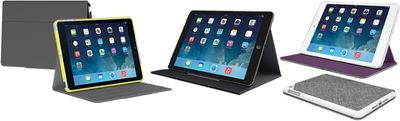
newlogitechcases

Logitech Big Bang, Turnaround, and Hinge

The Logitech Hinge is an ultra flexible case designed to offer a wide array of viewing angles, while the Big Bang is an ultra-protective, rugged case designed to protect the iPad from drops, spills, and scratches. The Turnaround, like the Hinge, is a multi-angle stand that also allows the iPad to be rotated from portrait to landscape mode and folds up into a stylish clutch.

All of Logitech's new products can be preordered from the Logitech website, at the following price points:

- Ultrathin for iPad Air - $99.99
- Ultrathin for iPad mini/Retina mini - $89.99

- Big Bang for iPad Air - $99.99
- Big Bang for iPad mini/Retina mini - $79.99

- Hinge for iPad Air - $59.99
- Hinge for iPad mini/Retina mini - $49.99

- Turnaround for iPad Air - $59.99
- Turnaround for iPad mini/Retina mini - $49.99

Top Rated Comments

Ivan0310 Avatar
156 months ago
this is an advertisement not a rumor.

It's a useful product announcement for something of which I was previously unaware. I really don't understand people's being incensed by such posts, calling them advertisements. I appreciate being informed by this site on products and services relevant to my needs as a Mac and iOS user.
Score: 7 Votes (Like | Disagree)
156 months ago
this is an advertisement not a rumor.
Score: 6 Votes (Like | Disagree)
156 months ago
Wasn't the innovation with iOS that you don't need a physical keyboard anymore? :confused:

Some people like/need a keyboard. You don't. Then don't buy a keyboard and don't post in keyboard threads. Really rather simple.

----------

What does not make sense about it? I am at the library with my iPad mini retina. I have some stuff that I want to type in to pages from a book I'm using for research. If I dictate it I'm being loud and obnoxious. Trying to use an on screen keyboard for this is tedious. So I use my keyboard.

What I fail to see is why this is news when a better product exists.

clamcase.com

Gudi knows full well why people want/need a keyboard. He/she is being the T word.
Score: 4 Votes (Like | Disagree)
spinedoc77 Avatar
156 months ago
Than why is everyone so keen to make external keyboards for iOS devices? It just makes no sense.

Really? :confused:
Score: 2 Votes (Like | Disagree)
156 months ago
I like the advertisement. My wife and I own the Logitech Folio case for our iPad Airs and they work brilliantly well. Super-tough and provides great viewing angles. (Little heavy but, as is the common "advice" on these boards: go the gym :)) We've both been interested in the keyboard case for sometime so I may consider buying one to share - not to mention the "Turnaround" which looks pretty awesome.

Logitech make some truly great products. (My Logitech Anywhere MX is coming to three years now; still going strong.)
Score: 1 Votes (Like | Disagree)
156 months ago
Than why is everyone so keen to make external keyboards for iOS devices? It just makes no sense.
No, what makes no sense is acting like an optional keyboard is the exact same thing as always needing a keyboard.
Score: 1 Votes (Like | Disagree)

Popular Stories

iOS 26

iOS 26.4 Adds Two New Features to CarPlay

Tuesday March 24, 2026 1:55 pm PDT by
iOS 26.4 was released today, and it includes a couple of new features for CarPlay: an Ambient Music widget and support for voice-based chatbot apps. To update your iPhone 11 or newer to iOS 26.4, open the Settings app and tap on General → Software Update. CarPlay will automatically offer the new features so long as the iPhone connected to your vehicle is running iOS 26.4 or later....
AirPods Pro Firmware Feature

Apple Releases New Firmware for AirPods Pro 3, AirPods Pro 2 and AirPods 4

Tuesday March 24, 2026 12:31 pm PDT by
Apple today released new firmware for the AirPods Pro 2, AirPods Pro 3, and the AirPods 4. The firmware has a version number of 8B39, up from 8B34 on the AirPods Pro 3, 8B28 on the AirPods Pro 2, and 8B21 on the AirPods 4. There is no word on what's included in the firmware, but Apple has a support document with limited notes. Most updates are limited to bug fixes and performance...
apple tv 4k new orange

tvOS 26.4 Adds These New Features to Your Apple TV

Wednesday March 25, 2026 3:33 pm PDT by
Apple this week released tvOS 26.4, and the software update includes a handful of new features and changes for the Apple TV. tvOS 26.4 is compatible with all Apple TV 4K and Apple TV HD models released since 2015. To update your Apple TV, open the Settings app on the device, navigate to System → Software Updates, and select Update Software. Below, we have recapped what is new in tvOS...