How To Put Newsstand In A Folder - MacRumors
Skip to Content

How To Put Newsstand In A Folder

by

newsstand1
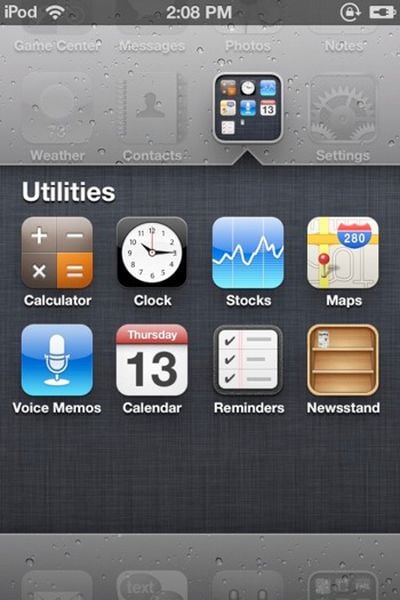
The Coding Massacre has discovered a trick to force the iOS 5 Newsstand into a folder. The only reason to do this is to tuck Newsstand away and hide it -- users who have performed this trick discovered that opening Newsstand when its in a folder crashes Springboard, the main home screen on the iPhone.

Simply follow these steps:

- Take two apps and go to create a folder
- The second the apps are in the folder and it’s doing the folder creation animation, drag Newsstand into the folder
- As long as you’re quick enough Newsstand will go into the folder!

If you wish to use Newsstand at some point, simply remove it from the folder and place it back on the main level.


Top Rated Comments

firestarter Avatar
189 months ago
Message to Apple: Please allow us to turn off features like this that we don't want/need!
Score: 42 Votes (Like | Disagree)
Icaras Avatar
189 months ago


A folder within a folder.

Inception? :D
Score: 19 Votes (Like | Disagree)
189 months ago
It's not just Newsstand, it's any folder.

Score: 19 Votes (Like | Disagree)
pellets007 Avatar
189 months ago


A folder within a folder.

Score: 17 Votes (Like | Disagree)
189 months ago
Message to Apple: Please allow us to turn off features like this that we don't want/need!
Agreed. Like contacts... it seems redundant to have a contacts app if I can access my contacts from the phone app.
Score: 12 Votes (Like | Disagree)
189 months ago
Wow, i cant believe my trick actually got posted on MacRumors. This is awesome :3 And yes, on the source link i did mention folder within a folder is possible using this method, but its not very practical, since it crashes everytime you try to open the folder. But if your trying to hide a folder from like your friends or something, its a perfect solution. Funny thing is, i tried this trick on an iOS4 device.. It worked. Its been an iOS glitch for over a year and i hadn't realized it till now xD
Score: 11 Votes (Like | Disagree)

Popular Stories

macOS 27 on MacBook Pro

macOS 27 Will Mark the End of an Era

Saturday April 18, 2026 6:45 am PDT by
During its Platforms State of the Union segment at WWDC 2025, Apple revealed that macOS 26 Tahoe is the final major macOS version for Intel-based Macs. The upcoming macOS 27 release will be compatible with Apple silicon Macs only, meaning that you will need a Mac with an M-series chip or a MacBook Neo with an A18 Pro chip in order to install the software update. macOS 27 should be available...
macworld iphone 18 pro colors

iPhone 18 Pro's Four Rumored Colors Revealed, Including 'Dark Cherry'

Friday April 17, 2026 3:50 am PDT by
A source said to be familiar with Apple's supply chain today revealed the color options Apple is planning for the iPhone 18 Pro, iPhone 18 Pro Max, and the upcoming foldable iPhone. Image via Macworld. The information comes from Macworld, which says the signature new color for this year's Pro models will be Dark Cherry, a deep wine-like red. While other sources had previously reported on a...
Aston Martin CarPlay Ultra Screen

Apple Says CarPlay Ultra is Coming to These Vehicle Brands

Saturday April 18, 2026 5:59 am PDT by
Last year, Apple launched CarPlay Ultra, the long-awaited next-generation version of its CarPlay software system for vehicles. Nearly a year later, CarPlay Ultra is still limited to Aston Martin's latest luxury vehicles, but that should change fairly soon. In May 2025, Apple said many other vehicle brands planned to offer CarPlay Ultra, including Hyundai, Kia, and Genesis. CarPlay Ultra...