Belkin Introduces 3 iPad Kitchen Accessories - MacRumors
Skip to Content

Belkin Introduces 3 iPad Kitchen Accessories

by

Belkin today introduced three new iPad accessories designed for use in the kitchen.
FUL1 F50L99 28333 APPL
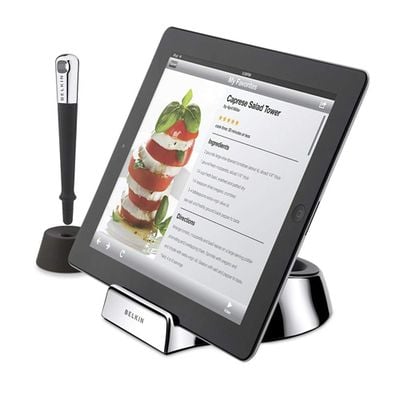
The first is the Chef Stand + Stylus. The Chef Stand is similar to other stands, with the advantage that it is designed to get dirty and can be washed in warm soapy water. The stand, which can be used in concert with other iPad cases, allows chefs to follow recipes et al. It can be used with the iPad 1 or 2.

The Chef Stand + Stylus is $39.99.
kitchenmount
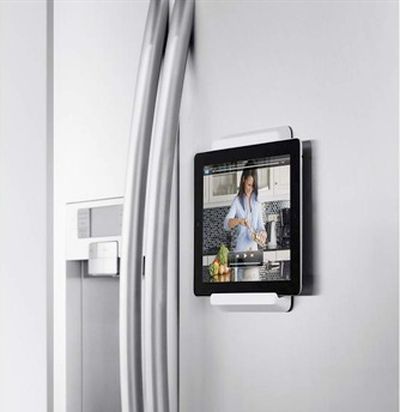
Next, Belkin introduced a Fridge Mount for iPad 2 -- though it can really be used to mount the iPad to anything. It mounts on the fridge using 3M Command Strips -- basically double-sided mounting tape -- and then uses the iPad 2's built-in Smart Cover magnets to hold it in place. The mount works with the iPad 2 only.

The Fridge Mount for iPad 2 is $39.99.
undercabinetmount
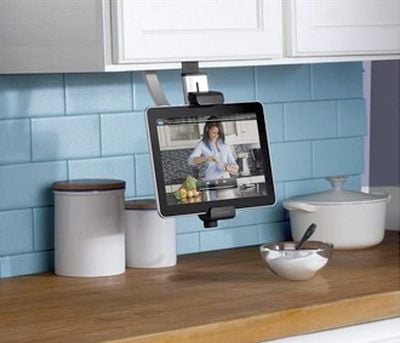
Finally, the company introduced an easy-installation under-cabinet mount for the iPad. The mount uses a clamp to any cabinet or shelf and holds the iPad in place, off the counter and out of the way. The under-cabinet mount works with any 7-10" tablet.

The Kitchen Cabinet Mount is $49.99.

Top Rated Comments

190 months ago
screw cookbooks!
Score: 3 Votes (Like | Disagree)
benmrii Avatar
190 months ago
It has a home button, a dock connector, and appears to say "iPad" in the upper left corner of the screen.

If it's not an iPad, pray tell... ;)

It's just heavily Photoshopped. The sides that are vertical in the picture are elongated to make it appear there is more viewing space than there actually would be in landscape mode.
Score: 1 Votes (Like | Disagree)
190 months ago
First pic, that's not an iPad, btw. :P

It has a home button, a dock connector, and appears to say "iPad" in the upper left corner of the screen.

If it's not an iPad, pray tell... ;)
Score: 1 Votes (Like | Disagree)
Shrink Avatar
190 months ago
Sick (http://www.urbandictionary.com/define.php?term=sick) - 1) crazy, cool, insane

Even this 40-something guy knew that :D

Oh dear, the gray hair (what's left of it) is showing again. :o

You young folks and your crazy slang - land o'goshen, it's just the bee knees.:D
Score: 1 Votes (Like | Disagree)
oddnendz Avatar
190 months ago
That wall mount looks great..... especially for watching cooking videos on how to make something..... I'm not sure about the stand. My sister was using the iPad to view a recipe while making cupcakes..... she splattered batter on the iPad...... **shudders**
Score: 1 Votes (Like | Disagree)
190 months ago
I wonder what too so long! The iPad is perfect for holding recipes and finding new ones. I use it all the time in the kitchen.
Score: 1 Votes (Like | Disagree)

Popular Stories

iOS 26

iOS 26.4 Adds Two New Features to CarPlay

Tuesday March 24, 2026 1:55 pm PDT by
iOS 26.4 was released today, and it includes a couple of new features for CarPlay: an Ambient Music widget and support for voice-based chatbot apps. To update your iPhone 11 or newer to iOS 26.4, open the Settings app and tap on General → Software Update. CarPlay will automatically offer the new features so long as the iPhone connected to your vehicle is running iOS 26.4 or later....
AirPods Pro Firmware Feature

Apple Releases New Firmware for AirPods Pro 3, AirPods Pro 2 and AirPods 4

Tuesday March 24, 2026 12:31 pm PDT by
Apple today released new firmware for the AirPods Pro 2, AirPods Pro 3, and the AirPods 4. The firmware has a version number of 8B39, up from 8B34 on the AirPods Pro 3, 8B28 on the AirPods Pro 2, and 8B21 on the AirPods 4. There is no word on what's included in the firmware, but Apple has a support document with limited notes. Most updates are limited to bug fixes and performance...
apple tv 4k new orange

tvOS 26.4 Adds These New Features to Your Apple TV

Wednesday March 25, 2026 3:33 pm PDT by
Apple this week released tvOS 26.4, and the software update includes a handful of new features and changes for the Apple TV. tvOS 26.4 is compatible with all Apple TV 4K and Apple TV HD models released since 2015. To update your Apple TV, open the Settings app on the device, navigate to System → Software Updates, and select Update Software. Below, we have recapped what is new in tvOS...