WatchDots Review - MacRumors
Skip to Content

Review: Customize Your Apple Watch's Digital Crown and Side Button With WatchDots

by

Beyond casing material and band, there are no other obvious customization options for the Apple Watch, but one product is aiming to change that. WatchDots are small, colorful vinyl stickers that change the look of the Apple Watch's Digital Crown and side button.

WatchDots come in six colors and were conceived as a way for Apple Watch Sport owners to match their Digital Crowns to their bands, mimicking the colored Digital Crowns on some of the gold Edition Apple Watches. Colors mainly match the Sport bands, in black, white, blue, pink, and green, but there's also a red option to mimic Tim Cook's own Apple Watch, which has a red Digital Crown.
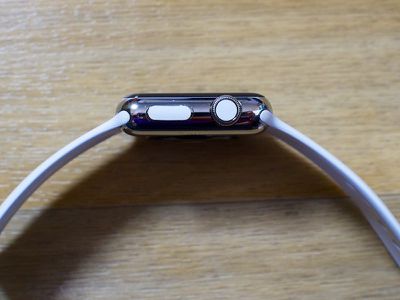
whitewatchdots
I have a stainless steel Apple Watch with a white Sport Band, so I ordered the matching white WatchDots to give them a try (I also ordered pink, but those are backordered). It's hard to wax poetic about a set of nondescript vinyl stickers, but I like the WatchDots. They tie the look of the band to the look of the Apple Watch, and they've also drawn a lot of notice -- not from the general public, but from other Apple Watch owners.
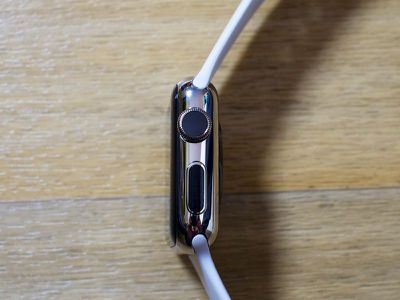
blackwatchdots
WatchDots cost $9.99, which is a bit expensive given their size in relation to a vinyl sticker you might get for your iPhone or MacBook. For that price, you get three sets of dots in your chosen color (with 3 dots for the Digital Crown and three dots for the side button), along with a bonus set in another color (mine was black).
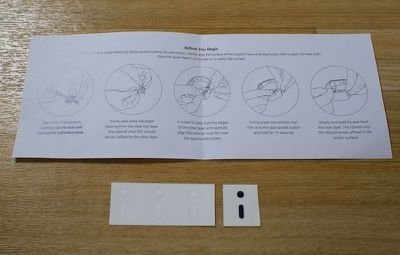
watchdotspackagecontents
As with any vinyl sticker, you'll need some tools to apply WatchDots: a microfiber cloth to clean the Digital Crown and side button, a bright light, and some scissors to cut apart the pieces. Having applied a lot of screen protectors and vinyl stickers in my life, I looked at the WatchDots and assumed they'd be difficult to apply, but I was pleasantly surprised by a clever application method that only takes a couple of seconds.
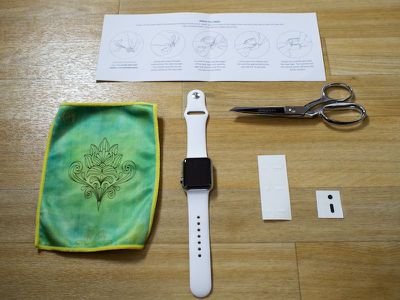
watchdotsnecessarysupplies
Each WatchDot sticker is backed with an opaque sticky material. You cut out a square of this around the dot, line it up on the Apple Watch, press, and hold for a few seconds. The pressure and the heat of a finger cause the decal to stick to the Apple Watch rather than the backing paper, which you can just peel away. The opaque material can make it a little difficult to see what you're doing, but with decent lighting, it's not a big deal. WatchDots' creators are looking for a better backing material, so the opaqueness may change in the future.

Sizing on all of the WatchDot pieces that I received was uniform and each piece fit well on the watch. On the Digital Crown, the dot doesn't cover every trace of black at the edges (my natural dot is black because I have a stainless steel watch), but were the dot any bigger, it doesn't look like it'd fit securely. The same goes for the side button sticker -- it's not edge to edge, but that's not possible because the button is somewhat curved.
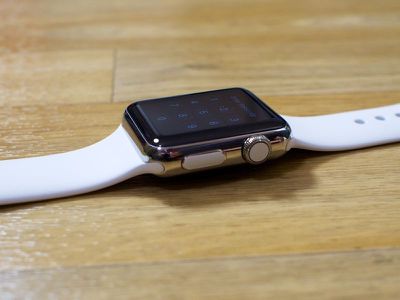
whitewatchdotssideview
WatchDots creator Jason Fournier tells me the ideal size of the WatchDots was determined after a lot of prototyping and testing. An edge-to-edge design for both buttons was tested, but it left no margin of error for applying the films, making alignment difficult. "Because of this," he said, "we intentionally chose a slightly smaller size to allow for human error."

My WatchDots have been on my Apple Watch for about two weeks now and they're looking as good as new. There's been no peeling, even when my watch has gotten wet, and using the Digital Crown and side button a lot hasn't affected them. Since this is a review, I put on and removed several sets of WatchDots, and I can safely say they're not going to cause any damage to your watch. You can peel them right off with a fingernail, but like most vinyl stickers, they're not reusable.
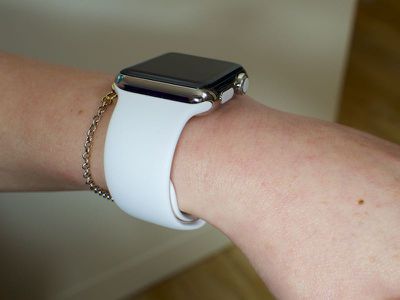
whitewatchdotsonwrist
I asked Fournier how the idea for WatchDots was conceived, and he told me the concept came to the WatchDots team after seeing the difference between the Apple Watch Sport and other Apple Watch models.

On the Edition model the Digital Crown is color-matched to the band. On the stainless steel model the Digital Crown is black. Apple has set a precedent that a color-matched crown is a desirable look and our goal was to bring that to the lower-cost watches with a high-quality, inexpensive product.

Because they were conceived to match the Apple Watch Sport, WatchDots are available in a limited number of colors for the time being, but Fornier says new colors will be coming in the future. Orange, yellow, and gold have been popular recommendations from customers, and the WatchDots team is also exploring different materials and textures.

My own suggestion was emoji WatchDots, a request Fornier says the WatchDots team is looking into as part of an expansion into graphics, icons, and other custom designs, so at some point in the future, we may be able to decorate our Apple Watches with smileys, hearts, and other little characters. Jony Ive probably won't approve, but the Apple Watch was designed to be personalized.

Bottom Line

WatchDots aren't going to appeal to everyone, but I like the look of a Digital Crown that matches my band, and many Sport Watch users may agree. At $9.99, WatchDots are definitely pricy, but they're the most affordable way to add a bit of flare to your watch.
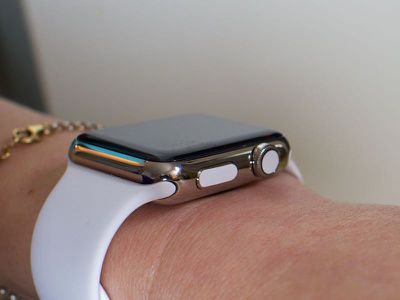
whitewatchdotsonwrist2

How to Buy

WatchDots can be purchased from the WatchDots website for $9.99. Each purchase includes three sets of WatchDots in your chosen color along with a bonus random set.

Update 3/31/16: I removed the WatchDots from my Apple Watch after having left them on for several months and there was a residue left behind. This didn't happen the first few times I removed the WatchDots, but I recommend using with caution.

Note: MacRumors received no compensation for this review.

Related Roundup: Apple Watch 12
Buyer's Guide: Apple Watch (Buy Now)
Related Forum: Apple Watch

Top Rated Comments

148 months ago
We're reviewing stickers now?
Score: 6 Votes (Like | Disagree)
jephrey Avatar
148 months ago
It's only my opinion, but this is laughable... Next will be themed Hello Kitty stickers. I've never faulted macrumors for reviewing a product until now. This is like a review for a $1 phone case from the dollar store. This deserves 0 attention. I'm surprised there's not a drawing.


I'll take some jewel stickers out of my daughter's bracelet set and stick them to the crown so it's bedazzled.

:(
Score: 5 Votes (Like | Disagree)
AngerDanger Avatar
148 months ago
I'm not able to interpret this tagline as anything but innuendo—I mean, these are basically Pasties for watches:


Attachment Image
Score: 4 Votes (Like | Disagree)
OldSchoolMacGuy Avatar
148 months ago
Look horrid. And $10 for a couple stickers barely bigger than the head of a pencil?

I suppose a sucker is born every minute.
Score: 2 Votes (Like | Disagree)
UnfetteredMind Avatar
148 months ago
We can say anything we want as long as we preface it with something like, "I don't mean to be rude, but ...," right?

I don't mean to be rude, but that looks
Score: 2 Votes (Like | Disagree)
148 months ago
I bought one a month ago on eBay for $3. Even shipped from the UK. Only for the crown vinyl. You can get a set of 3 black ones, white ones, black and white or black/red/white. Here's mine.

Attachment Image
Score: 1 Votes (Like | Disagree)

Popular Stories

Apple Watch New Charging Puck

Here's Why a New Apple Watch Charging Puck Was Just Released

Wednesday September 16, 2026 8:53 am PDT by
The new Apple Watch Series 12 and Apple Watch Ultra 4 have hardware changes that allow for faster charging, but you will need to use the new version of the Apple Watch Magnetic Fast Charger included in the box in order to achieve this boost. If you need extra ones for your own charging stands or travel or so forth, Apple released the new version of the charger on its online store last week, with...
watchos 27

PSA: watchOS 27 Removes This Useful Feature From Your Apple Watch

Thursday September 17, 2026 1:34 am PDT by
Apple released watchOS 27 on September 14, bringing a new Audio Intelligence feature set to its latest Apple Watch models, but as a result, owners of previous models are set to lose out doubly in the process. Apple Watch Series 12 and Ultra 4 models later this year will get Live Rewind, a feature that provides a transcript of any spoken audio that was picked up by the device in the last 15...
Apple Watch Series 12 First Impressions Thumb

Hands-On With the Apple Watch Series 12

Friday September 18, 2026 1:07 pm PDT by
The Apple Watch Series 12 came out today, and we picked one up to get a look at the new feature set. There are no major external changes, but Apple updated the device's internals and health sensors. Subscribe to the MacRumors YouTube channel for more videos. The Apple Watch Series 12 has the same design as the Series 11, but it does come in different colors. The aluminum models are available...
Latest Stories
Oops, Apple's Website Just Hinted at iPad Mini 8
3 hours ago
OLED MacBook Pro Won't Get M7 Chips Until Late 2027
6 hours ago
Apple Pledged $25 Million to Trump's White House Ballroom
7 hours ago
Touchscreen MacBook Pro Could Launch on November 6
9 hours ago
New Withings Users Must Pay $99/Year for Apple Health Syncing
9 hours ago
Meta and Apple Bring Muse Spark Open AI Model to Mac Studio
10 hours ago
iPad Mini 8: Apple Has Tested Both 60Hz and 120Hz ProMotion Displays
10 hours ago
Apple TV 4K 2022 vs. 2026 Buyer's Guide: All Differences Compared
12 hours ago
Apple CEO John Ternus on Early Foldables: 'Kind of Cheap and Crappy'
12 hours ago
Greg Joswiak Says Apple Isn't Focused on Making AI for 'Lunatic Fringe'
13 hours ago
Amazon Offers $120 Discount on AirPods Max 2, $50 Off AirPods Pro 3
14 hours ago
Apple CEO John Ternus Featured on Cover of TIME Magazine: 'New Era'
14 hours ago
Apple Announces Deadline to 'Get Ready' to Pre-Order the iPhone Duo
15 hours ago
MKBHD is 'Not Convinced' About Apple's New HomeView, Here's Why
15 hours ago
Apple's Wall-Mounted HomeView Ships Without a Power Adapter
15 hours ago
Rare Apple-1 With Steve Jobs Letter Sells for $1.15 Million
16 hours ago
Apple Now Inviting Media to October 28 'Launch Experience'
17 hours ago
iPhone Duo's A20 Pro Chip Benchmarked Ahead of Launch
1 day ago
10 HomeView Features You Might Have Missed
1 day ago
Apple Becomes Second Company to Close Above $5 Trillion
1 day ago
Which Apple Home Devices Get Siri AI, and When
1 day ago
Apple's Long-Delayed HomeView Was Already Being Tested in 2024
1 day ago
Apple Intelligence Coming to China in December With iOS 27.3
1 day ago
Apple Invites App Updated With Two New Features
1 day ago
OpenAI Says Ex-Employee Showed Its Device Plans to Apple
1 day ago
Discover the Best Cases and Screen Protectors for Your New iPhone Duo
1 day ago
Apple Store Near Los Angeles Closed Due to 'Events Beyond Our Control'
1 day ago
No, HomePod Mini 1 Won't Support Siri AI as CNET Reported
1 day ago
iPhone Duo Compromises: Everything You Have to Give Up
2 days ago
Apple HomeView Has These 15 Apps, Some CarPlay Apps and Widgets Also Supported
2 days ago