

Apple Seeds Second Beta of watchOS 3.1 to Developers - MacRumors
Skip to Content

Apple Seeds Second Beta of watchOS 3.1 to Developers

Apple today seeded the second beta of watchOS 3.1, Build 14S464, to developers for testing purposes, two weeks after seeding the first beta and three weeks after releasing watchOS 3 to the public.

watchOS 3.1 can be downloaded through the dedicated Apple Watch app on the iPhone by going to General -> Software Update. To install the update, the Apple Watch must have 50 percent battery, it must be placed on the charger, and it must be in range of the iPhone. watchOS 3.1 requires an iPhone running iOS 10 to install.
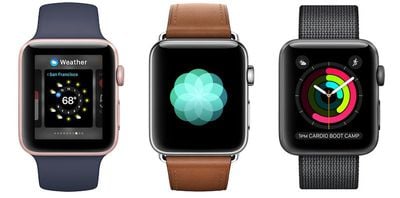
apple watch series 2 2
watchOS 3.1 appears to focus on bug fixes and under-the-hood performance improvements rather than outward-facing changes, as no new features were discovered in the first beta. We'll update this post with anything new that's found in the second beta.

watchOS 3 brings a new interface to the Apple Watch, with a dedicated App Dock and instant launch apps. There are new Activity sharing features, a "Breathe" app guides you through daily deep breathing sessions to cut down on stress, and there are new Reminders, Find My Friends, and Heart Rate apps.

Three new watch faces are included, and an SOS feature can automatically call emergency services. A revamped Messages app makes it easier to reply to incoming texts, plus there's a new "Scribble" feature for writing replies on the Apple Watch face with a finger.


Related Roundup: Apple Watch 11
Buyer's Guide: Apple Watch (Caution)

Popular Stories

modular ultra training load

watchOS 27 to Offer New Watch Faces, Including 'Modular Ultra' Variant

Monday May 4, 2026 5:58 am PDT by
For watchOS 27, Apple is testing new Apple Watch faces, and one of them is a simpler version of an existing Apple Watch Ultra watch face that could be coming to standard Series models. Writing in his latest Power On newsletter, Bloomberg's Mark Gurman reports that Apple is testing multiple new faces for watchOS 27, code-named "Orchid." One of them is said to be a "simplified take" on the...
Apple Announces 2026 Pride Band Watch Face and iPhone Wallpaper Feature

Apple Announces 2026 Pride Band, Watch Face, and iPhone Wallpaper

Monday May 4, 2026 6:05 am PDT by
Apple today introduced its 2026 Pride Collection, including a new Apple Watch band, watch face, and a matching wallpaper for the iPhone and iPad. Apple said its Pride Collection celebrates LGBTQ+ communities around the world during Pride Month in June and beyond. In addition, the company noted that it is proud to financially support organizations that serve LGBTQ+ communities. The new Pri...
Apple Watch Ultra 2 Black Titanium

watchOS 26.5 Fixes Two Apple Watch Bugs

Tuesday May 5, 2026 7:56 am PDT by
watchOS 26.5 fixes two Apple Watch bugs, according to Apple's release notes for the update, which is expected to be released next week. Apple fixed bugs in the Messages and Workout apps:• Fixes an issue where Messages on Apple Watch may use SMS instead of iMessage when paired with a dual SIM iPhone • Fixes an issue where Workout app audio alerts could fail to play if the phone was not...

Top Rated Comments

126 months ago
Would love to see them getting the usability back into the Weather app. The current mode of switching between temperature, rain and conditions forecast by force touch is just annoying.
Score: 3 Votes (Like | Disagree)
Aluminum213 Avatar
126 months ago
How about they make it easy to connect the Apple Watch to the MacBook

Stupidly complex
Score: 3 Votes (Like | Disagree)
126 months ago
Would love to see them getting the usability back into the Weather app. The current mode of switching between temperature, rain and conditions forecast by force touch is just annoying.
OMG Yes!!! I already left feedback about this. I hope they revert it back to how it was in watchOS 2.
Score: 2 Votes (Like | Disagree)
ErikGrim Avatar
126 months ago
(with a click and up to 5 swipes)
Use the digital crown for scrolling.
Score: 1 Votes (Like | Disagree)
126 months ago
OMG Yes!!! I already left feedback about this. I hope they revert it back to how it was in watchOS 2.
Thank god. That change was soooo annoying. And made no sense. I submitted an extensive feedback report on that.
Score: 1 Votes (Like | Disagree)
SockRolid Avatar
126 months ago
Not seeing too many changes from the previous beta.
In Weather, while looking at the 24-hour display for a city,
scrolling the crown animates the temp and city name now.
Didn't it used to scroll the whole display up and down between cities?
Can't remember.
Score: 1 Votes (Like | Disagree)














