

Benchmarks Show iPhone Performance Difference When iOS 9's Low Power Mode is Activated - MacRumors
Skip to Content

Benchmarks Show iPhone Performance Difference When iOS 9's Low Power Mode is Activated

With iOS 9, Apple introduced a Low Power mode, designed to extend battery life when an iPhone's power is running low. According to the feature's description, Low Power mode works by reducing an iPhone's performance and cutting down on background activity.

Geekbench 3 has just been updated to work with iOS 9, letting us get a more detailed look at how Low Power mode works and how much it throttles an iPhone's CPU performance when activated.

Without Low Power mode activated, an iPhone 6 Plus scored 1606 on the single-core processor test and 2891 on the multi-core processor test. When Low Power mode was turned on, the same iPhone 6 Plus scored 1019 on the single-core test and 1751 on the multi-core test, suggesting there's a significant performance reduction when Low Power mode is enabled to save as much battery as possible.
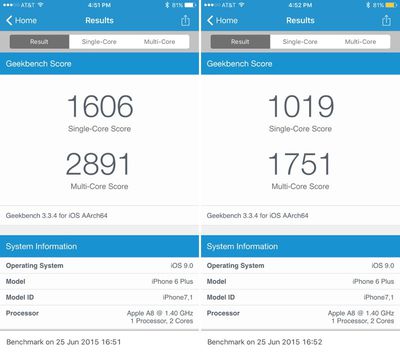
lowpowermodeperformancereduction
Results were similar on an iPhone 5s, with performance reduced by about 40 percent. We saw single/multi-core scores of 1386/2511 without Low Power mode and scores of 816/1405 with Low Power mode turned on.

Low Power mode activates when an iPhone is at 10 or 20 percent battery level, providing a popup that lets users toggle it on quickly. It can also be turned on via the new Battery section of the Settings app. When it's turned on, in addition to lowering CPU speeds, Low Power mode also disables Mail Fetch, Background App Refresh, motion effects, and animated wallpapers.

Indicated by a yellow battery icon, by limiting performance and disabling battery draining features, Low Power mode can extend an iPhone's battery life by up to three hours. Other performance improvements in iOS 9 extend the iPhone's battery by an hour even when Low Power mode is not enabled.

iOS 9 is currently available to developers and will be released to the general public in the fall.

(Thanks, Brandon!)

Related Forum: iOS 9

Popular Stories

Apple TV Thumb 3

Here's What's Coming in the 2026 Apple TV

Thursday April 23, 2026 12:08 pm PDT by
There are a lot of folks waiting for a new version of the Apple TV because the set-top box hasn't been updated since 2022. There is an update coming this year, but people will need to wait a bit longer because Apple is holding the next Apple TV until the new version of Siri comes out this fall. Design Apple TV design updates don't happen often, and that's not changing in 2026. The next...
Four iPhone 18 Pro Colors Mock Feature

iPhone 18 Pro Launching in September With These 10 New Features

Monday April 20, 2026 7:13 am PDT by
While the iPhone 18 Pro and iPhone 18 Pro Max are not launching until September, there are already plenty of rumors about the devices. It was initially reported that the iPhone 18 Pro models would have fully under-screen Face ID, with only a front camera visible in the top-left corner of the screen. However, the latest rumors indicate that only one Face ID component will be moved under the...
MacBook Pro Low Angle Wide Lens

Apple to Launch 'MacBook Ultra' With These Six New Features

Friday April 24, 2026 10:32 am PDT by
While the 14-inch and 16-inch MacBook Pro were just updated with M5 Pro and M5 Max chips last month, bigger changes are reportedly around the corner. According to Bloomberg's Mark Gurman, the higher-end MacBook Pro models will be receiving a major redesign by early 2027, and he said that Apple might use "MacBook Ultra" branding for them. If so, the MacBook Ultra would likely be a...

Top Rated Comments

Pupi Avatar
141 months ago
I love this mode but it needs a toggle in the Control Center.

Conversely, calculator doesn't really need to be in the Control Center any longer since spotlight/search can make calculations now.
Score: 30 Votes (Like | Disagree)
TechGod Avatar
141 months ago
Are there any iOS 9 features that are not available on the iPhone 4S or other A5 devices?
But that calculator app is so beautiful and I love using it and I won't stop! I love having it in control center so it downer crowd the first page of apps.
Or, Apple could just make control centre customisable.
Score: 25 Votes (Like | Disagree)
141 months ago
And it's still more powerful than the new 12" MacBook:D
Score: 18 Votes (Like | Disagree)
141 months ago
I like the concept but the yellow battery color has to change. One comment I got was "the battery icon is urine yellow."
If your urine is that yellow you should probably see a doctor.
Score: 16 Votes (Like | Disagree)
Arrr Avatar
141 months ago
I'm not surprised at the performance throttling, did anyone think the low power consumption was just "Apple Magic" or something? Lowering power consumption can only be done a few different ways.

I know most people love the battery life on their iPhones as is, but this should satisfy those who need an extra push at the end of the day.
Score: 14 Votes (Like | Disagree)
141 months ago
Good on Apple for even creating this mode, most people I know love the battery life on their iPhones as is.
I wouldn't say 'love it', but it's alright. However, it can't typically compete with the battery life of flagship Android devices. I give credit to Apple when it comes to optimising their energy usage, seeing what they can achieve even with a relatively small battery.
Score: 8 Votes (Like | Disagree)














