'DockPhone' Adds Phone Dialing to Yosemite, Bypassing FaceTime - MacRumors
Skip to Content

'DockPhone' Adds Phone Dialing to Yosemite, Bypassing FaceTime

by

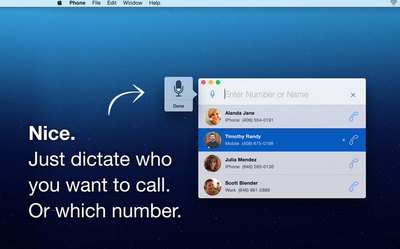
DockPhone, a newly released Mac app, fixes a problem many OS X Yosemite users have faced in the months since the release of the new operating system: the inconvenience of opening FaceTime or Contacts to make a phone call on a Mac. With DockPhone app, users can now search for contacts or directly enter a number within the app, bypassing the need of opening FaceTime altogether.

Though it was one of the major new Continuity features included in OS X Yosemite when it launched earlier this year, many users lamented needing to open FaceTime or Contacts to place phone calls from their desktops or laptops. Receiving calls was simple, but making them through the video chat app designed for a different purpose or cluttered Contacts app felt unintuitive.
Screenshot (45)
DockPhone lets users skip that step, offering a streamlined experience allowing users to easily enter a contact's name or specific phone number to start a phone call. The app interacts with FaceTime behind the scenes to connect with your iPhone, and finally get the call out to the person you dialed. As with making normal phone calls on a Mac, users still need OS X Yosemite on their Mac, an iPhone with iOS 8 or later, and both devices on the same Wi-Fi and iCloud accounts.

While DockPhone is not the first app to offer such functionality, with others such as Keypad having launched some time ago, DockPhone uniquely allows users to also use their voice to begin phone calls. After clicking the microphone button, simply saying the name of a contact or reciting a phone number will begin a call. Recent contacts also appear in widget form in the Notification Center sidebar of your Mac screen, with quick-access prompts to contact them again.

DockPhone is available for download from the Mac App Store for $0.99. [Direct Link]

Top Rated Comments

n-evo Avatar
149 months ago
You know something's wrong when a third party app fixes a first party problem.
Of course it's extremely uncommon for third-parties to extend functionality of first-party products. We definitely didn't see that happening much throughout history.
Score: 4 Votes (Like | Disagree)
149 months ago
Can't you already do this with Spotlight?
Score: 4 Votes (Like | Disagree)
149 months ago
You know something's wrong when a third party app fixes a first party problem.
Score: 3 Votes (Like | Disagree)
149 months ago
What do I have to do? I tried typing in "Call phone number" or just the phone number but neither showed up any results to make phone calls.
What I think he meant was (at least that's what I immediately thought when I saw this app, as well) is that you can open spotlight and type the contact's name. Their contact card will then pop up and you can hover over the phone number and click the phone symbol to dial. That's how I've been doing this for a while now.

Doesn't solve the lack of dialer problem but at least you don't have to launch any app when you're dialing a contact.
Score: 2 Votes (Like | Disagree)
WildCowboy Avatar
149 months ago
This doesn't have a dial pad either? One reviewer said that and another can't get it to work like you.

Do MacRumors test apps they post about?

I've tested it and it worked fine for me. It does not have a dial pad, which may be an issue for some people. Voice search is handy and worked for me as well.

Continuity's phone call stuff can be buggy, so it may be hard to tell whether failures are due to DockPhone or Continuity. But calls have gone through ok for me in limited testing.
Score: 2 Votes (Like | Disagree)
149 months ago
Just cmd+space to open spotlight and then type in the contact's name. Easy Peezy.

----------


Yep, exactly what I meant. Why bother with a dialer? Spotlight is easier. Another really nice benefit of Yosemite. Not sure about Mavericks or earlier.

My only gripe is that you can't enter phone numbers. Besides the convenience of being able to dial new numbers, it's also an issue when I call a number with an automated directory (for English press 1, etc. ). Gotta carry on the entire convo on your phone from that point on.

Unless I'm missing something.
Score: 1 Votes (Like | Disagree)

Popular Stories

Four iPhone 18 Pro Colors Mock Feature

iPhone 18 Pro Launching Later This Year With These 10 New Features

Tuesday May 26, 2026 6:32 am PDT by
While the iPhone 18 Pro and iPhone 18 Pro Max are not launching until September, there are already plenty of rumors about the devices. It was initially reported that the iPhone 18 Pro models would have fully under-screen Face ID, with only a front camera visible in the top-left corner of the screen. However, the latest rumors indicate that only one Face ID component will be moved under the...
apple wallet drivers license feature iPhone 15 pro

Apple Just Expanded iPhone Driver's License Feature to Arkansas

Wednesday May 27, 2026 9:41 am PDT by
In select U.S. states, residents can add their driver's license or state ID to the Apple Wallet app on the iPhone and Apple Watch, and then use it to display proof of identity or age at select airports and businesses, and in select apps. Starting today, the feature is available in Arkansas, which is the 14th state to offer it. However, it may take some time to roll out to all users. To...
Apple Watch Blood Glucose Monitoring Feature 2

Apple Watch for Diabetes: The Latest on Apple's Plans for Non-Invasive Blood Sugar Monitoring

Tuesday May 26, 2026 9:30 am PDT by
For many years now, it has been rumored that the Apple Watch will eventually gain non-invasive blood sugar monitoring capabilities, which would enable millions of people with diabetes to track their blood glucose levels without needing to prick their skin with a needle or wear a dedicated continuous glucose monitor. According to Bloomberg's Mark Gurman, Apple recently shifted oversight of...