

Apple's AirDrop file-sharing feature debuted with the release of OS X Lion and allowed users to transfer files from one Mac to another without using email or an external storage device. The feature made its way to iOS devices with the release of iOS 7, and offered a simple way for users to share files like photos between iOS devices. Now, with the release OS X Yosemite, users can use AirDrop to transfer files between the Mac and an iOS device for the first time.
This video shows you how it works:
Prior to the release of OS X Yosemite, users looking to transfer files between a Mac and iOS device usually had to resort to a third-party service like Dropbox or use an iCloud-connected app like Messages. AirDrop on OS X Yosemite and iOS 8 provides an easy-to-use solution for transferring files, as users can either drag and drop files from the Mac to iOS or move files from iOS to the Mac using the Share feature.
On the Mac, a number of apps like Safari, Preview, Pages, and Contacts support the Share feature. Third-party Mac apps like Deliveries, Ember, and Notability also feature Share support, allowing content to be transferred via AirDrop. On iOS, most of Apple's stock apps including Photos, Safari, Notes, and Maps feature Share support. Third-party apps including Camera+, Evernote, and eBay also support the feature.
Before you Start
You will need iOS 7 or later and OS X Yosemite in order to use AirDrop to transfer files between a Mac and an iOS device. Using AirDrop to move files between iOS and Mac is supported by all Mac models released in 2012 and later running OS X Yosemite. You can confirm that your Mac is compatible with AirDrop by clicking the Finder icon in the Dock and clicking the "Go" icon in the Menu Bar. If AirDrop is not listed as an option, then your Mac is not compatible with the feature. AirDrop between a Mac and an iOS device also requires an iPhone 5 or later, iPad 4 or later, iPad mini, or fifth-generation iPod touch.
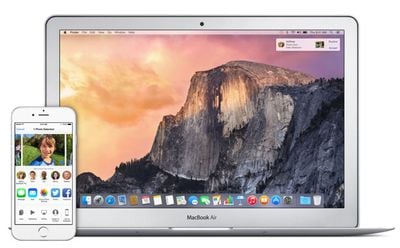
Apple notes that AirDrop users should ensure that devices being used are within 30 feet of each other. If you have a firewall enabled on your Mac, navigate to Menu Bar -> Apple -> System Preferences -> General -> Security & Privacy -> Firewall -> Firewall Options and ensure that "Block all incoming connections" is not checked.
Keep in mind that it is not required for both devices to log into the same iCloud account to use AirDrop, but doing so offers the benefit of transferring files through AirDrop automatically without the need to approve each transfer. Files transferred between devices logged into different iCloud accounts will need permission to accept file transfers. Both iOS devices and Macs must be powered on and not locked in order to make AirDrop file transfers.
Steps
1. Turn on Wi-Fi on your iPhone (Settings -> Wi-Fi) and Mac (Menu Bar -> Wi-Fi -> Turn Wi-Fi On. AirDrop will still work between the Mac and an iOS device even if both are using different Wi-Fi networks.
2. Turn on Bluetooth on your iPhone (Settings -> Bluetooth) and Mac (Menu Bar -> Apple -> System Preferences -> Bluetooth -> Turn Bluetooth On).
3. Turn on AirDrop on your iPhone (Slide up to access Control Center -> AirDrop -> Choose "Contacts Only" or "Everyone") and Mac (Finder -> Menu Bar -> Go -> AirDrop -> Click "Allow me to be discovered by:" -> Choose "Contacts Only" or "Everyone").
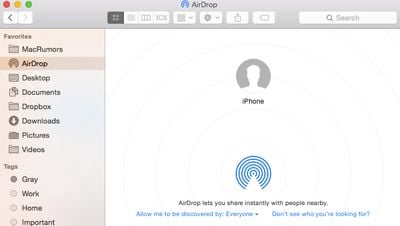
4. You may now begin using AirDrop to transfer files between a Mac and an iOS device. To test it out, go to the AirDrop menu in Finder and notice that your iOS device is represented by circle. Drag and drop a file onto the circle, and your iOS device will prompt you to accept the file.
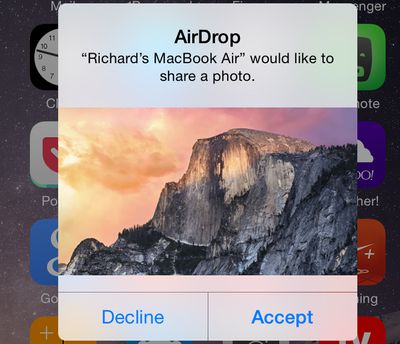
You can also transfer files from the Mac to an iOS device using apps that have Share feature built-in. The Share menu can be accessed in the upper right corner of an app and is represented by a square with an upward facing arrow.

Selecting the AirDrop option from the Share menu brings up a list of devices that can receive files.

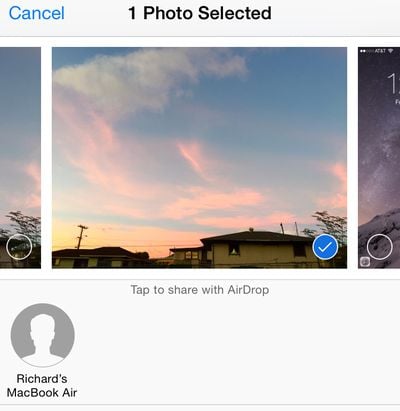
5. Transferring a file from an iOS device to the Mac can be done in any app that supports the Share functionality. Like on the Mac, the Share button brings up a list of options for transfers including AirDrop. For example, sending an image to the Mac from the Photos app can be done by tapping the Share button, tapping AirDrop, and selecting the desired Mac. A prompt to accept the file should then appear on the Mac.
Troubleshooting
Some users have had trouble with AirDrop functionality between the Mac and iOS devices since it launched with OS X Yosemite. Members on our forums and on Apple's support forums have reported that restarting both devices fixed their problems. If the devices aren't recognizing each other, make sure AirDrop is set to "Everyone" instead of "Contacts Only," as the latter setting has caused some problems for users. A number of users have also realized their Macs are too old to support AirDrop functionality between OS X and iOS after attempting to try out the feature, so ensure that your Mac is a 2012 model or newer by going to Menu Bar -> Apple -> About This Mac.

















Top Rated Comments
Every once in a while it works, but most of the time the Mac icon does not show up on the iPhone's Airdrop dock.
Airdrop does work reliably when going from Mac to iPhone, but that's not useful because I'm always snapping pictures on the phone that I want to share with my Mac.
I wish Apple's passion for quality control matched its new-found passion for diversity, LQBG rights, women freezing their eggs, children's education. etc. Tim talks a lot about those issues, but can I get a statement about all the bugs I'm increasingly finding in Mac products? No.
I miss the old Apple, which didn't carry the Progressive torch quite so high, but could launch products that Just Worked.
I know Apple has played this type of game before, as do other manufacturers, but in recent memory they struck a good balance between planned obsolescence and backward compatibility that endeared them to me. I think that balance is off now. If I can't use ecosystem features after such a short amont of time (computers are usually depreciated over 5 years), I don't see why I need to pay the "Apple Tax" when it's time for a new computer.
So I guess if Apple didn't support Gay Rights, Women's Rights, or Children's Education one of two things would take place: 1) Air Drop would work 100%, all the time, or 2) It wouldn't bother you because Apple would not have nasty Progressive tendencies.
I guess Tim Cook is just fixated about being a decent human being and doesn't give a damn about quality products like he would if he were a Neanderthal.
OOOOOKaaaay. We can now infer your position on a variety of issues. But why you link Apple's concern with those issues and Airdrop is unfathomable to me. They are not related in any way.
Across my many devices, there are certain transfers, like from my iPad Air to my iMac, that work every time.
But there will be others such as iMac to iPhone 6 Plus that fail every time. By fail, I mean I will try to transfer the file, the icon on the Mac will say "Waiting..." and nothing will ever appear on the iPhone. If I cancel the transfer and initiate it again, usually it will work.