

iOS 8.1: 'Text Message Forwarding' Activation Requires iMessage Email Address - MacRumors
Skip to Content

iOS 8.1: 'Text Message Forwarding' Activation Requires iMessage Email Address

by

Earlier today, Apple released iOS 8.1 which introduced number of new features to iOS and Yosemite. One of the anticipated features was SMS Text Message Forwarding, which allows SMS messages received by your iPhone to be mirrored on your iPad or Mac running OS X Yosemite.
sms-forwarding
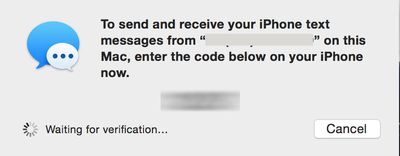
Several of our forum members had difficulty activating the feature, as the required activation code would never appear on their Macs or iPads.

MacRumors reader Michael wrote in with this solution which requires an email address to be activated in iMessage:

...you need to have your email address turned on for iMessage on your iPhone in order to enable Text Message Forwarding. If you don't, the numeric access code will not appear on your iPad or Mac during the setup process. As soon as you enable your email address for iMessage (you only need to do this on your iPhone) the numeric access codes appear as expected. Once you have text message forwarding setup you can disable your email address again in iMessage as it seems to only be necessary for the numeric access code setup step, not the actual text message forwarding itself.

MacRumors was able to verify this scenario and found that an email address does indeed have to be active on your iPhone for the activation message to properly be sent. In our testing, SMS messages were still received after the email address was removed from iMessage. The setting to add your email address to iMessage is under Settings -> Messages -> Send & Receive. Note, you may have to wait a few moments after adding an email address before the activation code will send.


Tag: iOS 8.1
Related Forum: iOS 8

Top Rated Comments

arn Avatar
155 months ago
Not sure why that would be a surprise to anyone. Your Messages account is tied to your Apple ID, which is your email address.

it doesn't entirely make sense. You are already logged into your iMessage account either way. This is just which phone numbers / email addresses you want to receive iMessages for.

arn
Score: 12 Votes (Like | Disagree)
rdlink Avatar
155 months ago
Not sure why that would be a surprise to anyone. Your Messages account is tied to your Apple ID, which is your email address.
Score: 5 Votes (Like | Disagree)
155 months ago
it just works
Score: 4 Votes (Like | Disagree)
Glassed Silver Avatar
155 months ago
I have a bunch of email addresses active in iMessages on iPhone, yet, no code.

*sigh*

(iPhone 5, iMac mid-11, iPad Air)

Glassed Silver:mac
Score: 4 Votes (Like | Disagree)
155 months ago
I think this article is inaccurate and it simply states a workaround that happens to work...

I had the same problem described in the article, and all I had to do was sign out of iMessages app on my iPhone and sign back in. After signing in, I still had a checkbox next to my phone number and I was able to receive the verification number on my Mac.
Score: 2 Votes (Like | Disagree)
155 months ago
Ok same issue seems to be under FaceTime settings too.

I only like to tick my mobile number under FaceTime not my email address as well.

When email address is not ticked, you cannot enable iPhone Mobile Calls. Keep getting error.

Anyone else?
Score: 2 Votes (Like | Disagree)

Popular Stories

Apple Watch Ultra 2 Black Titanium

New Apple Watch Series 12 and Apple Watch Ultra 4 Features Revealed

Sunday August 30, 2026 7:54 am PDT by
Bloomberg's Mark Gurman today further outlined what to expect from the Apple Watch Series 12 and Apple Watch Ultra 4 set to be unveiled on September 9. While it was initially rumored that Touch ID may be coming to the Apple Watch this year, Gurman reiterated that he does not expect the Series 12 or Ultra 4 to have any major design changes compared to the current Series 11 and Ultra 3 models. ...
Mac mini vs Studio Feature Sans Text 1

Apple Caught Off Guard by AI Demand for Mac Mini and Mac Studio

Sunday August 30, 2026 8:52 am PDT by
Apple's unusually timed announcement of new Mac mini and Mac Studio models this week was driven by unexpectedly strong enterprise appetite for AI hardware, according to The Information. Apple normally releases new Mac models in the autumn, closer to October or November, making this week's announcement unusually early, falling just before the anticipated arrival of new iPhone models. The...
Apple Event Logo

Apple Unveiled Four New Products This Week

Wednesday August 26, 2026 5:54 pm PDT by
Apple on Tuesday unveiled a new Mac mini with M6 and M5 Pro chip options, a new Mac Studio with M5 Max and M5 Ultra chip options, a new version of the Polishing Cloth with a lower price, and updated Magic Keyboards for Macs. To learn more about these products, read our coverage below: Apple Announces New Mac Mini With M6 and M5 Pro Chips and More Apple Unveils New Mac Studio With M5 Max...









































