

Apple outlined several of iOS 8's major features during yesterday's WWDC keynote, but with the operating system now in the hands of developers, details on several lesser known features have been leaking out.
One new feature sees the iPhone displaying apps on the lock screen based on location. For example, MacRumors readers have seen relevant app icons pop up while at or near brick and mortar locations like Starbucks and the Apple Store. While at a Starbucks, for example, the Starbucks app icon is displayed in the lower left corner of the iPhone's lock screen, which allows the Starbucks app to be easily accessed.
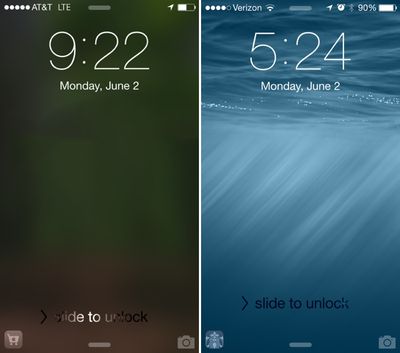
This feature isn't limited to Apple's own stores or to major retailers, either, as one Twitter user has also seen an app for a train station on the lock screen while at that particular location.
Displaying location-based apps on the lock screen is particularly useful at Starbucks and the Apple Store as both locations allow users to make purchases using their iOS devices. In fact, a common theme between the apps that have demonstrated this functionality is a specific on-site function like the ability to make a purchase or display a ticket.
It is not clear how this feature works, or which apps are compatible at this point, but the iOS 8 release notes mention the location based apps as a facet of Location Services. "When Location Services is turned on, the device's current location is used to recommend relevant apps on the lock screen." Based on the description of the feature, it appears to work through both the App Store and physical location and will eventually be able to be turned off by turning off location services for the App Store.
As we approach the public release of iOS 8, it's likely we'll hear more about this new location-based alert feature. iOS 8 is expected to be available to the public in the fall, following a developer-oriented beta testing period.
(Thanks, Kyle!)
Update 11:55 PM PT: It appears that Apple will also suggest apps that are not installed when visiting certain locations. For example, a Twitter user who did not have the Costco app installed had a Costco app icon pop up when at local Costco, which took him to the App Store where he could download the app. He was not able to access the rest of the App Store after tapping the icon; only the Costco app was available.




















