

VMware Fusion 6 Brings Updated Virtualization Support for OS X Mavericks and Windows 8.1 - MacRumors
Skip to Content

VMware Fusion 6 Brings Updated Virtualization Support for OS X Mavericks and Windows 8.1

Following last week's introduction of Parallels Desktop 9, VMware has announced the launch its new VMware Fusion 6 virtualization software, adding support for OS X Mavericks and Windows 8.1, as well as a number of other new features.

- Designed for Mac OS X Mavericks - Extend the unique features of Mavericks to a Windows environment, such as taking full advantage of every display connected to a Mac with multiple display support and enhanced dictation support in Windows applications.

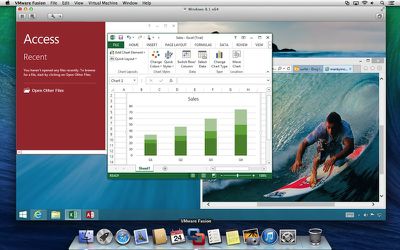
- Ready for Windows 8.1 - Get the most out of Windows 8.1 by running Windows Store applications side-by-side with Mac applications. With VMware Fusion 6, users can access Windows Store applications in Launchpad or the Applications folder and put them in the Dock in Unity mode.

- Optimized for the Latest Macs - VMware Fusion 6 is optimized for the latest Macs taking advantage of Intel's latest Haswell processors for even better battery life and even faster performance when running Windows applications.

- Create the Most Powerful Virtual Machines - Create virtual machines with support for up to 16 vCPUs, 8 TB virtual disks, and up to 64 GB of memory to run the most demanding Windows applications on a Mac.

- Enhanced User Interface - From its streamlined user experience and improved PC migration assistant, to easier installation of Windows and more granular selection of computer resources, everything has been enhanced to give users an even better way to run Windows on a Mac.
vmware_fusion_6_windows_8_1
A more advanced VMware Fusion 6 Professional version is also available, adding greater flexibility for restricting and expiring virtual machines, linked clones for easily creating multiple copies of virtual machines, and more.

Available through the VMware Store, VMware Fusion 6 is priced at $59.99 while VMware Fusion 6 Professional is priced at $129.99. Users upgrading from version 4 or 5 can receive discounted pricing of $49.99/$69.99, while any customers who purchased VMware Fusion 5 on or after August 1 can receive a free upgrade to version 6.


Popular Stories

Apple Card iPhone 16 Pro Feature

Apple Card Promo to Offer Free AirPods Pro 3

Friday May 15, 2026 8:59 am PDT by
Starting as early as next week, customers who sign up for an Apple Card at Apple's retail stores in the U.S. will receive $249 cash back when they purchase AirPods Pro 3, according to Bloomberg's Mark Gurman. The promotion has yet to be officially announced by Apple, so exact terms and conditions are not available at this time. AirPods Pro 3 are priced at $249 in the U.S., so customers who...
Apple WWDC25 iOS 26 CarPlay Light mode 250609

Six Popular iPhone Apps Now Available on CarPlay

Thursday May 14, 2026 9:10 am PDT by
Apple's CarPlay system for accessing iPhone apps on a vehicle's dashboard screen has received six popular apps in recent weeks: ChatGPT, Perplexity, Grok, Google Meet, WhatsApp, and the indie artist streaming platform Audiomack. Make sure you have the latest version of each app and they will automatically appear on CarPlay. ChatGPT Starting with iOS 26.4, CarPlay supports voice-based...
ipad mini 7 blue

OLED iPad Mini: Release Date, Pricing, and What to Expect

Thursday May 14, 2026 5:08 am PDT by
According to the latest rumors, Apple is close to launching its next-generation iPad mini. So what should we expect from the successor to the iPad mini 7 that Apple released over a year ago? Read on to find out. Processor and Performance Apple is working on a next-generation version of the iPad mini (codename J510/J511) that features the A19 Pro chip, according to information found in code...

Top Rated Comments

166 months ago
and let the parallels vs fusion arguments begin!!

VirtualBox!!
Because I'm cheap!
Score: 10 Votes (Like | Disagree)
tigres Avatar
166 months ago
damn, these yearly required upgrades are so tiresome. I think I have paid them nearly a grand over the years.

:(
Score: 7 Votes (Like | Disagree)
sjinsjca Avatar
166 months ago
Any reason why people just aren't using bootcamp??
Bootcamp is great if your Windows instance absolutely needs all the resources of your machine, as in gaming.

However, today's personal computers are so powerful that you can get amazing performance running Windows (or Linux, or what-have-you) at the same time as OS X. There are many advantages to doing so, not least being that you can hot-key between OS X and Windows (or Linux or...). It's like having a desk with two computers on it.

Or more: my rMBP is powerful enough to run several virtual machines at the same time. So I can have Windows XP, Windows 7, any of several flavors of Linux, all accessible simultaneously.

In my work it's necessary that I have reasonably quick and portable access to different versions of various OSes with different versions of various software. Virtual machines make that possible. I have a nice USB 3 external drive with my less-used VMs on it; I just velcro it to the back of my rMBP's display when I need it. Connected via USB 3 or Thunderbolt, the VMs run at native speed. (For external storage, USB 3 and Thunderbolt are pretty evenly matched, as the drive is the bottleneck in that case.) If I'm using a particular VM frequently for a project or something, I'll copy it to my rMBP's SSD. Currently I have four VMs resident on the SSD.

Within the last hour I've had Win7, WinXP and Linux Mint all running at the same time as OS X. Can't do that with Boot Camp.

If I don't need a VM that's currently on my SSD, I can just copy it to my external drive and reclaim the disk space in my laptop. Can't do that with Boot Camp either.

If I screw up a VM, I can just pull an earlier version from my Time Machine backups. Can't do that with Boot Camp-- lots of folks don't realize it until it's too late, but Time Machine doesn't touch the Boot Camp partition. Or, I can make snapshots of my VMs and revert to them if desired. (They take up beaucoup disk space, though.)

I have VirtualBox too. It has improved greatly in recent years. Its USB handling still lags behind Fusion's, but it may be fine for your purposes and is free. If you're not a gamer, I'd recommend it over Boot Camp for running Windows or Linux.
Score: 5 Votes (Like | Disagree)
Plutonius Avatar
166 months ago
I prefer bootcamp :)

I prefer OS X :).
Score: 3 Votes (Like | Disagree)
166 months ago
I installed it, it replaced VMWare Fusion 5. It crashes each time it attempts to launch. I restarted. will reinstall now. I don't have a list of things to try, to fix it.

Here's how I fixed it:
1. Uninstalled it by dragging "VMWare Fusion" folder to the trash.
2. Restart machine
3. Delete preferences folder "/Library/Preferences/VMware Fusion"
4. Empty trash
5. Re-installed Fusion 6
Score: 2 Votes (Like | Disagree)
lincolntran Avatar
166 months ago
Are you also tired of the annual payment hike for OS X or are you only tired of the annual payment hike for third party software like VMWare Fusion...?

It's expensive to live in Apple land. I think everybody knows that by now.

What are you talking about? Unlike windows, OS X gets cheaper to upgrade every release.
Score: 2 Votes (Like | Disagree)















