

Dropbox today released an update for its Mac client, offering a redesigned drop down interface and improved file sharing capabilities.
With version 2.0 of Dropbox, users can share files with one another using a link from the Desktop menu. File sharing notifications are sent out in real time, to the desktop application and the iOS app.
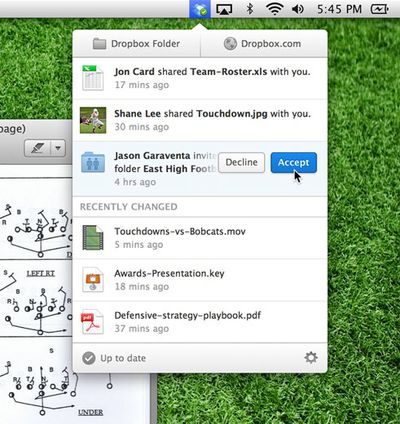
Introducing a shiny new feature: a new tray popup that combines the old tray menu features with a timeline of the most important sharing events in your Dropbox. For instance, if someone shares a link with you, you can now see it immediately!
Moreover, if someone shares a folder with you, you can now accept or decline the invitation directly from your desktop. Not only are you notified of these events in real time, but you can easily get to them later. Also, files recently edited are made available so you can easily view or share them.
The interface has been updated to facilitate the simplified file sharing process, adding the ability to accept or decline invitations to files and folders via the desktop.
Dropbox 2.0.0 is available immediately and can be downloaded for free from the Dropbox website. Dropbox’s iOS app is expected to be updated later today.
















Top Rated Comments
I wish they offer 50G for $5 per month which is perfect for what I need.
$10 for 100G is too much premium from the free version
I disagree entirely. I don't know if it's just me, but I am usually always notified when an app has an update. A window just pops up and tells me Hey, there's an update!
But if I get it from the App Store, I have no idea there's an update unless I load the store. And I do not want that icon in my dock, because I prefer to reserve it for important apps I actually use more than once in a while.
It deviates from the default behaviour of the other menu bar icons (by being a drop down bubble as opposed to a solid ribbon) AND it hides the important info (% used, GB available, Preferences, Quit Dropbox) behind a second click. I wish there were a way to change its look back to version 1.6's.
Take Evernote for example. Their service has only improved once they entered the App Store...and updates are just that much easier.