Apple has issued a Carrier Update for Verizon iPhone 5 devices this evening to eliminate an issue where Verizon Cellular Data would be used while the iPhone 5 is connected to a Wi-Fi network.
This carrier settings update resolves an issue in which, under certain circumstances, iPhone 5 may use Verizon cellular data while the phone is connected to a Wi-Fi network. Follow these instructions to install the update.
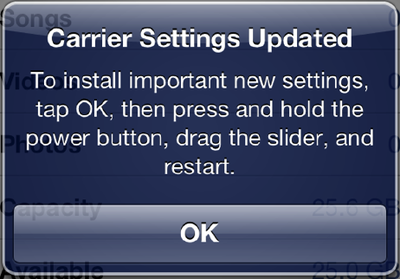
1. Tap Settings > General > About. 2. Wait for the following alert to appear: (top right) 3. Tap OK to install the update. 4. Hold the Sleep/Wake button down until you see "slide to power off". 5. Slide to power off. 6. After the device powers off, hold the Sleep/Wake button to turn your phone back on.
Note: To finish the installation of the update, your iPhone 5 must be turned off and then on again. After your iPhone restarts, tap Settings > General > About, then scroll down to Carrier and verify that "Verizon 13.1" is displayed.
The update has to be performed somewhat manually but is delivered over-the-air, per the instructions above. Apple describes the update as an "important new carrier update" but doesn't provide many details on how/when these circumstances might arise.
Sunday September 13, 2026 3:00 am PDT by Eric Slivka
Update 10:04 a.m.: iOS 27 is rolling out now, though it may take a bit for all users to see it, so keep checking!
Apple is about to release iOS 27, which will finally deliver more advanced Siri AI capabilities as well as a variety of other refinements, improvements, and new features to iPhones. It's Apple's biggest software update of the year, and Apple announced at Wednesday's iPhone event...
Monday September 14, 2026 9:00 am PDT by Joe Rossignol
Update — 10 a.m. Pacific Time: Apple has released iOS 27.
During its iPhone 18 Pro and iPhone Duo event last week, Apple announced that iOS 27 will be released widely on Monday, September 14.
iOS 27 should be available around 10 a.m. Pacific Time / 1 p.m. Eastern Time today via the Settings app, under General → Software Update.
Below, we have highlighted eight new features and...
Tuesday September 15, 2026 1:43 am PDT by Tim Hardwick
Apple today announced a new subscription initiative that turns paid iCloud+ subscriptions into a broader services bundle in more than 100 countries.
In select countries, Apple says every paid iCloud+ plan, including the cheapest 50GB tier, now includes Apple TV and Apple Arcade "at no additional cost," while family sharing extends the storage, TV and Arcade access to up to five people....
This is going to cause a major headache for verizon. good. EVERYONE make sure you don't have to pay any overages at the end of this month. If they charge you claim it was the problem before apple's update


 Apple has issued a Carrier Update for Verizon iPhone 5 devices this evening to eliminate an issue where Verizon Cellular Data would be used while the iPhone 5 is connected to a Wi-Fi network.



















