Got a tip for us? Share it...

How to Adjust the Resolution of the iPhone Simulator to 1136x640

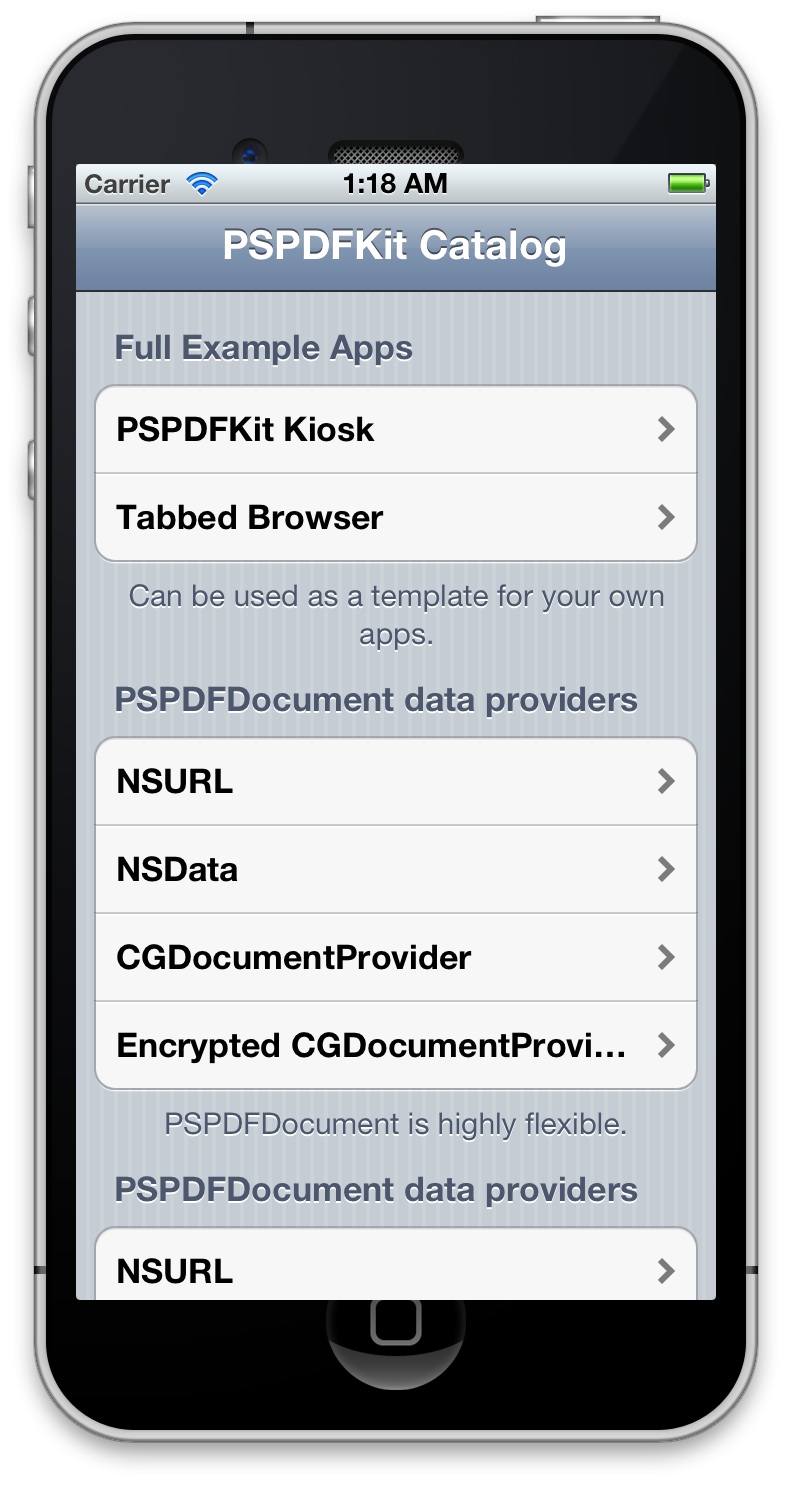
After reports that iOS 6's Springboard automatically adjusts to support the rumored 1136x640 resolution of the next iPhone, developer Cédric Luthi determined how accomplish that feat.
Earlier today, my friend Peter Steinberger asked if there is a way to tweak the iOS simulator device size. So I investigated, and found a pretty elegant solution. Without further ado, here is how to change the size of the iOS simulator in order to test your apps in resolutions never seen before.
The instructions are relatively simple, requiring the download of a small text file, and an editing of plist file. The hack is said to work on Xcode 4.4.1+ and the iPhone 5.1 Simulator with the iPhone (Retina) device.

It seems that except for Springboard, developer's apps will only get the new size in iOS 5/5.1 with this hack. Screenshot of it in action (top right) by @steipete.

Top Rated Comments

(View all)

Posted: 10 months ago

Post deleted by moderator


It's not a photoshop. It's a taller-than-normal app running in the iPhone simulator on a Mac. The overlap is because the iPhone frame is a fixed size, while the simulator has been hacked to be larger than expected.

arn

----------

Making the screen taller and not preserving the old resolution and aspect ratio is only one thing: retarded.

I cannot wait to enjoy stretched out games or black bars. /S


Will likely be black bars.

arn
Rating: 9 Positives
Posted: 10 months ago

It's not a photoshop. It's a taller-than-normal app running in the iPhone simulator on a Mac. The overlap is because the iPhone frame is a fixed size, while the simulator has been hacked to be larger than expected.

Oh. Sorry... :o
Rating: 5 Positives
Posted: 10 months ago
DEVELOPERS DEVELOPERS DEVELOPERS DEVELOPERS!!

Get those apps ready!!
Rating: 5 Positives
Posted: 10 months ago


Here's another tip:

If you copy the entire "iPhone (Retina).deviceinfo" directory to another name, ie "iPhone (Tall).deviceinfo" you can set it up to easily switch between the standard and tall modes.

You just have to change the "displayName" and "Executable File" properties to match whatever you renamed the .deviceinfo to.
Rating: 4 Positives
Posted: 10 months ago
How do we know 1136x640 is the resolution they're going for? Wouldn't it make more sense to have it 1280x720? They could call it iPhone HD :)
Rating: 3 Positives
Posted: 10 months ago
Making the screen taller and not preserving the old resolution and aspect ratio is only one thing: retarded.

I cannot wait to enjoy stretched out games or black bars. /S
Rating: 3 Positives
Posted: 10 months ago


Assuming Apple indeed launches a new device with a 'taller' screensize, my main question would be if and how they will handle backwards compatibility?

At the moment I'm just checking a combination of UI_USER_INTERFACE_IDIOM and view.bounds to dynamically layout views. But it looks like any app that makes assumptions on the 320x640 bounds and/or have incorrect auto-layouts will however run into trouble on a taller screen (mine did..).


In my app (consisting of 10+ views, mostly UITableView based, some of them fairly complex and with plenty of customization), I only had 2 minor issues to fix.

In one view I didn't have an autosizing mask set correctly, so it was leaving black gaps between subviews rather than expanding them to fit the extra space.

In the other, I had hardcoded the y-coordinate of a subview to 480 so that it would slide onto the screen from the bottom using CA. Had to tweak that to use the actual screen size.

Things may have been slightly trickier if my app supported interface rotation. In general, though, I think most well-written apps using UIKit should have only need minor tweaks/fixes to support the "iPhone tall".
Rating: 2 Positives
Posted: 10 months ago

Ahh, changing it to retina fixed it. Yup, I just moved the plist to my Desktop, changed it, and moved it back.

Image (http://i49.tinypic.com/15zfgjn.png)


nice, I guess for a portrait app it would fill in gracefully. not so much with landscape :


got some work to do.
Rating: 2 Positives
Posted: 10 months ago
Real nice tweak. I was wondering what my app might look on the rumored new screen size. Now I know :)

Since there seem to be some discussions on if/why app need to anything to be compatible with this new screen, here's my take:

Apple's auto-layout works well but most screen layouts will need some further thought.

18% more screen height (or width depending on orientation) impacts space above, below and/or between elements which simply doesn't (always) look good.

It does also offer an opportunity to display more elements, adding to the user experience of the larger screen.

Not sure on this one but I noticed that full-screen 'slide up/down' animations leave a different impression on the taller screen. I get the subjective impression that the animation duration for a slide up/down appears 'longer' on the taller screen - even if the effective duration is the same 0.5 sec... Have to play with this a bit more... (or maybe someone has an idea why this might be?)

Look forward to read other iOS developer/designer impressions!
Rating: 1 Positives
Posted: 10 months ago

Agreed. Kinda like how there's no native iPad apps and we're all stuck using iPhone apps, right?

Wait a second...


I'm stuck not having access to the same library of apps running natively. How is less native apps a good thing? On my iPad, it sucks that there's a bunch of iPhone apps and games that I can use, but poorly. Now on an iPhone I have to use crappy "old iPhone apps" ? So we have non-retina apps, retina apps, iPad apps, retina iPad apps, and now "tall iPhone" apps? So are we gonna get a separate section on the app store for the new device? iPhone, Tall iPhone, and iPad sections? Lol.

Not to mention developers have to deal with another aspect ratio / resolution. Which is doable, but it's extra unnecessary work.

Anyways. We'll see how they really handle this new device. But as soon as I heard it was only taller I was like *facepalm*.

Not to mention having a wider screen in portrait would make typing easier. 4" 960x640 would be the best for both users and developers. Of which I am both.
Rating: 1 Positives

[ Read All Comments ]