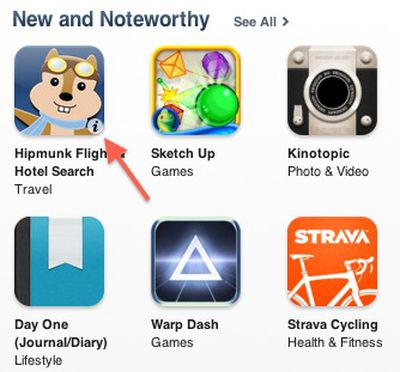
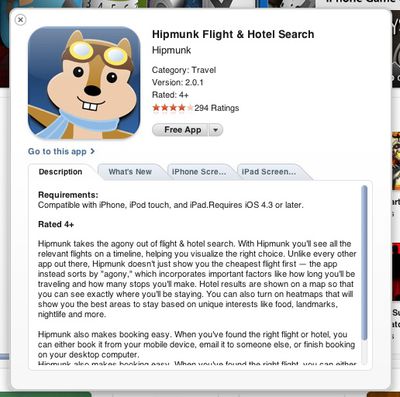
Italian site iSpazionotes [Google translation] that Apple has made a small but helpful tweak to the iTunes Store when accessed from a computer, now allowing users to access information on content such as songs, albums, videos, apps, and books via a pop-up window rather than needing to click through to a separate page within the store. The new option, which appears in most locations within the store as a small "info" button in the lower right corner of the content's icon when the user hovers over the item, is available on both main iTunes Store and App Store feature pages as well as in search results.
The pop-up windows offer different content depending on which area of the store the user is in, with music, books, and podcasts offering a description of the selected item. In the App Store, the pop-up windows contain multiple tabs with each item's description, reviews, and iPhone and iPad screenshots. Users can also easily purchase the items from their respective pop-up windows.
Finally, movies and TV shows display a small "play" icon instead of the "info" icon, and immediately pop up a window with a video preview and details on each item.
Tuesday September 15, 2026 1:43 am PDT by Tim Hardwick
Apple today announced a new subscription initiative that turns paid iCloud+ subscriptions into a broader services bundle in more than 100 countries.
In select countries, Apple says every paid iCloud+ plan, including the cheapest 50GB tier, now includes Apple TV and Apple Arcade "at no additional cost," while family sharing extends the storage, TV and Arcade access to up to five people....
Monday September 14, 2026 10:48 pm PDT by Tim Hardwick
Apple released iOS 27 this week, and despite the company's focus this year on refining its flagship operating system and nixing bugs, there are still many additional features to explore, not least of which is Apple's new context-aware Siri, re-tooled for the generative AI era.
Which iPhones Support Every iOS 27 Feature?
This year's major iPhone software update isn't all about AI, though,...
Monday September 14, 2026 9:00 am PDT by Joe Rossignol
Update — 10 a.m. Pacific Time: Apple has released iOS 27.
During its iPhone 18 Pro and iPhone Duo event last week, Apple announced that iOS 27 will be released widely on Monday, September 14.
iOS 27 should be available around 10 a.m. Pacific Time / 1 p.m. Eastern Time today via the Settings app, under General → Software Update.
Below, we have highlighted eight new features and...
Good new feature. If you are just browsing, it's more convenient than clicking through to read the copy, reviews,etc. and then having to come back to the display page to browse more. Thumbs up.:D
Nice touch.... though from the limited browsing I have done of the App store, I would prefer a greater variety of parameters to sort Applications. As the numbers pile up, it will just get more difficult to find something useful.