

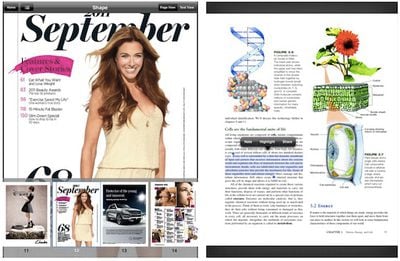
Amazon today updated its Kindle app for iOS, taking on Apple's Newsstand feature by adding compatibility with hundreds of magazines on the iPad. In addition, Kindle for iPad can now handle "print replica" textbooks, preserving the original formatting and layout from print editions for improved usability.
- New Design for Magazines: Kindle for iPad customers now have access to the huge selection of over 400 magazines and newspapers that are available on Kindle Fire. Magazines such as Martha Stewart Living, Food Network Magazine, Cosmopolitan, Men’s Health, Popular Science and many more are displayed in rich full-color pages. Customers can buy a single issue or subscribe to popular magazines and leading newspapers and have them wirelessly delivered to the Kindle for iPad app.
- Read print replica textbooks including rich formatting and layout of the print editions and support for notes and highlights, zoom and pan, and linked table of contents.
In addition, Amazon has added support for Send-to-Kindle on all iOS devices, allowing users to send documents to their Kindle devices and apps for reading while also storing them in the cloud. Finally, Kindle for iOS now sports a new library view and support for PDF import and viewing.














































Top Rated Comments
Sounds interesting ... Really it is just the look and feel of the iBook App (the smoothness of the page turning etc) that keeps me interested. The Kindle, though a bit more clunky has a much greater selection and I can read it on my computer!
Moving to eBooks was the last step in going digital for me. I haven't bought a CD in at least 5 years, quit buying DVD's a couple years ago, so books/magazines were the last step. I get all my music via iTunes, movies are rented/purchased through iTunes and AppleTV2 or Netflix, and now books/magazines are through Kindle.
I can keep stuff on the device or in the Cloud...nice because I can use the Kindle App on my MBP to read the books/magazines if I'm not using the Kindle Fire...plus, if I ever move to an iPad I'm not losing any investment in content.
I love the form factor of the KF. I have it in a nice case so it's the size of an average paperback book, maybe just a little bigger, easy to hold and does web, email, apps, streams Netflix as well as being a great eReader.
I have no issues reading on it. I keep the brightness turned down and use the tan background so it's very, very close to reading an older, slightly yellowed paperback. I spend at least 2 hours every night reading in bed before going to sleep.
Why would an Apple Fanboi buy a Kindle Fire and not an iPad? Mainly because I have a 17" MacBook Pro. If I didn't have the MBP, would be a different story. The iPad just doesn't give me anything my MBP can't do, except the cool form factor. Spending the $$$ on an iPad compared to the cost of the Fire...just for an eReader....just couldn't see it. It was the right decision for me personally, my needs, and budget.
I like being able to sync all my books across all devices, too. And that now includes a Kindle Touch. Works great!
I too like the convenience of having all of my documents with me at all times, that's why I got an iPad in the first place. Carrying all of my library is neither here or there; I do not need access to all of the books I have ever read or might read all of the time. Actually studying or reading an academic book on the iPad has not been a satisfactory experience to me. Maybe I am a bit old-fashioned when it comes to books.
I'm interested to check out this new feature, too.