

With today's release of iTunes Match, some users with very large music libraries are discovering an annoying restriction. Those with non-iTunes Music Store libraries with more than 25,000 songs are unable to activate iTunes Match. There simply isn't an option to select only certain songs to upload to iCloud. Fortunately, Macworld has a quixotic but effective solution.
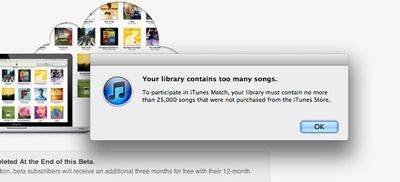
iTunes has the ability to access multiple music libraries. By separating out the songs to sync with the songs not to sync, it is possible to force iTunes under iTunes Match's 25,000 song limit.
To do that, quit iTunes, hold down the Option key, and launch iTunes. You’ll be prompted to create a new library or choose a different library. Choose the option to create a new library. iTunes will open and you’ll have nary a tune in your library.
Move to the Store menu and choose Turn on iTunes Match. You’ll be prompted for your Apple ID and password. Enter them and click OK and iTunes will switch on iTunes Match. Now open iTunes' preferences, click the Advanced preference, and uncheck the Copy Files to iTunes Media Folder When Adding to Library option and click OK. This will prevent iTunes from generating duplicates when you follow the next step.
Rather than steal all their thunder, head to Macworld for the full instructions.
















Top Rated Comments
I've got around 13k songs. 20 are from iTunes when they gave out free music through Coca Cola, 2 albums were free from eMusic. The rest are free game rips, ripped CDs, massive chunk of music from musician friends, ripped parents records.
You can have a "looooooot" of music outside of the iTunes store without it being stolen.
Your foolishness is showing. Hush now.
This is the assumption that many people make.
I have been collecting CD's for almost 25 years now. I also used eMusic to get a couple of thousand songs when that was very cheap (around 10p a track). I currently have around 39,000 fully legal songs in my collection.
It doesn't work out as very much spending per year over that sort of time.
Ditto here I am a musician and I have been collecting music for over 40 years. I presently have 3.1 terabytes loaded on my HHD's I can go something like 3 years playing 24/7 without a repeat. iTunes is not going "match" much of what I have. I only have about 700 gig's indexed on iTunes. I suppose you could call my music collection my digital "fake book". :D
eye no rite?! cuz lyke alluv my 1,000s of CDs that i've purchased over the past 25 years and ripped over the past 10 years are like totally stolen. i didn't invest countless amounts of money into them or anything.
worst. comment. EVER.
----------
i neg'd you for making a highly specious, probably false, assumption... not for "having an opinion" as your sig suggests.