iOS 5 Beta 3 Brings Enhanced Location Controls and Other Tweaks - MacRumors
Skip to Content

iOS 5 Beta 3 Brings Enhanced Location Controls and Other Tweaks

It's All Tech posts an extensive list of changes discovered so far in the third beta version of iOS 5, which was seeded to developers just a short time ago. Among the interesting new features and tweaks are:
ios 5 beta 3 location
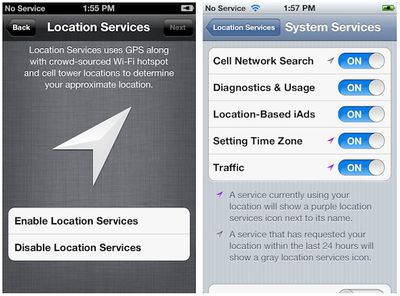
- Enhanced location services controls: Aside from a prominent new screen in the iOS 5 setup process outlining how location services work, the new beta also includes finer granularity of controls, allowing users to specify whether such functions as cell network searching, diagnostics, iAds, time zone setting, and traffic information may make use of the device's location information. This is of course in addition to the per-app location controls that are already available.

- Speed enhancements: User reports indicate that performance is significantly improved under the new beta, with a considerable reduction in lag.

- Voice roaming: In addition to the existing ability to turn off data roaming in order to avoid hefty data charges, the new beta adds a "voice roaming" toggle that will allow users to prevent their phone from connecting while on roaming networks not included in their carrier's service package and thus subject to extra fees.

- Prompt for moved video content: With iOS 5, Apple has rebranded the "iPod" app on the iPhone and iPad as "Music", in line with what is found on the iPod touch. The new beta now issues an initial prompt informing users that video content such as movies, TV shows, and music videos have been moved to the "Videos" app.

- Safari preferences: The ability to clear cookies and data has been restored in the new beta, and a new "Advanced" page has been added with additional tools for removing data and debugging.

- Other assorted tweaks: A new icon for the "Reminders" app that is being added in iOS 5, an iTunes Store button in the "Music" app, the Wi-Fi Sync setting renamed to "iTunes Wi-Fi Sync", and mailbox creation from within Mail.


Popular Stories

8 CarPlay Features in iOS 27 Feature

Which iOS 27 CarPlay Features Actually Work in Your Car?

Thursday September 17, 2026 4:17 am PDT by
In iOS 27, available now, CarPlay gets its biggest update in years, but some features depend on what type of car you have rather than your iPhone model. Some of the biggest additions won't do anything in the vast majority of vehicles on the road today. Here's how the new features pan out. Works in Any CarPlay Vehicle Custom widgets: In iOS 27, CarPlay is no longer limited to Apple's handful ...


iphone 18 pro max prepare

iPhone 18 Pro Max Requires 'Prepare to Ship' Battery Drain Before Shipping

Friday September 18, 2026 4:27 pm PDT by
The iPhone 18 Pro Max has a battery capacity over 20 watt-hours, which means there are additional shipping requirements. If an iPhone 18 Pro Max needs to be shipped somewhere, its maximum battery capacity has to be limited through firmware. According to Apple, the iPhone 18 Pro Max uses an "innovative battery-firmware solution" that limits battery capacity to below 20Wh between when the...
Apple Watch New Charging Puck

Here's Why a New Apple Watch Charging Puck Was Just Released

Wednesday September 16, 2026 8:53 am PDT by
The new Apple Watch Series 12 and Apple Watch Ultra 4 have hardware changes that allow for faster charging, but you will need to use the new version of the Apple Watch Magnetic Fast Charger included in the box in order to achieve this boost. If you need extra ones for your own charging stands or travel or so forth, Apple released the new version of the charger on its online store last week, with...

Top Rated Comments

198 months ago
did u really just say "in steve jobs we trust"? im sorry but steve jobs isnt even considered human to some of us.....more like the devil
Yes, damn him and his company that gives us high-quality electronics and software. The devil indeed.
Score: 17 Votes (Like | Disagree)
Voidness Avatar
198 months ago
They fixed one major annoyance with Notification Centre. Previously, in a full-screen game like Cut the Rope where the status bar is hidden, swiping from the top of the screen would pull down Notification Centre immediately. This was really annoying and interrupted the flow of the game. Now, swiping from the top in an application without a status bar will pull down the Notification Centre "handle" without interrupting the game. To pull down the Notification Centre completely, you pull down the handle. Here's a screenshot:
Score: 9 Votes (Like | Disagree)
198 months ago
Mail in iOS5

STEVE!!! CAN YOU HEAR ME?!

I have been asking for this since before iOS4... Please can we have separate signatures for the separate email boxes? It is a royal pain to either have to type out my professional signature block on professional emails or erase it for emails from my personal box.

I have sent this suggestion numerous times through Apple's website and it seems so silly to even be an issue!
Score: 9 Votes (Like | Disagree)
198 months ago
Sweet, now they just need to separate gps functionality from "Airplane Mode" since GPS is passive technology.
Score: 9 Votes (Like | Disagree)
Gemütlichkeit Avatar
198 months ago
I like everything except the extra "Music" and "Video" apps. Video's were fine being a tab in iPod.

At least take away the Youtube app and add it to "video"
Score: 8 Votes (Like | Disagree)
198 months ago
I hope that the battery life has improved.
Score: 8 Votes (Like | Disagree)