iPad App Store Gains Search Filters, Install Buttons for Previously-Purchased Apps - MacRumors
Skip to Content

iPad App Store Gains Search Filters, Install Buttons for Previously-Purchased Apps

Apple made several tweaks to the iPad interface for the iOS App Store yesterday, enhancing users' abilities to filter app searches and to determine which apps they have already purchased but may not have installed on their devices.
105712 ipad app store filters

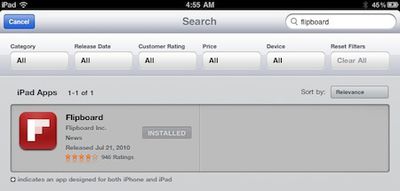
As noted by MacStories, the new search filters appear as a toolbar at the top of search results pages. The filters allow users to limit their searches by category, release date, customer rating, price, and device compatibility. With the number of iOS applications now exceeding 300,000 and iPad-specific apps pushing past 60,000, users should find the new filters handy for weeding through listings.
105712 ipad app store install buttons

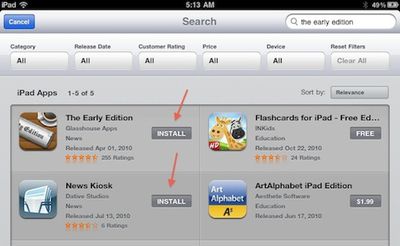
The second change, also noted by MacStories, involves a tweak to the way previously-purchased applications are displayed in App Store searches on the iPad. Typically, results have been displayed with a button showing the price of the app, and the user simply taps the button to purchase and install the app. Results for apps already installed on the device have been displayed with an inactive button simply saying "installed".

But what was less than ideal was the handling of apps that had been previously purchased but not currently installed on the user's device. Apple allows such apps to be downloaded free of charge, but search results simply displayed the normal button with the purchase price displayed. Users were required to attempt the purchase the application before discovering that they were entitled to download it free of charge to their devices. With the new tweaks, these search results now display an active "install" button indicating to users that they may install the previously-purchased apps without being charged a second time. The feature applies to the iTunes Store account that the user is signed into on the iPad App Store at the time of searching.


Popular Stories

8 CarPlay Features in iOS 27 Feature

Which iOS 27 CarPlay Features Actually Work in Your Car?

Thursday September 17, 2026 4:17 am PDT by
In iOS 27, available now, CarPlay gets its biggest update in years, but some features depend on what type of car you have rather than your iPhone model. Some of the biggest additions won't do anything in the vast majority of vehicles on the road today. Here's how the new features pan out. Works in Any CarPlay Vehicle Custom widgets: In iOS 27, CarPlay is no longer limited to Apple's handful ...
Apple Watch New Charging Puck

Here's Why a New Apple Watch Charging Puck Was Just Released

Wednesday September 16, 2026 8:53 am PDT by
The new Apple Watch Series 12 and Apple Watch Ultra 4 have hardware changes that allow for faster charging, but you will need to use the new version of the Apple Watch Magnetic Fast Charger included in the box in order to achieve this boost. If you need extra ones for your own charging stands or travel or so forth, Apple released the new version of the charger on its online store last week, with...
ios272anniversary

iOS 27.2 Could Save Your Marriage

Wednesday September 16, 2026 1:32 pm PDT by
The iOS 27.2 beta that Apple released today adds a feature that reminds you it's your anniversary when you call someone, as long as you've added the date in the Contacts app. On the date of your anniversary, when you go to call the person, you'll see a reminder that it's an important day so you don't forget to say something. The anniversary alert uses Call Context, a feature Apple added in...