

Got a tip for us? Share it...

iOS 4 Features: MultiTasking, Folders, and Much More


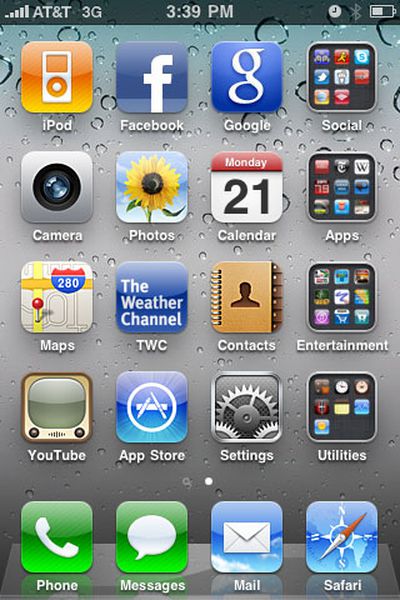
Image from Post your Home screen thread

Today's release of iOS 4 marks a major upgrade to Apple's iPhone and iPod touch devices. High demand for the software update has caused a strain on Apple's servers resulting in slow downloads for many customers. For those who are able to get the software downloaded and installed, here are a few walkthroughs that go over the major features found in the new iOS.

- iLounge: Apple iOS 4.0
- ArsTechnica: iOS 4: what's new, notable, and what needs work
- Macworld: Exploring iOS 4's multimedia features
- TiPb: iOS4 Walkthrough
- Gizmodo: Hidden Secrets of iOS 4

From a casual user standpoint, the biggest features will include:

- Folders - With the explosion of the App Store, App management has been a major issue. The introduction of Folders allows users to simply drag and drop icons on top of each other to create a custom folder of Apps. Tapping on the folder brings up a display of all the enclosed icons.
- MultiTasking / Fast App Switching - Exiting an App will now place it into a suspended mode that allows you to return to it quickly... at least for those apps that support it. Meanwhile, Apps with more sophisticated needs such as Pandora Radio can continue to play streaming music after you've left the app. Double tapping on the home button gives you a display of most recent apps that you've used and also gives you quick access to the iPod/Music controls if you swipe right on the icon bar.

Note that Apple's Game Center is not yet live. While an early version was provided to developers, Apple does not plan to launch the social gaming service until later this year.


Top Rated Comments

(View all)

22 months ago
I hope all the reviews warn 3G and 2nd Gen iPod Touch users not to upgrade unless they absolutely need to. Performance is terrible.
Rating: 0 Positives / 0 Negatives
22 months ago
Wait, there is no porn folder?

Oh that's right, it's called Safari =p
Rating: 0 Positives / 0 Negatives
22 months ago


Any ideas!?

Happened when rearranging everything into folders after the ios 4 update.

It's a bit upsetting! Have tried restoring and it then made me lose all my apps off the phone, I guess it couldn't reinstall them without the App Store being present?
Rating: 0 Positives / 0 Negatives
22 months ago
Wallpapers? Revolutionary! I bet the other phone companies copy Apple on that feature.
Rating: 0 Positives / 0 Negatives
22 months ago
My download finished quite quickly, but I have started the update and it is on the "Backing up iPhone" stage. It has been running for over 30 minutes and its only about 10 or 15 percent done. Is this normal?!?
Rating: 0 Positives / 0 Negatives
22 months ago
Anyone else having problems with apps crashing/not starting. Zinio for example will not start (nor will Tagesanzeiger, swiss newspaper app), very upsetting :(
Rating: 0 Positives / 0 Negatives
22 months ago

Wallpapers? Revolutionary! I bet the other phone companies copy Apple on that feature.


sarcasm? how original!
Rating: 0 Positives / 0 Negatives
22 months ago
Does anyone know how to use the "crop" and "rotate" features in the photo album? I can't seem to find info on it anywhere, but it's listed as a new feature. K, thanks.
Rating: 0 Positives / 0 Negatives
22 months ago
After 3 hours of downloading, backing up, installing and restoring we r almost there.
Rating: 0 Positives / 0 Negatives
22 months ago
1. I tried it on a 3G - it almost kills the phone. Performance is poor, everything is sluggish. We have another 3G that is jailbroken, so I have been enjoying these features for a long time now. In fact I've had more than this.

2. Wallpaper? In 2010? How cool is that?!


Sorry, I have to go - my other MBP crashed while restoring the 3G. This was the first and last time that I tried the first version of any Apple software. This stinks!
Rating: 0 Positives / 0 Negatives

[ Read All Comments ]













