Got a tip for us? Share it...

MagicPrefs Adds Functionality to Magic Mouse

Ever since the release of Apple's multi-touch Magic Mouse just a few months ago, one of the primary complaints from users has been a lack of support for Expos and other functionalities given the limited options available in System Preferences for configuring the mouse.

Addressing these issues, Gizmodo today points to a new menu bar application, MagicPrefs, that greatly expands the customizability of the Magic Mouse.
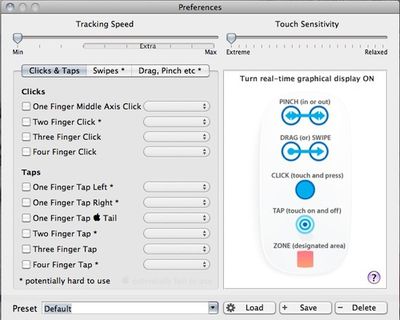

The free MagicPrefs application offers the ability to customize various types of clicks, taps, swipes, and pinches and assign them to a wide variety of system functions. The application also permits tracking speed to be increased beyond the default maximum, addressing another common complaint about the Magic Mouse. Finally, MagicPrefs offers real-time visual feedback of touch patterns to allow users to experiment with and test various gestures.


Top Rated Comments

(View all)

28 months ago
Very cool, just what I have been waiting for.
Rating: 0 Positives / 0 Negatives
28 months ago
Yeah, this just might make the mouse worth buying :eek:.
Rating: 0 Positives / 0 Negatives
28 months ago
Wow, that is ****ing amazing. I wonder why Apple didn't just do this program themselves.

My 2 big complaints was the lack of programmable multitouch function and the slow tracking speed. It looks like I can now access Expose from the mouse and can increase the tracking speed.

Seriously, this should be Page 1 news.

I know so many people that held off on getting the Magic Mouse because of Expose. This is VERY big news.

I can't wait to test it out tonight.
Rating: 0 Positives / 0 Negatives
28 months ago
I can't see why Apple doesn't offer this...

I was interested in the magic mouse until I found out what limited touch functionality it had.
Rating: 0 Positives / 0 Negatives
28 months ago
Will this mouse -- along with the swiping/scrolling functionality -- work on a Vista-based PC? Anyone know? Thanks...
Rating: 0 Positives / 0 Negatives
28 months ago
Not owning a Magic Mouse, I'm surprised to learn this functionality didn't accompany that software update for all Magic Mouse users.
What was the point of that patch?
Bizarre.

So... um... thanks MagicPrefs!

And agreed with @levitynyc: I too find this info Page 1 worthy.
Rating: 0 Positives / 0 Negatives
28 months ago

I can't see why Apple doesn't offer this...

I was interested in the magic mouse until I found out what limited touch functionality it had.


It's clear why Apple didn't do this. Apple are about keeping an interface simple and intuitive. To have a dozen functions right from the get go is overwhelming for general access.

I mean, they could add ten buttons to a trackpad if they wanted, but Apple's style is to go with, well.... none.
Rating: 0 Positives / 0 Negatives
28 months ago

It's clear why Apple didn't do this. Apple are about keeping an interface simple and intuitive. To have a dozen functions right from the get go is overwhelming for general access.

I mean, they could add ten buttons to a trackpad if they wanted, but Apple's style is to go with, well.... none.


Simple would be a normal mouse with one button, oh wait they already did that!
Rating: 0 Positives / 0 Negatives
28 months ago
Does this do anything different to BetterTouchTool?
Rating: 0 Positives / 0 Negatives
28 months ago
There's also BetterTouchTool which is both free and good.

This one may be worth checking out too.

Ultimately, I can't understand why Apple made MagicMouse so lame. BBT and this one are definitely must haves to get the most out of your MM - they really do make the mouse shine.
Rating: 0 Positives / 0 Negatives

[ Read All Comments ]