

Got a tip for us? Share it...

App Store Highlight: RedLaser

Prior to the iPhone 3GS, the 2-megapixel camera with a fixed focus lens in previous iPhone models was a pain point for many users frustrated with its inability to capture detail within short distances, particularly compared to cameras in other less expensive cell phones. Developers who created apps using the iPhone's camera often received the brunt of this ire.

In particular, this shortcoming affected barcode reader apps, and many such apps made available in the App Store before the release of the iPhone 3GS suffered from poor reviews by users who had disappointing experiences trying to use them. With the improved 3-megapixel camera with an auto-focus lens in the iPhone 3GS, this appears to have changed for the better. When it comes to the current crop of barcode reader apps, RedLaser by Occipital stands out - it was recently updated to version 2.2.0 and it works very well. In our informal tests, it had a 100% success rate of reading barcodes on a variety of items using an iPhone 3GS.

RedLaser's feature list includes the following:

- Scans UPC, EAN, and UPC-E barcodes
- Finds prices using Google Product Search, and Amazon
- Email a list of products
- Send barcodes as email attachment
- Search ANY website using a custom URL (How-To coming soon)
- Automatic search localization for USD, EUR, and GBP, as well as Amazon (.com/.co.uk/.de/.co.jp/.fr/.ca/.cn) autoselection


Scanning a barcode goes quickly and there are on-screen guide bars to help you place the barcode in a position to be scanned. Once the barcode is in the correct position, the guide bars turn green and the barcode is scanned - there is no need to actually capture an image of the barcode or press any other virtual buttons to prompt the scan.
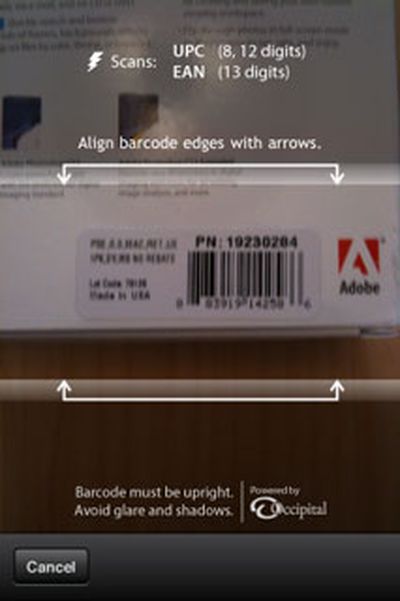
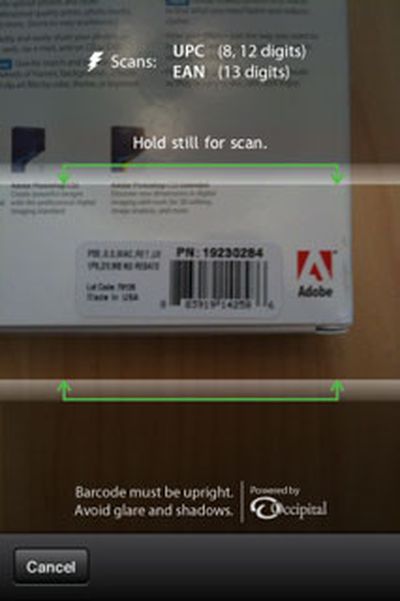
Lining up a barcode to scan


By default, the app automatically conducts a search on Google and Amazon to find pricing and product information, though this automatic search following a scan can be turned off in the main settings pane.
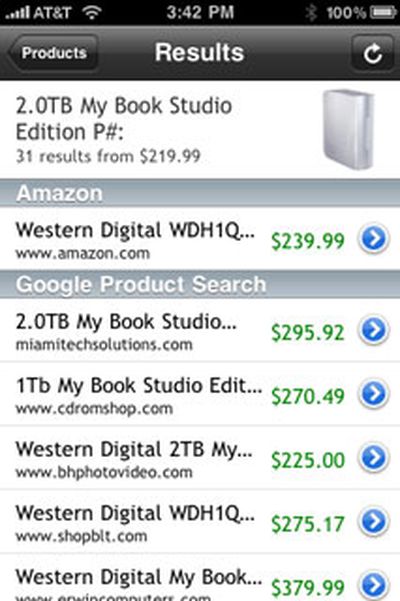
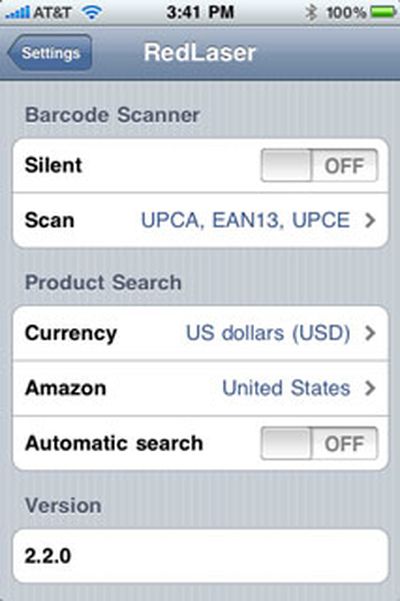
Search results after scanning a barcode and the settings pane


RedLaser's description states that it works on all iPhone models, though informal testing with a first-generation iPhone yielded fewer successful scans than with an iPhone 3GS, as expected, though it still works well enough that its $1.99 price [App Store] makes it a good buy if you like to comparison shop online as you browse in a brick-and-mortar store.


Top Rated Comments

(View all)

Posted: 34 months ago
How many scans that used the automatic search feature did you actually attempt? There are quite a few reports from users on the iTunes Store that say that the automatic search feature fails very often and it appears that the failures are caused by misread barcodes (i.e. you get a completely incorrect product lookup). A few users say that more often than not you get the wrong product (which makes the scanning nearly useless). Some of these reports are coming from iPhone 3GS users so it's not just a question of the camera not being able to focus on the barcode.

I know that this product is only $1.99, but if it really fails to work then it would just be a waste of two dollars and a frustration for users.

Can anyone who has an iPhone 3GS and RedLaser comment further on its accuracy in reading barcodes and the results of the auto search?
Rating: 0 Positives / 0 Negatives
Posted: 34 months ago

Can anyone who has an iPhone 3GS and RedLaser comment further on its accuracy in reading barcodes and the results of the auto search?


I have a 32gb 3GS and have also had a 100% recognition rate. Sometimes the search can't find the product online, but it still tells you what you're scanning.

What it really needs is this: The ability to lookup stores nearby to find the product if it's out of stock. For instance, I was at Target yesterday with my wife, and she was having a bad day and wanted her favorite treat: Ritter Sport Marzipan bars. Well they were out of stock and I used this app to scan the code to see if there were any at other stores but it only showed online sources, which didn't really help us much. It did recognize this somewhat obscure (I think German?) brand though.
Rating: 0 Positives / 0 Negatives
Posted: 34 months ago
I bought it and I have to say that it works really well. Far better than others I have tried. I was showing this off in a bar the last night and it scanned a number of things including a beer bottle in pretty poor lighting conditions.

Too bad Delicious Library can't do this, though I'm not sure why. They say Amazon has issues about displaying its info on mobile devices, but RedLaser can do it.
Rating: 0 Positives / 0 Negatives
Posted: 34 months ago
This app is great for me. It saved me money plenty of times and it was well worth the $.99 I paid for it a couple of months ago (before the 2.2.0 update).
Worked great at Best Buy when It showed me the lower prices on BestBuy.com than in the Best Buy store I was standing in.
Rating: 0 Positives / 0 Negatives
Posted: 34 months ago
Is there any way to type in the barcode? It would be especially helpful if it were a 10 key (num pad) as well.

I work in retail and even the top of the line commercial scanners don't work 100% of the time especially if the barcode is skewed, stretched or partially wiped out.
Rating: 0 Positives / 0 Negatives
Posted: 34 months ago

Is there any way to type in the barcode? It would be especially helpful if it were a 10 key (num pad) as well.

I work in retail and even the top of the line commercial scanners don't work 100% of the time especially if the barcode is skewed, stretched or partially wiped out.


I just bought it ($2 was worth just the chance to find a non-junk barcode app), and yes, it does let you key in the barcode manually.

I've tried it on about 20 various items so far, and it's only refused to scan 1. None have come back incorrect so far (though it did identify my USB Humping Dog as "USB Dancing Dog" :) ). I'm impressed, though it was annoying that the 1 it could not scan was pretty much perfect in every way.

I'm on a 3G, and it also does the scanning in real-time. I hated those apps where you had to take a picture of the barcode. Again, good job.

No 2D barcode support, hopefully they'll add that later.

Edit: The very next item I scanned was "xkcd: volume 0". It came up as "Product of Fangamer.net", though the number was scanned correctly. So it looks like a database error, not a scanning error.
Rating: 0 Positives / 0 Negatives
Posted: 34 months ago
Now that the camera is becoming a seriously useful part of App Building, perhaps Apple should consider installing slightly better and more serious cameras on the iPhone as opposed to an additional gimmick...
Rating: 0 Positives / 0 Negatives
Posted: 34 months ago
That works pretty well with iPhone 3G too! (Not tried that app RedLaser but others.)

You just need the Griffin Clarifi hard case, one of the best cases for iPhones, because it protects the camera lens (maybe the only one, an important feature because the lens is very exposed to scratches) and offers an additional closeup lens. I wrote a description (German language) with photos of that case and examples of nice closeup photos made with iPhone 3G:

http://rossau.wordpress.com/2009/04/21/schutz-nahlinse-griffin-clarifi-case/


And there are apps like Evernote and Snappr since quite a while offering text recognition or barcode scanning with that closeup lens. All links inside the article.

Old thread here at MR:

http://forums.macrumors.com/showthread.php?t=614682
Rating: 0 Positives / 0 Negatives
Posted: 34 months ago
Darn, I was all set to buy until I got the "requires OS 3.1" message.
Looks good but not give-up-unlock-n-jailbreak good. Back into the pocket goes me $2. Maybe drop the OS requirements Mr. Dev?
Rating: 0 Positives / 0 Negatives
Posted: 34 months ago

For instance, I was at Target yesterday with my wife, and she was having a bad day and wanted her favorite treat: Ritter Sport Marzipan bars. Well they were out of stock and I used this app to scan the code to see if there were any at other stores but it only showed online sources, which didn't really help us much. It did recognize this somewhat obscure (I think German?) brand though.


10 years ago Ritter Sport was obscure. These days you can find em in Wal-Mart. Damn good chocolate though. Not like American chocolate, which tastes as though it were comprised of 50% wax, 40% sugar and 10% cacao.
Rating: 0 Positives / 0 Negatives

[ Read All Comments ]














