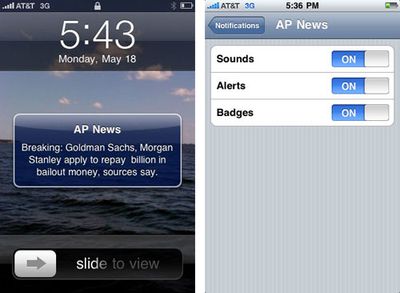
iPhone Push Notification Settings and Screenshots
Apple began
high volume testing of the upcoming Push notification system for iPhone applications earlier this week. The system offers 3rd party applications the ability to push notifications to the user even when they are not the running application.
Each application will ask for permission to provide push notifications upon launch. Once authorized, you can customize the type of notifications you wish to receive: sounds, alerts, and/or badges. Alerts provide an SMS-like pop up dialog while badges simply add a number to the corner of the app's icon. An additional gallery of screenshots is provided by MyAppleGuide.
The Push notification system will accompany the iPhone 3.0 release which is scheduled this summer.
Popular Stories
Update 10:04 a.m.: iOS 27 is rolling out now, though it may take a bit for all users to see it, so keep checking!
Apple is about to release iOS 27, which will finally deliver more advanced Siri AI capabilities as well as a variety of other refinements, improvements, and new features to iPhones. It's Apple's biggest software update of the year, and Apple announced at Wednesday's iPhone event...
Update — 10 a.m. Pacific Time: Apple has released iOS 27.
During its iPhone 18 Pro and iPhone Duo event last week, Apple announced that iOS 27 will be released widely on Monday, September 14.
iOS 27 should be available around 10 a.m. Pacific Time / 1 p.m. Eastern Time today via the Settings app, under General → Software Update.
Below, we have highlighted eight new features and...
Apple today announced a new subscription initiative that turns paid iCloud+ subscriptions into a broader services bundle in more than 100 countries.
In select countries, Apple says every paid iCloud+ plan, including the cheapest 50GB tier, now includes Apple TV and Apple Arcade "at no additional cost," while family sharing extends the storage, TV and Arcade access to up to five people....