

Got a tip for us? Share it...

Apple Depicts Advanced Multitouch Gesturing Control Panel in Mac OS X

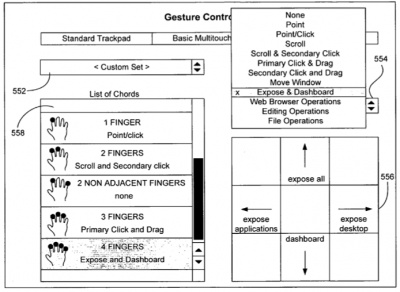
In case there were any doubts that Apple was exploring the use of advanced multitouch gestures under Mac OS X, a recent Apple patent application authored by Wayne Westerman (of Fingerworks) shows mockups of a Mac OS X gesturing control panel with options to configure standard trackpad, basic multitouch, and advanced multitouch settings:


Apple's notebooks already contain what we presume to be "basic multitouch" with two-finger scroll, rotate, and zoom, but "advanced multitouch" has not yet been seen in shipping products.

The patent application depicts how one could customize these advanced gestures for Expose and Dashboard, by using four finger swipes up/down/left/right:
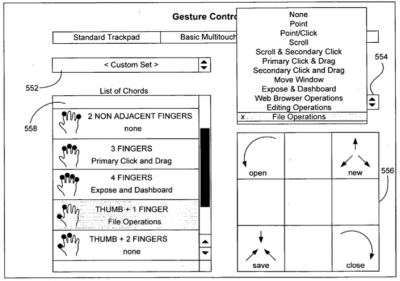
File operations, such as Open, New, Save and Close using gestures based on your Thumb and Forefinger:
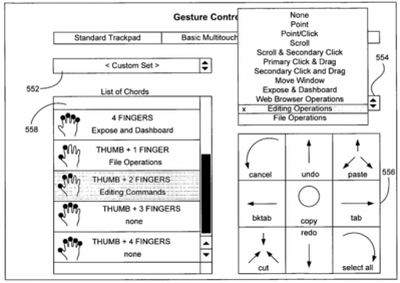
And even editing operations such as Copy, Cut, Paste, Undo, Select All, Tab, and Cancel using gestures based on your Thumb and Two Fingers:
They also claim to be able to distinguish between various combinations of fingers, including adjacent and non-adjacent finger presses. In particular, they point out that the pinky finger when applied sideways to the trackpad (as in the bottom of a fist) generates a unique pattern and could be used for its own customizable functionality: such as adjusting volume or putting the computer to sleep.

Over the past few years, numerous multitouch patent applications have been revealed Apple's ongoing work on gesture computing. Apple has been making small and steady steps at introducing the multitouch interface -- first in the iPhone, and now in the MacBook Air. Apple is expected to expand this basic multitouch functionality to the remainder of their notebook product line.


Top Rated Comments

(View all)

55 months ago
This is quite impressive. Looking forward to multi-touch on the new MacBook Pros. Perhaps, even the next generation Mighty Mouse will incorporate Multi-Touch capabilities.
Rating: 0 Positives / 0 Negatives
55 months ago
HOLY... CRAP.

I'm saving up RIGHT NOW for a Macbook Pro. :D
Rating: 0 Positives / 0 Negatives
55 months ago
The mouse is slowly becoming obsolete...
Rating: 0 Positives / 0 Negatives
55 months ago
I imagine this will speed things up further still. But to learn EVERY gesture? Seems like a hobby more than a functional premise.
Rating: 0 Positives / 0 Negatives
55 months ago
Well, here's to hoping, but I won't be able to enjoy any of these features on my current setup, unfortunately.
Rating: 0 Positives / 0 Negatives
55 months ago
cool news. If the MBP get updated tomorrow or whenever they do, they'll probably have it.
Rating: 0 Positives / 0 Negatives
55 months ago
Next Up:

Apple re-inventing the human-computer interface with... full-body computing.

The mouse is going to see so archaic in a couple of years.

I sit around 20 hours a day working on my computer (or so it feels), and my gut is paying the price. I welcome a little more physical movement in my computer usage. :)
Rating: 0 Positives / 0 Negatives
55 months ago
So I take it the MBA and new MBPs should get this eventually as a update one day?
Rating: 0 Positives / 0 Negatives
55 months ago
Great, so we are finally getting cut & paste then?
Rating: 0 Positives / 0 Negatives
55 months ago
i thought tablets were going to be the next big thing, but i guess there still a ways off to becoming the norm.
Rating: 0 Positives / 0 Negatives

[ Read All Comments ]













