

Got a tip for us? Share it...

iPhone Safari 'Action' Pop Up?

Forum user photobiker notes an interesting pop-up that appears in certain situations in the iPhone's Safari browser. Holding and pressing in the margin of a webpage (near the edge of the screen) brings up a small pop-up titled "Action".
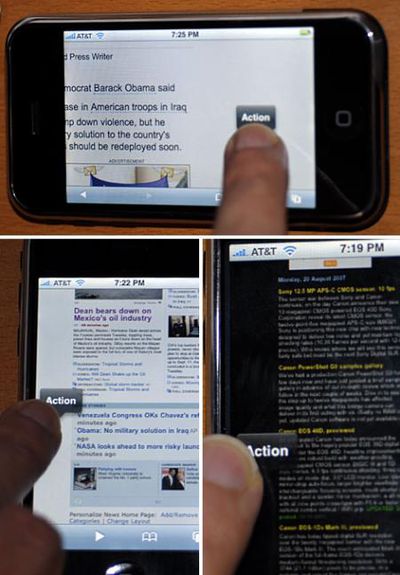


Steps to bring it up:

- Open Safari on the iPhone
- Visit a page with some margins, like most pages have (the pictures were taken with http://news.yahoo.com and http://dpreview.com)
- Tap-and-hold inside the margin, the screen is dimmed
- Hold your finger perfectly still for 2 seconds
- An "Action" popup menu appears

As far as can be seen, it doesn't quite do anything. Note that this shouldn't be confused with pressing-and-holding on links in Safari which has long been known to bring up the target of the link -- but could simply be a bug related to this known feature.


Top Rated Comments

(View all)

Posted: 59 months ago
I haven't seen this described anywhere so...

- Open Safari on the iPhone
- Visit a page with some margins, like most pages have (the pictures below were taken with http://news.yahoo.com and http://dpreview.com)
- Tap-and-hold inside the margin, the screen is dimmed
- Hold your finger perfectly still for 2 seconds
==> An "Action" popup menu appears

I did not get the "Action" popup to do anything but it sure looks like the prototype of a UI that could be used for copy/paste. Maybe one of you will find a way to associate an actual action to it?

On some pages where the margin is fairly narrow (like the left margin of dpreview.com), you have to tap completely to the left of the screen, maybe with half the finger out of the screen.

Here are the pictures....
Rating: 0 Positives / 0 Negatives
Posted: 59 months ago
I've never seen that one... mine does. Looks like it'll have a drop down?
Rating: 0 Positives / 0 Negatives
Posted: 59 months ago
Not working for me. Maybe because I've updated to 1.0.2? What version of iPhone software are you running?
Rating: 0 Positives / 0 Negatives
Posted: 59 months ago

Not working for me. Maybe because I've updated to 1.0.2? What version of iPhone software are you running?


I can reproduce it on iPhone 1.0.2. I have to hit the very edge of the physical screen for it to happen

arn
Rating: 0 Positives / 0 Negatives
Posted: 59 months ago
What's interesting to me is that it happens on "blank" portions of the web interface.

I think this is probably going to develop into options similar to what you get if you right click on blank portions of a web browser on a destkop? Maybe even cool options like "take a screenshot and save to photos".
Rating: 0 Positives / 0 Negatives
Posted: 59 months ago
I'm afraid there's nothing special about it, and it existed since the iPhone came out.

With the iPhone web browser, if you press and hold on a link you will eventually see one of those bubbles telling you the url that the link points to. If an element has a Javascript event rigged up to occur on click, you will get the word "Action" instead of a URL.

Basically, that bubble is just letting you know that the space you're clicking on is set up to perform some sort of Javascript event if you click it.
Rating: 0 Positives / 0 Negatives
Posted: 59 months ago
After much tapping, I finally got it to work on news.yahoo.com. Haven't had any luck on other sites. My finger is now numb from repetitive tap syndrome.
Rating: 0 Positives / 0 Negatives
Posted: 59 months ago
(that first picture looks like a butt; plumber butt :D)
Rating: 0 Positives / 0 Negatives
Posted: 59 months ago
go to a news site click and hold on a link... it pops up with the name of the link.
Rating: 0 Positives / 0 Negatives
Posted: 59 months ago
Yeah, I remember a post on MR way back in the day (1.0.0), and I was able to get it to work on google news, so it's been there all along. I always wondered if it was a copy / paste, etc... (right click stuff) that wasn't ready for prime time so was cut, but somehow slipped in under certain situations.

Paul
Rating: 0 Positives / 0 Negatives

[ Read All Comments ]













