

Got a tip for us? Share it...

My iTunes Widgets from Apple

Apple has released a web widget that allows users to embed their recent iTunes Purchases, iTunes Reviews and iTunes Favorites into their website, blog or social networking profile. The new service is called My iTunes

iTunes is giving you an effortless way to keep your friends up-to-date with your favorite music, TV shows, movies, and more. My iTunes widgets are simple, self-updating add-ons for your web page, social-networking profile, or blog.

Use My iTunes to share your top reviews, favorite artists, and new music, movies, and TV shows from the iTunes Store with anyone who visits your site.


To start, you need to log into the iTunes Store. From there you click "Enable My iTunes" from your profile and check off which features you want to display:

- My iTunes Purchases - The most recent music, music videos, TV shows, and movies you've purchased from the iTunes Store.
- My iTunes Reviews -Music, music videos, TV shows, and movies you've given a 4- or 5-star rating on the iTunes Store.
- My iTunes Favorites - The artists whose music you've purchased the most from the iTunes Store.

The end result is a Flash widget (Screenshot shown here):
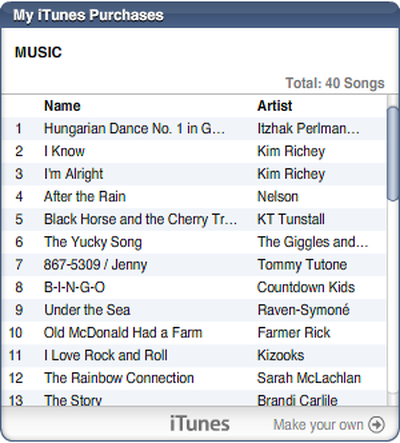

Image links to live widget embedded in the comment thread
Musical taste of David Kirk (& kids) of Tech Recipes


Top Rated Comments

(View all)

59 months ago
We've enabled this tag temporarily for people to share their itunes.

Instructions: To embed your own into the forums, you need to get your "userid" from the Get HTML Code URL from iTunes after you've enabled My iTunes.

Click on Get HTML Code
Attachment 81964

Copy the UserID from the URL
Attachment 81963

then use

Attachment 81965
Rating: 0 Positives / 0 Negatives
59 months ago
thats pretty awesome. i think it will open up a lot of people to new music. ..and fill up the pages of threads really quick.
Rating: 0 Positives / 0 Negatives
59 months ago

To embed your own into the forums, you need to get your "userid" from the Get HTML URL.


Where is that?
Rating: 0 Positives / 0 Negatives
59 months ago
After you get your my itunes page up on safari or firefox or whatever then you make it how you want it to appear then there's a button to the left that says copy code .. i think .. it the top button of the two choices.. you click that then at the end of the url is your userid.
Rating: 0 Positives / 0 Negatives
59 months ago
[itunes-purchases]61416680[/itunes-purchases]

Pretty sweet.
Rating: 0 Positives / 0 Negatives
59 months ago
So now Apple likes Flash?

How are all these widgets and the new .Mac photo gallery stuff supposed to work on my iPhone?
Rating: 0 Positives / 0 Negatives
59 months ago
This is cool..

It also leads me to believe flash is coming to the iPhone ;)

[widget removed, not working]
Rating: 0 Positives / 0 Negatives
59 months ago
I noticed that couple nights ago. Good stuff.
Rating: 0 Positives / 0 Negatives
59 months ago
That is pretty cool... looks like a good way to learn about interesting new music from people, but some of the websites out there are absolutely awesome for this. I guess apple paid attention when sites like Last.fm were bought by CBS for 280 million...

http://arstechnica.com/news.ars/post/20070530-cbs-wants-to-be-an-audience-company-buys-last-fm-for-280-million.html
Rating: 0 Positives / 0 Negatives
59 months ago
[itunes-purchases]92255024[/itunes-purchases]

Now if only they were to put like Last.fm's recently played, it would be so awesome
but i doubt that will happen soon enough

sigh
Rating: 0 Positives / 0 Negatives

[ Read All Comments ]













