

Accessory company Alogic has been releasing an increasing number of displays, and the latest model arrives as a 40-inch 5K2K ultrawide model that joins existing 34-inch and 40-inch 4K models in the Edge family. I've been testing out the new 40-inch 5K2K model for the past few months, and I've found it to be a solid display offering major screen real estate for productivity users.
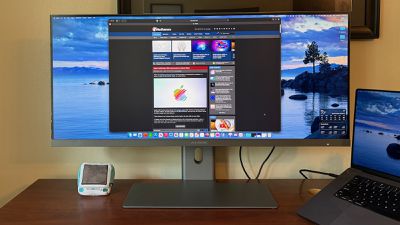
As a 40-inch ultrawide display, the Edge 5K is big, and it arrives in a fairly large box, although it is packaged efficiently with styrofoam padding, stand parts, and other accessories nestled around the massive display. The Edge 5K is available in either silver or space gray, and setup is simple, with a large metal foot that's attractively thin paired with a solid arm that features a cable passthrough for organization. The two stand pieces attach easily to each other with a single screw that can be tightened by hand or with a screwdriver, and the whole stand snaps easily into the back of the display.
Alternatively, you can use any sturdy 100×100mm VESA mount if you prefer a different method of supporting the display. A separate 180-watt power brick powers the display and attached accessories, and it can push up to 90 watts upstream to a connected computer.
I will say that there is a bit of wobble in the display, due partly to the sheer size of the display panel and also the range of adjustments supported by the stand, which includes height, tilt, swivel, and rotation. It remains stable enough on my desk amid vibrations from typing and other movement, but it can definitely wobble if you bump it or have it on surface that is anything less than rock solid. Alogic tells me the bit of wobble is a tradeoff it elected to make in order to maximize adjustability. It's certainly not a deal-breaker for me, but something to be aware of.
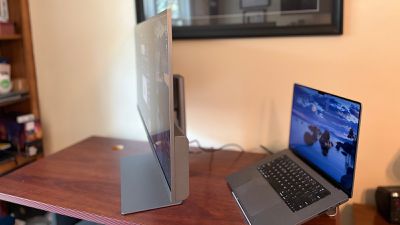
This display looks sleek, with thin black bezels around the top and sides and then a thicker silver aluminum chin with some subtle Alogic branding and a power status light (that does unfortunately pulse rather brightly while the display is sleeping, so be aware if you're using it in a bedroom). The panel housing itself has a very thin profile on the upper two-thirds, and then a thicker portion bulging out of the back on the lower third where the stand attachment, ports, and electronics are housed.
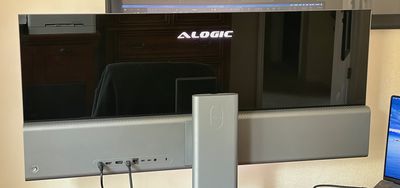
The upper two thirds is actually glass on the rear, which brings a bit of class if you position your display such that the rear of it is visible. The design also takes advantage of the display backlight to provide a lighted Alogic logo on the rear of the display, which could be a positive or a negative depending on your preference. Alogic tells me it put extra focus on the design of the display's backside, based on feedback from users who like to use these monitors in offices where the rear is frequently visible to others sitting across a desk, for example.
I was impressed with the display quality out of the box. I really didn't need to make any adjustments in either macOS or the through on-screen menus of the display, though I did ultimately play around with them to understand the range of adjustments that are available. As a 40-inch 5K2K display, it measures in at 5,120 by 2,160 pixels at 138 pixels per inch. That doesn't match true Retina pixel density of an iMac or a smaller 4K or 5K display, but I was pleasantly surprised at how sharp everything looked, even coming from my usual setup of as pair of high-density LG UltraFine 5K displays.
The Edge 5K offers 100% coverage of the sRGB spectrum, 99% of DCI-P3, and 94% of Adobe RGB. It also supports refresh rates up to 100Hz, and while that's not as high as some gaming-specific displays on the market, the bandwidth demands of the display's high resolution limits the ability to push a super-high refresh rate. Still, 100Hz is great for a productivity-focused setup and will even work fine for many games.
This is a matte display, so definitely be aware of that if it's a concern for you. I'm doing productivity work near a window and can get a bit of glare at certain times of day, so I prefer matte displays and this one looks great to my eye. It's an IPS panel with up to 400 nits of typical brightness, which is fine for my workspace although there are brighter displays on the market.
While you can certainly run the display at full 5,120 × 2,160 resolution, I found that it made on-screen content too small given the viewing distance I am typically at. On the other end, running at 2,560 × 1,080 as a true Retina display made content too large, so I found the 3,840 × 1,620 scaled option to be the perfect resolution for this display in my setup. It provides a large canvas for putting multiple apps and windows side-by-side, with everything appearing at a legible size, and macOS handles scaled resolutions quite well so I had no issues with display quality.
Coming from a pair of 27-inch 5K displays, I did have to figure out a new layout for my desktop with the slightly smaller amount of screen real estate, but having it all on one display made it easier to adjust my window sizes and tile them on my desktop.
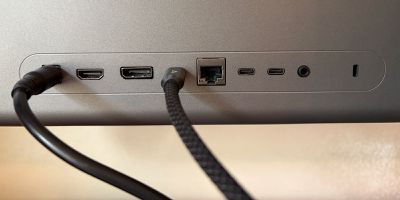
The Edge 5K features a number of handy connectivity options on the rear, with display connectivity options of USB-C (supports both data and power delivery), DisplayPort 1.4, and HDMI 2.0 (refresh rate limited to 30Hz at 5K resolution). When connected over USB-C, the display also acts as a hub with two additional downstream USB-C ports running at USB 2.0 speeds, a Gigabit Ethernet port, and a 3.5mm audio jack for connecting headphones or externally-powered speakers (does not support microphone input).
Two 3-watt speakers are built into the display, but as is typical in most displays, they don't sound great. The speakers also don't integrate with Mac keyboard shortcut keys for volume (the same is true for display brightness), but Alogic tells me it's planning a firmware update for around the middle of the year to add this functionality.
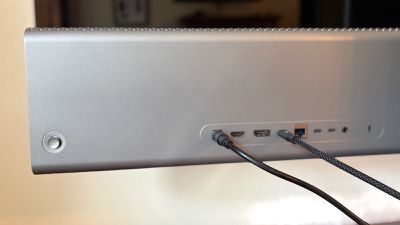
The rear of the Edge 5K features a joystick button to access and navigate through the on-screen menus. It provides quick access to volume, brightness, display presets, and cycling through connected video sources, and then you can dive deeper into an array of adjustments for the backlight, contrast, blue light shift, Adaptive Sync, sharpness, Picture by Picture and Picture in Picture mode settings, color temperature, HDR, and more.
The Alogic Edge 5K is normally priced at $1,699.99, but Alogic is currently offering a 10% discount that brings it down to $1,529.99. Silver and Space Gray color options are available, and it comes with a solid two-year warranty.
Comparison to Apple's Studio Display
At this price point, it is natural to compare the Edge 5K to Apple's just-upgraded Studio Display, but these displays serve very different purposes. The Studio Display measures just 27 inches with a 16:9 aspect ratio, and for most users it will run best in true Retina mode, yielding a desktop size of 2,560 × 1,440 from the display's 5,120 × 2,880 pixels.
While the Edge 5K also offers 5,120 pixels in the horizontal dimension, the 21:9 ultrawide aspect ratio means it offers fewer pixels in the vertical dimension than the Studio Display. But the much larger 40-inch size means you can effectively have more screen real estate than on the Studio Display if you run it a scaled resolution in between full and Retina sizes.
The Studio Display does of course also offer a true Apple design aesthetic and build quality, and offers tight integration with macOS that the Edge 5K can't currently match. The Edge 5K also lacks a built-in webcam and microphone, and downstream USB-C connectivity options are more limited at just USB 2.0 speeds.
On the positive side, the Edge 5K offers more connectivity options, so if you have a PC or other video source, you can use HDMI or DisplayPort to connect it directly to the Edge 5K without the need for adapters, and you can easily switch between inputs or even take advantage of dual sources simultaneously with Picture in Picture or Picture by Picture.
Both of these displays are toward the pricier end of things among more mainstream displays, but they're different enough that you should be able weigh your needs (physical display size, connectivity, etc.) to figure out what's most important to you and which display will meet those needs the best.
Note: Alogic provided MacRumors with the Edge 5K display for the purposes of this review. No other compensation was received. MacRumors is an affiliate partner with Alogic. When you click a link and make a purchase, we may receive a small payment, which helps us keep the site running.















































Top Rated Comments
This doesn't even have a a19 with 12gb ram? How is that possible?
It's easily fixed with BetterDisplay, so it's possible.