Vimeo Releases iPhone App With Video Editing Features - MacRumors
Skip to Content

Vimeo Releases iPhone App With Video Editing Features

by

130158 vimeo iphone video editing

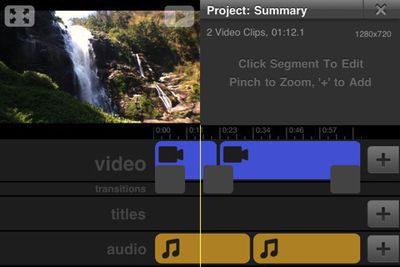
Popular video sharing site Vimeo today released a new iPhone application offering a number of features including relatively advanced video editing features including focus control, trimming and combining tools, transitions and effects, and music/audio tools. The application of course also offers more standard features for Vimeo users, including support for viewing and uploading of Vimeo videos, editing data on existing videos, and sharing options.

An easy-to-use video editor

- Capture video with focus control and grid alignment
- Combine, edit, and trim your videos
- Add transitions, titles, and effects
- Add music and recordings
- Control volume levels
- Save edited videos to your camera roll or upload directly to Vimeo

The whole Vimeo experience

- Watch and manage all your existing Vimeo videos and download them to your camera roll
- Easily upload your raw footage or edited creations in HD or SD
- Pause and resume uploads
- Replace existing videos
- Edit title, description, tags, privacy and credits
- Share with Facebook, Twitter, Tumblr, WordPress, Email or SMS
- Add your clips to your Groups, Channels and Albums
- Stats on daily plays, likes and comments

Vimeo is available in the App Store free of charge, and more features are promised for future updates.

Related Forum: iPhone

Top Rated Comments

Amazing Iceman Avatar
201 months ago
It can't load on iPad 1. It says it requires a camera.
Anyways, I don't have any real use for it at this time. Maybe later. I think the same iMovie on iPad1 workaround can be applied.
Score: 1 Votes (Like | Disagree)
201 months ago
vimeo iPhone 4 app

I just tested the new vimeo iPhone 4 app and for a FREE video editing app it works great. Way to go vimeo!
Score: 1 Votes (Like | Disagree)
201 months ago
Great app!
Hope they make it universal down the line...
Score: 1 Votes (Like | Disagree)
imutter Avatar
201 months ago
I just got it lol and now I saw this .....looks really cool
Score: 1 Votes (Like | Disagree)
citi Avatar
201 months ago
Free is good. I love all of these editing options. I have been using Splice lite and have been impressed by it, despite all of the crashes. I haven't tried imovie but something about the $5 throws me off, and I'm not cheap. I will give Vimeo a try
Score: 1 Votes (Like | Disagree)

Popular Stories

Foldable iPhone 2023 Feature 1

Gurman: iPhone Ultra Wows Early Testers, Except for Its Camera

Sunday August 23, 2026 11:19 am PDT by
Apple's upcoming foldable iPhone Ultra is winning over the few people who have had hands-on time with the device, though the camera setup may leave some users wanting, according to Bloomberg's Mark Gurman. Writing in his latest Power On newsletter, Gurman says people who have used the device – which is reportedly referred to internally as the iPhone Ultra – like how it fits in your...
iPhone 18 Pro Dark Cherry Feature

iPhone 18 Pro and iPhone Ultra: When Will Apple Event Be Announced?

Monday August 24, 2026 6:45 am PDT by
It is now late August, meaning that Apple's annual iPhone event is just around the corner. Below, we take a look at when the event might be held this year. This September, Apple is expected to unveil the iPhone 18 Pro, iPhone 18 Pro Max, and an all-new foldable iPhone that will reportedly be named the iPhone Ultra. The regular iPhone 18, a lower-end iPhone 18e, and the iPhone Air 2 are not...
apple magic keyboard with glyphs 2026 refresh

Apple Quietly Refreshes Magic Keyboards

Tuesday August 25, 2026 7:22 am PDT by
Apple today quietly introduced updated Magic Keyboard models with revised U.S. English key labeling. On the new keyboards, the tab, caps lock, shift, return, and delete keycaps are labeled with glyphs rather than edge text. On the full-size models with a numeric keypad, the change goes further, with the home, page up, page down, end, clear, and enter keys also swapping their text labels for...