Since iOS 14, Apple has supported encrypted DNS, which in a nutshell makes it much harder for snoopers on the same Wi-Fi network as you to see the domain names of the websites you are visiting.
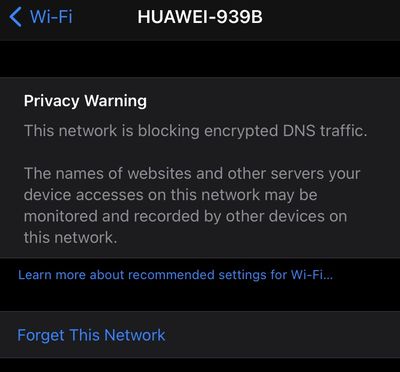
Because Apple's mobile operating system supports domain name encryption, sometimes you might see a warning that the Wi-Fi network you're connected to is blocking encrypted DNS traffic.
This privacy warning appears in the information screen for a Wi-Fi network in Settings -> Wi-Fi. (You can get to this screen by tapping on the circled 'i' next to a listed network).
If you see the warning message, don't panic -- it's actually normal behavior if the network you're connected to doesn’t meet the security standards recommended by Apple.
Given that there are many different Wi-Fi routers and network setups, it's difficult to offer the specific steps involved in changing settings for your particular situation to make the warning message go away. That said, some users have found one of the following actions to work for them:
- Restart your iOS device.
- Opt to Forget This Network on your iOS device, then reconnect.
- Restart your Wi-Fi router.
- Make sure your router's firmware is up-to-date.
If you're comfortable digging into the settings on your Wi-Fi router using an app or a browser, Apple maintains a support article called "Recommended settings for Wi-Fi routers and access points" that's worth referencing. If you set up your router in alignment with Apple's recommendations, you shouldn’t see the encrypted DNS warning message on your iOS device again.