

How to Watch Apple's WWDC 2018 Keynote Live - MacRumors
Skip to Content

How to Watch Apple's WWDC 2018 Keynote Live

by

WWDC 2018 starts on Monday, June 4, and as with previous years, Apple is kicking off the conference with a keynote on the first day, offering a look at some upcoming products and providing the first details on new operating systems.

Rumors have suggested we could potentially see new iPad Pro models and perhaps a new iPhone SE, and several Macs are due for a refresh, including the MacBook Pro, iMac, and 12-inch MacBook. We're also expecting a first-look at next-generation versions of macOS, iOS, and tvOS.

wwdc18
You can watch Apple's WWDC18 Keynote live as it happens using one of the methods described below. Note that the livestream for the event starts at 10:00am Pacific Time at the McEnery Convention Center in San Jose, California. For reference, here's when the event will begin based on other time zones in the United States and around the world:

  • Honolulu, Hawaii — 7:00 a.m. HAST

  • Anchorage, Alaska — 9:00 a.m. AKDT

  • Cupertino, California — 10:00 a.m. PDT

  • Phoenix, Arizona — 10:00 a.m. MST

  • Vancouver, Canada — 10:00 a.m. PDT

  • Denver, Colorado — 11:00 a.m. MDT

  • Dallas, Texas — 12:00 noon CDT

  • New York, New York — 1:00 p.m. EDT

  • Raleigh, North Carolina — 1:00 p.m. EDT

  • Toronto, Canada — 1:00 p.m. EDT

  • Halifax, Canada — 2:00 p.m. ADT

  • Rio de Janeiro, Brazil — 2:00 p.m. BRT

  • London, United Kingdom — 6:00 p.m. BST

  • Berlin, Germany — 7:00 p.m. CEST

  • Paris, France — 7:00 p.m. CEST

  • Cape Town, South Africa — 7:00 p.m. SAST

  • Moscow, Russia — 8:00 p.m. MSK

  • Helsinki, Finland — 8:00 p.m. EEST

  • Istanbul, Turkey — 8:00 p.m. TRT

  • Dubai, United Arab Emirates — 9:00 p.m. GST

  • Delhi, India — 10:30 p.m. IST

  • Jakarta, Indonesia — 12:00 a.m. WIB next day

  • Shanghai, China — 1:00 a.m. CST next day

  • Singapore — 1:00 a.m. SGT next day

  • Perth, Australia — 1:00 a.m. AWST next day

  • Hong Kong — 1:00 a.m. HKT next day

  • Seoul, South Korea — 2:00 a.m. KST next day

  • Tokyo, Japan — 2:00 a.m. JST next day

  • Adelaide, Australia — 2:30 a.m. ACST next day

  • Sydney, Australia — 3:00 a.m. AEST next day

  • Auckland, New Zealand — 5:00 a.m. NZST next day

MacRumors will also provide a live blog both here on MacRumors.com and on our MacRumorsLive Twitter account, along with detailed coverage of everything Apple announces during the week.

Watch the Keynote on Mac, iPhone or iPad

You can watch the WWDC keynote live on any Mac, iPhone, iPad, or iPod touch using Apple's native Safari browser. Bear in mind, to meet the stream's requirements, iOS devices must be running iOS 10 or later, while Macs need to be running macOS Sierra 10.12 or later.

safari mac wwdc18
Launch Safari from your chosen device and follow this link to the WWDC18 Livestream.

Watch the Keynote on Apple TV

You can watch the WWDC keynote live on an Apple TV. Fourth and fifth-generation Apple TV owners will need to download the Apple Events app from the tvOS App Store (see the steps below). Owners of earlier generation devices should see the Apple Events button automatically appear in their Home screen menu. (Second-generation Apple TV or later can also AirPlay the stream from another Apple device running Safari, as described above.)

  1. Open the App Store from the Home screen.

  2. Scroll down to the News category and select Apple Events. Alternatively, input "Apple Events" into the Search field and select it from the results.

  3. Click the Get button to download the app.
    apple events app

  4. Wait for the button to change to Open, and click it again. Alternatively, select the Apple Events app on your Home screen.
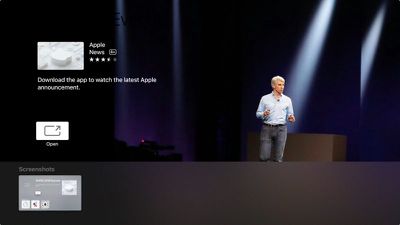

apple tv events app wwdc18
The app will tell you to tune in at your local time on June 4 to watch the event live (18:00 BST in our example), so clicking on the WWDC18 keynote button won't do much until then. Meantime, you do have the option to watch the previous three Apple Events while you wait, including last year's WWDC keynote.

Watch the Keynote on a Windows PC

If you don't have an Apple device handy, you can still watch the WWDC18 keynote on a PC running Windows 10. Open Microsoft Edge browser and follow this link to the WWDC18 Livestream.
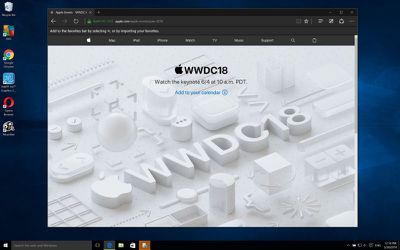
wwdc18 stream windows
While Apple offers no guarantees, other platforms may also be able to access the WWDC18 livestream using recent versions of Chrome or Firefox (MSE, H.264, and AAC codecs/extensions must be installed).


Top Rated Comments

pete2106 Avatar
110 months ago
I just want to see an iPhone X style redesign for the iPad Pro models.

Score: 4 Votes (Like | Disagree)
110 months ago
i hope they have some (good) surprises in store.
Score: 3 Votes (Like | Disagree)
Music Ambulance Avatar
110 months ago
A bit of curiosity. why are some time zones offset by 30 minutes?
Wha? Because some Timezones are 30 minutes apart. Hope that helps ;)
Score: 2 Votes (Like | Disagree)
Chupa Chupa Avatar
110 months ago
Also handy to have a pillow in front of you so when you doze off you don't hit your head on the desk. Seriously, can't remember the last interesting one -- maybe if you are a developer, it will start the creative wheels turning, but as a tech observer and Apple consumer, I've stopped wasting my time. I'm better off reading the highlights and then someone puts together a "Keynote in 5 min" video sans all the "Apple has sold more watches than the sum of all watches since pre-history" blah, blah, and the tedious Phil Schiller and 3rd party mono-tone demos.
Score: 2 Votes (Like | Disagree)
macduke Avatar
110 months ago
I just want to see an iPhone X style redesign for the iPad Pro models.
This would be great as long as there is no notch. I don’t mind the notch very much on my X but on iPad it would be annoying since I use it in landscape often. Just needs a very thin top and bottom bezel and hardly anything on the sides.
Score: 1 Votes (Like | Disagree)
Chupa Chupa Avatar
110 months ago
Please Apple, give me an excuse to buy a 12.9” iPad Pro.. I have to convince my wife it’s worth that price tag.
If your wife is not into tech then you already know she doesn't understand the need for any size iPad Pro. And as an adoring iPad Pro 12.9 owner, sorry, but it's hella expensive and NOT worth the price tag unless you legitimately use it for work. I wanted it, did not need it for work. Justifying it is pointless when you consider everything else that same money buys. So if you want one then you either have to find something extravagant she wants to "buy" her off, or buy it and take the risk of sleeping on the sofa for days, weeks. BUT the good thing is that if you do end up on the sofa, you'll have your 12.9 iPad to play with. Just don't fool around with the pron sites on it when you are in purgatory or your visit to sofa land could be much longer. Heh.
Score: 1 Votes (Like | Disagree)

Popular Stories

Apple MacBook Pro with PROLED XDR Display family lineup feature

Apple Announces OLED MacBook Pro With Touch Display

Wednesday October 28, 2026 10:11 am PDT by
Apple today announced a new high-end MacBook Pro, which is available in 14-inch and 16-inch sizes. The new device has a PROLED XDR display that supports touch gestures, and a glowing rear Apple logo. Pricing on the MacBook Pro starts at $2,899 for the 14-inch model and $3,399 for the 16-inch model. Apple says the MacBook Pro has the "world's best display in a pro laptop." The PROLED...
Apple MacBook Pro 14 in with M6 hero

Apple Announces New 14-Inch MacBook Pro With M6 Chip

Tuesday October 27, 2026 6:01 am PDT by
Apple today announced a refreshed 14-inch MacBook Pro featuring the M6 chip, upgraded connectivity specifications, and more. The M6 chip in the MacBook Pro features a 12-core CPU with 2 super cores, 4 performance cores, and 6 efficiency cores, paired with a 12-core GPU. This is up from the M5 chip with a 10-core CPU with 4 super cores and 6 efficiency cores, paired with a 10-core GPU. M6...
apple pro tell logo

Apple Opened Pre-Orders for Five New Products This Week

Wednesday October 28, 2026 2:49 am PDT by
Apple opened pre-orders for five new products on Wednesday, October 28, including its first touchscreen MacBook Pro models. Pre-orders opened for the following new products: iPad mini with OLED display and A20 Pro chip iMac with M6 chip 14-inch MacBook Pro with M6 chip 14-inch MacBook Pro with OLED touchscreen 16-inch MacBook Pro with OLED touchscreen Pre-orders for the iPad mini,...
Latest Stories
New Apple TV 4K and iPad Mini: RAM Amounts Revealed
6 hours ago
Apple Executive Comments on New iPad Mini Lacking 120Hz Display
10 hours ago
Here's a Hands-On Look at HomePod Mini 2's New Two-Tone Colors
11 hours ago
Apple Lowers App Store Fees in Taiwan Starting October 31
12 hours ago
HomeView Pre-Order Returns to $289.99 on Amazon
12 hours ago
Apple Avoids Showing Pinched Fingers on iPad Mini Page in South Korea
12 hours ago
Old 'Popcorn Time' App Left Hundreds of Thousands of Macs at Risk
14 hours ago
You Can Turn Off the New MacBook Pro's Touchscreen Functionality
14 hours ago
MacBook Pro Mini-LED vs. OLED Buyer's Guide: Every Difference
15 hours ago
Where to Pre-Order Apple's New MacBooks, iPad Mini, and iMac
16 hours ago
Apple Releasing HomePod Mini 2 Tomorrow With These New Features
18 hours ago
How macOS Adapts Its Controls for Touch on the New MacBook Pro
19 hours ago
Just Got an iPhone Duo? Try These Features First
20 hours ago
Apple Announced Scott Forstall's Departure 14 Years Ago Today
21 hours ago
Best Buy Opens Pre-Orders for PROLED XDR MacBook Pro With $100 Bonus Gift Cards
1 day ago
Here's Everything Apple Announced This Week
1 day ago
Here's a Real-World Look at the New MacBook Pro's Glowing Apple Logo
1 day ago
How Accurate Were Rumors About Apple's OLED Touchscreen MacBook Pro?
1 day ago
Apple Has 8 New Products Available for Pre-Order
1 day ago
iPhone Duo: Turn the Hinge Into an App Launcher
1 day ago
OLED MacBook Pro vs. Mini-LED MacBook Pro: Size and Weight Compared
2 days ago
Best Buy Offering Up to $100 Gift Cards With iPad Mini 8 and M6 MacBook Pro Pre-Orders
2 days ago
Adding Touch Didn't Cost the MacBook Pro Any Battery Life
2 days ago
Apple Releases Redesigned Mac Chargers and 'World Travel Adapter Kit'
2 days ago
Apple Executives Explain Why the MacBook Pro Finally Has a Touch Screen
2 days ago
New MacBook Pro Features Deeper Bass and Improved Closed-Lid Audio
2 days ago
New MacBook Pro Offers Up to 16TB of Storage, Double Previous Limit
2 days ago
Apple's New Touchscreen MacBook Pro Costs Up to $14,549
2 days ago
Apple Brings Dynamic Island to Mac for the First Time
2 days ago
Mac Studio With M5 Ultra Now Available With 512GB RAM for $22,299
2 days ago









































