

Notifications in iOS 15 got a design overhaul on iPhone and iPad, and one of the marquee feature additions is notification summary. This article explains what it is and how to use it.
notification summary 2
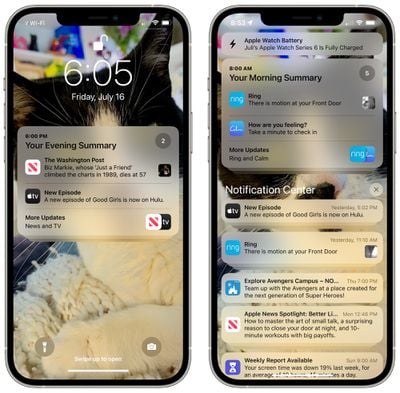
With the notification summary, you can schedule select app notifications to be delivered alongside others as a bundle at a specific time of the day. The idea is that by bundling non-urgent notifications and receiving them in a summary at convenient times, you can reduce the amount of times your device pings you and lessen distractions throughout the day.

You can create up to 12 daily summaries and schedule them to arrive on the Lock Screen and in the Notifications Center when you want. For example, you could opt to have them delivered during your lunch break, after dinner, or last thing before bedtime, and and on-device machine learning will automatically populate each summary based on priority.

Here's how to set up scheduled summaries.

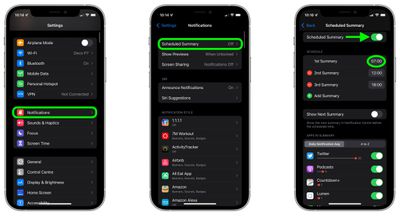
  1. Launch the Settings app and tap Notifications.
  2. Tap Scheduled Summary, then toggle on the switch next to Scheduled Summary to reveal the scheduling options menu.
  3. Under "Schedule," tap the time next to the 1st Summary and adjust it to when you'd like to receive it. If you want to receive additional daily summaries (up to 12 in total), tap Add Summary and similarly set the time.
  4. You can manually assign apps to your summary by toggling the switches next to them in the "Apps in Summary" list further down the options menu. Use the tabs to either view the apps list in alphabetical order or by the number of notifications sent by each app (the numbered red dots indicate the average daily number of notifications).
settings

That's all there is to it. Now that you have a notification summary (or summaries) scheduled, expect to see it appear in Notifications Center and on your Lock Screen at the set time.

Tip: You can add any app's notifications to your scheduled summary from the Lock Screen or Notification Center: Simply swipe left on the notification in question, tap Options, and select Add To Summary.


Related Forum: iOS 15

Popular Stories

apple intelligence black

Report: Apple's AI Strategy Could Finally Pay Off in 2026

Tuesday December 30, 2025 9:01 am PST by
Apple's restrained artificial intelligence strategy may pay off in 2026 amid the arrival of a revamped Siri and concerns around the AI market "bubble" bursting, The Information argues. The speculative report notes that Apple has taken a restrained approach with AI innovations compared with peers such as OpenAI, Google, and Meta, which are investing hundreds of billions of dollars in data...
apple fitness 2026 1

Apple Teases 'Something Big' Coming Soon to Apple Fitness+

Tuesday December 30, 2025 2:11 pm PST by
The Apple Fitness+ Instagram account today teased that the service has "big plans" for 2026. In a video, several Apple Fitness+ trainers are shown holding up newspapers with headlines related to Apple Fitness+. What's Apple Fitness+ Planning for the New Year? Something Big is Coming to Apple Fitness+ The Countdown Begins. Apple Fitness+ 2026 is Almost Here 2026 Plans Still Under ...
maxresdefault

Hands-On With a Rough iPhone Fold Mockup

Monday December 29, 2025 10:55 am PST by
Apple is rumored to be introducing a foldable iPhone in September 2026, and since it will bring the biggest form factor change since the iPhone was introduced in 2007, curiosity about the design is high. A 3D designer created an iPhone Fold design based on rumors, and we printed it out to see how it compares to Apple's current iPhones. Subscribe to the MacRumors YouTube channel for more ...
maxresdefault

Where's the New Apple TV?

Monday December 22, 2025 11:30 am PST by
Apple hasn't updated the Apple TV 4K since 2022, and 2025 was supposed to be the year that we got a refresh. There were rumors suggesting Apple would release the new Apple TV before the end of 2025, but it looks like that's not going to happen now. Subscribe to the MacRumors YouTube channel for more videos. Bloomberg's Mark Gurman said several times across 2024 and 2025 that Apple would...
iphone 17 pro dark blue 1

iPhone 17 Pro and Pro Max Users Report Static Speaker Noise While Charging

Tuesday December 30, 2025 10:39 am PST by
iPhone 17 Pro and Pro Max owners are having trouble with the speakers of their devices, and have complained about a static or hissing noise that occurs when the iPhone is charging. There are multiple discussions about the issue on Reddit, the MacRumors forums, and Apple's Support Community, where affected users say there is a noticeable static noise "like an old radio." Some people report...
iPhone Top Left Hole Punch Face ID Feature Purple

iPhone 18 Pro Launching Next Year With These 12 New Features

Tuesday December 23, 2025 8:36 am PST by
While the iPhone 18 Pro and iPhone 18 Pro Max are not expected to launch for another nine months, there are already plenty of rumors about the devices. Below, we have recapped 12 features rumored for the iPhone 18 Pro models. The same overall design is expected, with 6.3-inch and 6.9-inch display sizes, and a "plateau" housing three rear cameras Under-screen Face ID Front camera in...
iOS 26

iOS 26.2 Adds These 8 New Features to Your iPhone

Monday December 22, 2025 8:47 am PST by
Earlier this month, Apple released iOS 26.2, following more than a month of beta testing. It is a big update, with many new features and changes for iPhones. iOS 26.2 adds a Liquid Glass slider for the Lock Screen's clock, offline lyrics in Apple Music, and more. Below, we have highlighted a total of eight new features. Liquid Glass Slider on Lock Screen A new slider in the Lock...
samsung glitter blue

Samsung's Year End Sale Introduces Major Discounts on Popular Monitors and TVs

Monday December 29, 2025 6:29 am PST by
Samsung kicked off a new end-of-the-year sale this week, introducing great deals on monitors, TVs, Galaxy smartphones, and home appliances. Many of these deals are the exact same all-time low prices we tracked during Black Friday and Cyber Monday. Note: MacRumors is an affiliate partner with Samsung. When you click a link and make a purchase, we may receive a small payment, which helps us keep ...










































